
Visual Paradigm NotesKeep brings team notes, project documents, and visual materials into project-based workspaces. Its value for Agile teams is not just storing information: it helps make decisions, requirements, and design context easier to find and reuse as the work changes. NotesKeep combines note-taking, document management, and AI-assisted knowledge discovery.
Key concepts
-
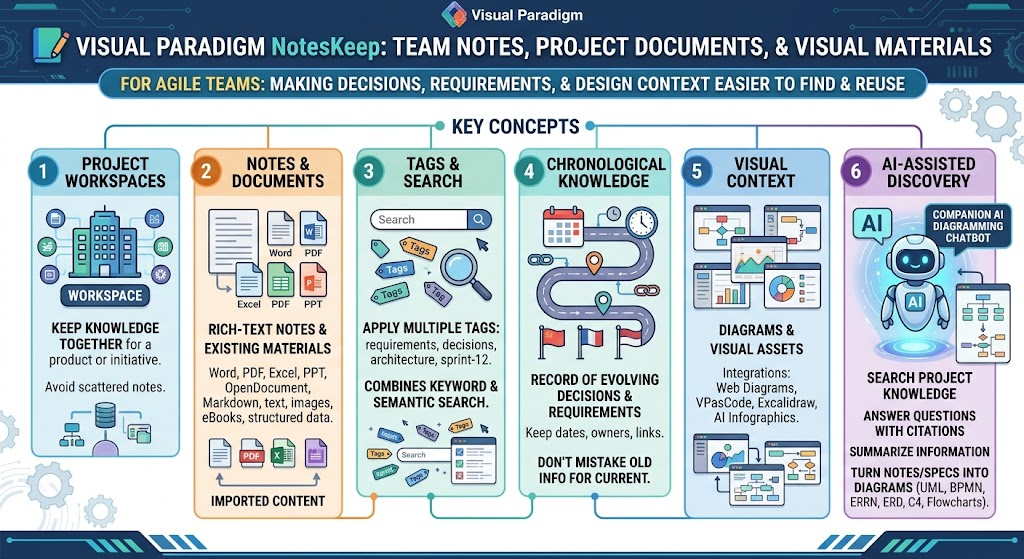
Project workspaces: Keep knowledge for a product or initiative together rather than scattering it across unrelated notes.
-
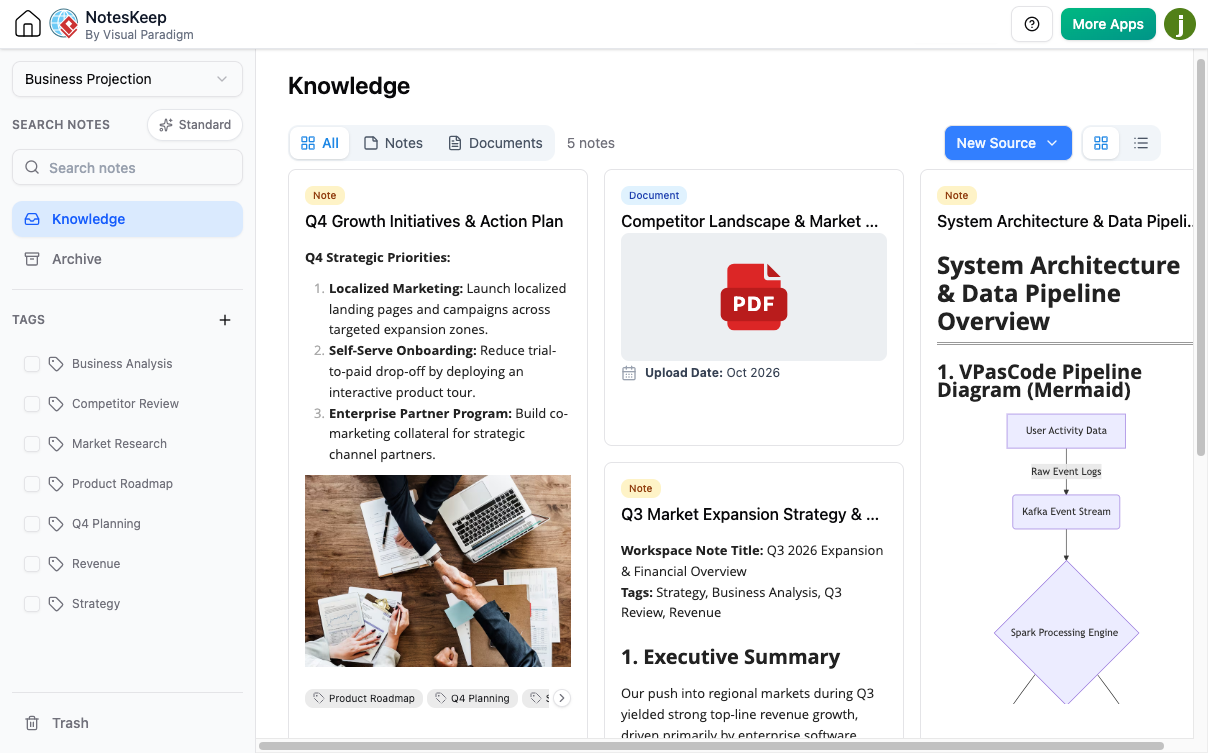
Notes and documents: Create rich-text notes or bring in existing materials. The current document-management feature supports common formats such as Word, PDF, Excel, PowerPoint, OpenDocument, Markdown, text, images, eBooks, and structured data files. Imported content can be managed alongside notes.
-
Tags and search: Apply multiple tags—such as
requirements,decisions,architecture, orsprint-12—to make notes easier to filter and retrieve. NotesKeep describes search as combining full-text keyword and semantic search. -
Chronological knowledge: Treat the workspace as a record of how decisions and requirements evolve. Keep dates, owners, and links to earlier decisions so that older information is not mistaken for current direction.
-
Visual context: Notes can include diagrams and other visual assets. Visual Paradigm also describes integrations for items such as web diagrams, VPasCode, Excalidraw drawings, and AI infographics.
-
AI-assisted discovery: The companion AI Diagramming Chatbot can search selected project knowledge, answer questions with citations to source material, summarize information, and help turn notes or specifications into diagrams. Supported diagram examples include UML, BPMN, ERD, C4, and flowcharts.
Benefits for Agile teams
Less knowledge lost between ceremonies. Capture outcomes from discovery, refinement, planning, reviews, and retrospectives in a shared place. New team members can use the record to understand not only what was decided, but how the team got there.
Better traceability. Link a user need to its discussion, decision, acceptance criteria, and relevant design note. That makes it easier to revisit assumptions when priorities or constraints change.
Faster retrieval. A consistent workspace and tag scheme helps the team find material without relying on someone remembering which meeting or file contained it.
More useful AI assistance. The chatbot can synthesize selected notes and documents, and its inline citations help the team inspect where an answer came from. Treat AI output as a draft for review, not as an authoritative decision.
A bridge between text and models. Teams can use written requirements and meeting notes as a starting point for diagrams, then review and maintain those diagrams as part of the project documentation.
Agile use cases
-
Product discovery: Collect stakeholder interviews, workshop notes, research, and whiteboard photos; synthesize themes, assumptions, and open questions.
-
Backlog refinement: Consolidate requirement discussions into candidate stories, acceptance criteria, dependencies, and unresolved decisions.
-
Sprint planning: Keep the sprint goal, planning notes, risks, and links to relevant design decisions together.
-
Daily coordination: Record blockers or cross-team decisions that need follow-up, rather than letting important context disappear in chat.
-
Sprint review: Capture feedback, requested changes, and follow-up questions alongside the feature or release context.
-
Retrospectives: Preserve experiments, observations, and action items so the next retrospective can check what changed.
-
Architecture and analysis: Ask the chatbot to help summarize technical material or draft a UML, BPMN, ERD, or C4 diagram from specifications and notes. Review the result with the relevant engineers and product stakeholders.
A practical setup
-
Create a workspace per product or initiative. Keep the scope meaningful; avoid one workspace for every small discussion and avoid a single workspace for unrelated products.
-
Choose a lightweight tag vocabulary. For example:
requirements,decision,architecture,research,risk,retro, andrelease. Use tags for cross-cutting categories, not as a substitute for clear titles. -
Use a consistent note format. For meeting and ceremony notes, include the date, participants, purpose, decisions, action items with owners and due dates, and links to related stories or documents.
-
Import useful existing materials. Add relevant specifications, PDFs, spreadsheets, and diagrams to the appropriate workspace. Label imported material with its source and date, especially if it may be superseded.
-
Keep current decisions explicit. When a decision changes, create a new dated entry that says what changed and what earlier guidance it replaces. Preserve the older record for context.
-
Query narrowly when using AI. In the Visual Paradigm AI Diagramming Chatbot, enable Search notes and select the relevant project or context. Ask a focused question, then check the citations against the source notes.
-
Save reviewed outputs. Keep useful summaries or generated diagrams with the project knowledge they came from, and mark drafts as drafts until the team validates them.
Suggested weekly workflow
| When | Team activity | NotesKeep practice | Useful outcome |
|---|---|---|---|
| Discovery or refinement | Discuss user needs and scope | Capture evidence, assumptions, questions, and candidate requirements | Shared context for backlog decisions |
| Sprint planning | Select work and agree on a goal | Record the goal, key dependencies, risks, and links to relevant notes | A durable planning record |
| During the sprint | Resolve questions and blockers | Add dated decision notes and link them to affected work | Fewer repeated discussions |
| Sprint review | Gather feedback | Record observations and follow-up items | Feedback that can inform the backlog |
| Retrospective | Choose an improvement experiment | Save the action, owner, and check-in point | A way to revisit whether the experiment helped |
Example AI prompts
With the relevant project selected and Search notes enabled, try prompts such as:
-
“Summarize the latest decisions about account recovery. Include the dates and cite the source notes.”
-
“Compare the product requirements in these notes and identify conflicts or unanswered questions.”
-
“Turn the approved checkout requirements into a first-draft use case diagram. List assumptions separately.”
-
“Summarize the retrospective actions from the last three sprints and identify which ones are still open.”
For any important output, verify the cited material, confirm whether it is current, and have the responsible team member approve it before treating it as a requirement or decision.
Good practices and pitfalls
-
Write notes so someone who missed the meeting can understand them; avoid shorthand without context.
-
Separate decision, proposal, and open question. This prevents tentative ideas from becoming accidental commitments.
-
Include dates and owners. An undated action item is difficult to follow up on.
-
Don’t duplicate the backlog itself unnecessarily. Use NotesKeep for context and records, and link to the team’s system of record for work tracking.
-
Be deliberate about importing old documents. Mark superseded material clearly so it does not confuse later searches or AI answers.
-
Use AI to accelerate synthesis and drafting, not to settle priority disputes or approve designs without team review.
Access notes
Visual Paradigm’s feature page lists NotesKeep core workspace access as requiring Combo Edition or higher in VP Online, or Professional Edition or higher with active maintenance in VP Desktop. It lists AI Chatbot features as requiring Deluxe Edition in VP Online, or Professional Edition or higher with active maintenance in VP Desktop. Check the current edition requirements before planning a team rollout.