


Introduction
In the world of project management and systems engineering, recurring problems are the silent killers of productivity. Teams often find themselves applying “quick fixes” or band-aids to symptoms without ever addressing the fundamental issue. This is where the 5 Whys Root Cause Analysis Tool steps in. Designed to transform the classic problem-solving technique into a digital, AI-enhanced workflow, this application promises to help engineers, managers, and analysts uncover the true origins of their challenges.
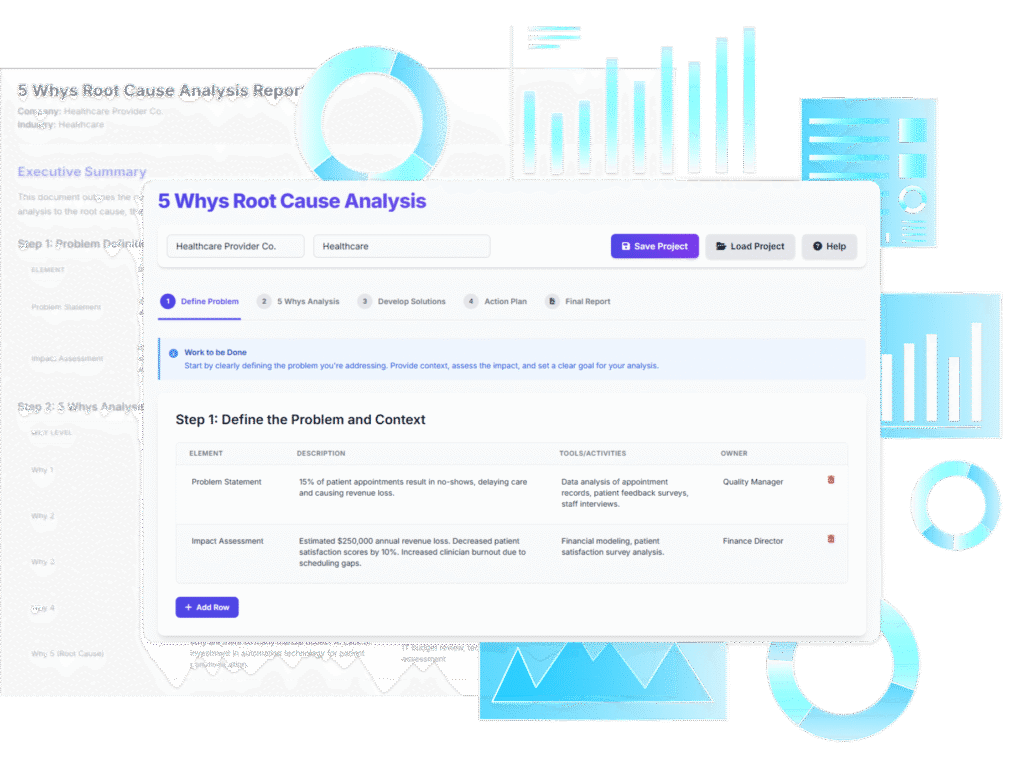
This review explores the functionality, user experience, and strategic value of this interactive tool, breaking down how it merges structured data entry with artificial intelligence to streamline post-mortems and quality assurance processes.
What is the 5 Whys Root Cause Analysis Tool?
The 5 Whys Root Cause Analysis Tool is an interactive web application that guides users through the specific steps of the 5 Whys methodology. Unlike a simple blank document or spreadsheet, this tool provides a rigid, wizard-style framework. It ensures that the user defines the problem, asks the necessary questions, develops solutions, and creates an action plan in a logical order.
The standout feature of this tool is its AI-Powered Analysis. While users can manually input data for a traditional experience, the tool integrates an AI engine that can draft a complete analysis—from problem definition to implementation plan—based solely on a user-provided context and problem statement.
Key Features and Functionality
1. AI-Powered Full Analysis Generation
For many teams, the hardest part of root cause analysis is staring at a blank page. The tool addresses this via its “Generate with AI” feature. By entering the company context (e.g., “B2B SaaS Logistics”) and a problem statement, the AI generates a comprehensive draft. This includes suggestions for the five levels of “Why,” corresponding solutions, and a monitoring plan. This feature acts as an experienced analyst sitting beside you, providing a solid foundation that can be refined rather than built from scratch.
2. The Step-by-Step Wizard Interface
The application is structured as a 5-step wizard. This design choice is deliberate and effective. It prevents the common pitfall of jumping straight to solutions before fully understanding the problem. The steps are typically organized as follows:
- Step 1: Problem Definition: Establishing the scope and impact.
- Step 2: 5 Whys Analysis: The core drill-down phase.
- Step 3: Solution Development: Brainstorming fixes for the root cause.
- Step 4: Action Plan: Defining implementation and monitoring.
- Step 5: Final Report: Compiling the data.
3. Dynamic Data Tables
Flexibility is essential in analysis. The tool employs dynamic data tables for every stage of input. Users can add, edit, or delete rows as needed. For instance, while the methodology is called “5 Whys,” some complex problems may require seven layers of inquiry, while simpler ones require only three. The dynamic tables accommodate this variance, allowing the user to expand or contract the analysis depth easily.
4. Privacy and Local Data Management
In an era of data privacy concerns, this tool takes a distinct approach. It does not store user analysis data in the cloud. Instead, users save their projects as local .json files. This ensures that sensitive operational data regarding failures or internal bugs remains on the user’s local machine. The final output can be printed or saved as a PDF, providing a professional artifact for stakeholders without exposing data to third-party servers.
User Experience and Workflow
Getting Started
The user journey begins with setting the scene. The interface is clean and distraction-free, focusing entirely on the task at hand. Upon launching, users are prompted to enter their “Company Name” and “Industry Context.” This context is crucial as it primes the AI to generate relevant jargon and scenarios specific to the user’s field.
The Analysis Phase
Whether manually entering data or reviewing AI-generated content, the experience feels like filling out a structured worksheet. The “Work to be Done” section guides the user through the objective of each step. For example, in Step 2, the tool encourages drilling down until the root cause is found. The ability to edit the text directly in the table cells allows for rapid iteration—users can tweak the AI’s language to better fit their specific organizational reality.
Reporting
The payoff of the process is the Final Report. Step 5 aggregates all the inputs into a consolidated, clean document. This report serves as a single source of truth, aligning the team on what went wrong and how it will be fixed. Since the report is designed for print/PDF export, it is immediately ready for distribution to management or for archival in a project repository.
Target Audience
This tool is versatile, but it provides the most value to specific roles:
| Role | Benefit |
|---|---|
| Project Managers | Facilitates structured post-mortems and keeps team meetings focused. |
| QA Engineers | Provides a systematic way to document bugs and prevent regression. |
| Operations Managers | Ideal for analyzing production line failures or safety incidents. |
| Business Analysts | Helps in diagnosing process bottlenecks and system inefficiencies. |
Pros and Limitations
Pros
- Speed: The AI generation dramatically reduces the time required to draft an analysis.
- Structure: The wizard format enforces discipline, ensuring no steps are skipped.
- Education: It teaches the 5 Whys methodology through usage, acting as a coaching tool.
- Privacy: Local file saving (.json) keeps sensitive business intelligence secure.
Limitations
- Internet Dependency: While manual entry works offline, the AI features require an active connection.
- Export Formats: The tool focuses on PDF/Print and JSON. There is no native export to editable formats like Word or Excel.
- Linearity: It is strictly built for 5 Whys. Users looking for Fishbone diagrams or Fault Tree Analysis will need different tools.
Conclusion
The 5 Whys Root Cause Analysis Tool is a powerful utility for anyone serious about continuous improvement. By marrying the simplicity of the 5 Whys technique with the generative power of AI, it removes the friction often associated with documentation and analysis. It encourages teams to dig deeper than surface-level symptoms and provides the structured environment necessary to develop lasting solutions. For teams tired of recurring issues and “band-aid” fixes, this tool offers a clear path to operational excellence.
Related posts:
 Learn-by-Example: Case Study of an Internship Management System
Review: Streamlining Strategy with the AI-Powered Business Model Canvas Builder
Mastering Multi-Language Support in Visual Paradigm AI Chatbot: A Step-by-Step Guide
Revolutionizing Slide Design: A Comprehensive Guide to Visual Paradigm’s AI Markdown Presentation Maker
Learn-by-Example: Case Study of an Internship Management System
Review: Streamlining Strategy with the AI-Powered Business Model Canvas Builder
Mastering Multi-Language Support in Visual Paradigm AI Chatbot: A Step-by-Step Guide
Revolutionizing Slide Design: A Comprehensive Guide to Visual Paradigm’s AI Markdown Presentation Maker