


Business Process Model and Notation (BPMN) is a standardized graphical notation designed to model business processes. It serves as a bridge between business stakeholders, analysts, and technical developers by providing a clear and consistent way to represent complex business workflows. Visual Paradigm offers a robust suite of tools and features to support BPMN, making it an excellent choice for organizations looking to streamline their processes.
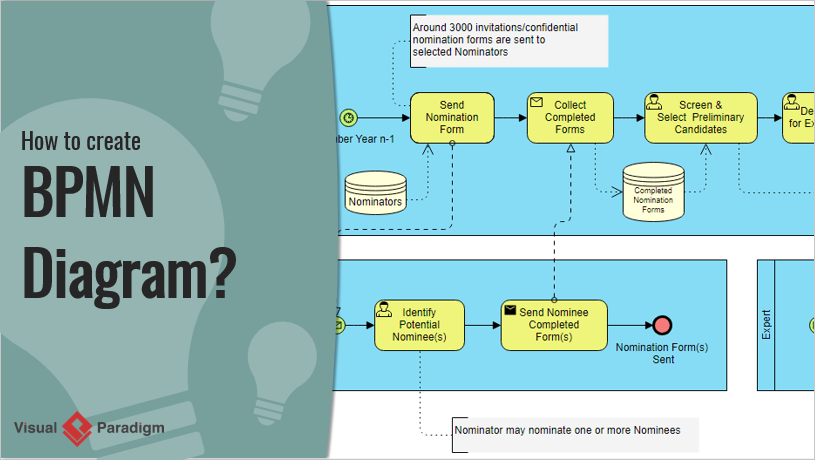
Key BPMN Concepts and Visual Paradigm Support
BPMN Elements

BPMN consists of various elements that represent different aspects of a business process. Visual Paradigm supports all BPMN elements, including:
- Activities: Represent tasks and sub-processes within a workflow.
- Gateways: Control the flow of processes, acting as decision points.
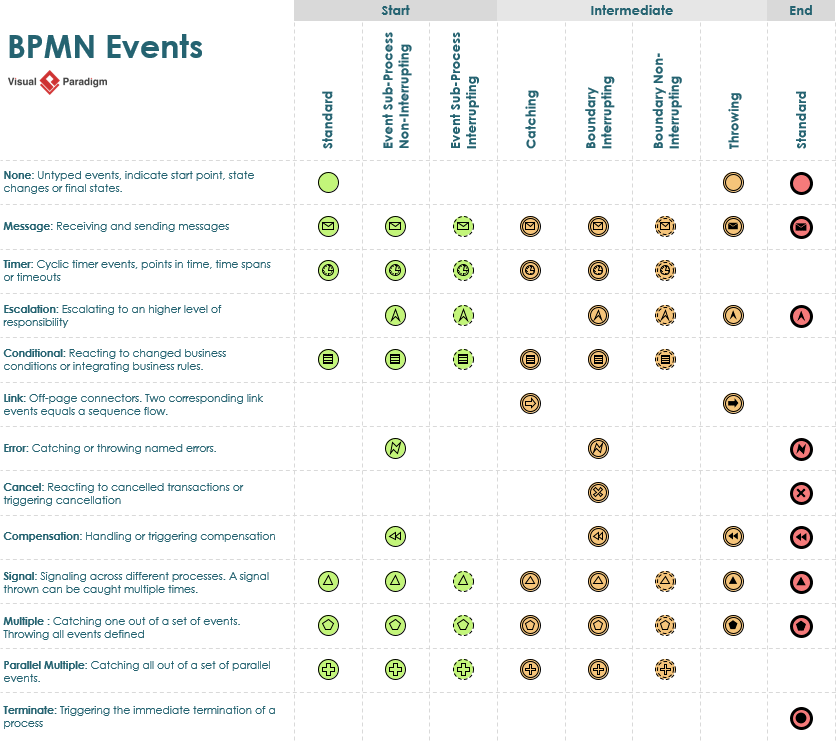
- Events: Represent things that happen during a process, such as start, end, or intermediate events.
- Sequence Flows: Define the order in which activities are performed.
- Data Objects: Represent information required or produced by activities.
More BPMN Elements
User-Friendly BPMN Editor
Visual Paradigm features an intuitive drag-and-drop BPMN editor, allowing users to quickly create and modify diagrams. This editor supports:
- Easy Diagram Creation: Quickly design accurate BPMN diagrams with minimal effort.
- Sub-process Management: Easily expand or collapse sub-processes to manage complexity.
Pools and Swimlanes
Pools and swimlanes are essential for defining responsibilities within a process:
- Pools: Represent participants in a business process.
- Swimlanes: Represent specific roles or departments within a pool.
Visual Paradigm allows you to model these elements clearly, defining responsibilities and improving process transparency.
As-Is and To-Be Process Modeling
Visual Paradigm supports both “As-is” and “To-be” process modeling:
- As-Is Modeling: Capture the current state of a process.
- To-Be Modeling: Define the desired future state after improvements.
The tool maintains traceability between these models, enabling smooth navigation and comparison.
RACI and CRUD Charts
Visual Paradigm can generate RACI and CRUD charts from BPMN diagrams:
- RACI Charts: Automatically assign responsibilities (Responsible, Accountable, Consulted, Informed) based on process content.
- CRUD Charts: Indicate the creation, reading, updating, or deletion of data objects within a process.
Process Animation and Simulation
Visual Paradigm brings process designs to life with animation and simulation capabilities:
- Animation: Helps in understanding process flow through dynamic visualization.
- Simulation: Allows you to study resource consumption, evaluate costs, identify bottlenecks, and trial run process improvements.
Integration with Other Modeling Artifacts
Visual Paradigm supports the integration of BPMN diagrams with other modeling artifacts, such as:
- UML Shapes: For software design and architecture.
- ERD Entities: For database modeling.
- Wireframes: For user interface design.
Report Generation
Visual Paradigm provides features for generating reports and managing glossaries, ensuring that all stakeholders have access to the necessary documentation.
Team Collaboration
Visual Paradigm supports team collaboration and communication, enabling multiple users to work on the same project simultaneously.
Working Procedure Editor
The operational procedures of individual business activities can be specified in the working procedure editor. This allows you to:
- Output Process Specifications: Include both the process diagram and working procedures.
- Share Guidelines: Use the specifications as guidelines for the team.
Examples of BPMN Diagrams with Visual Paradigm
Example 1: Order Processing
- Start Event: Order Received
- Activity: Verify Order Details
- Gateway: Order Valid?
- Yes: Proceed to Payment Processing
- No: Notify Customer and End Process
- Activity: Process Payment
- Activity: Ship Order
- End Event: Order Completed
Example 2: Employee Onboarding
- Start Event: New Hire Joins
- Activity: Complete Paperwork
- Activity: Assign Mentor
- Activity: Provide Training
- Activity: Set Up Workstation
- End Event: Onboarding Completed
Resource List
- IBM Think: Introduction to BPMN
- Archimetric: Comprehensive Guide to Visual Paradigm for Business Process Modeling
- Visual Paradigm: BPMN Tools
- Visual Paradigm: BPMN Diagram and Tools
- Visual Paradigm: BPMN Activity Types Explained
- Visual Paradigm: What is BPMN?
By leveraging Visual Paradigm’s comprehensive BPMN support, organizations can effectively model, analyze, and improve their business processes, leading to increased efficiency and better outcomes.
BPMN References
- Comprehensive Guide to Visual Paradigm for Business Process Modeling
- Streamlining Business Processes with Visual Paradigm’s BPMN Business Process Modeling Software
- Visual Paradigm: Your Comprehensive Solution for Integrated Enterprise Modeling
- Demystifying BPMN: A Comprehensive Guide to Business Process Modeling
- Navigating Business Processes with BPMN: A Visual Odyssey
- Visual Paradigm: The Ultimate All-in-One Visual Modeling Platform for Enterprise Architecture and Software Design
- Top Visual Paradigm Tools for Business Process Modeling
- Visual Paradigm: The Premier Tool for ArchiMate EA Modeling
- Mastering Visual Paradigm’s BPMN Tool: A Step-by-Step Learning Guide
- Simplify Business Process Modeling with Visual Paradigm’s BPMN Tools
- BPMN — Quick Guide
- BPMN in a Nutshell — with Free Online BPMN Tool & Examples
- A Comprehensive Guide to BPMN
- Modeling As-Is and To-Be Processes
- How to Perform Gap Analysis with BPMN?
- Visual Paradigm: A Comprehensive Suite for IT Project Development and Digital Transformation