
From Concept to Living Documentation: An AI-Enhanced UML Workflow with VPasCode
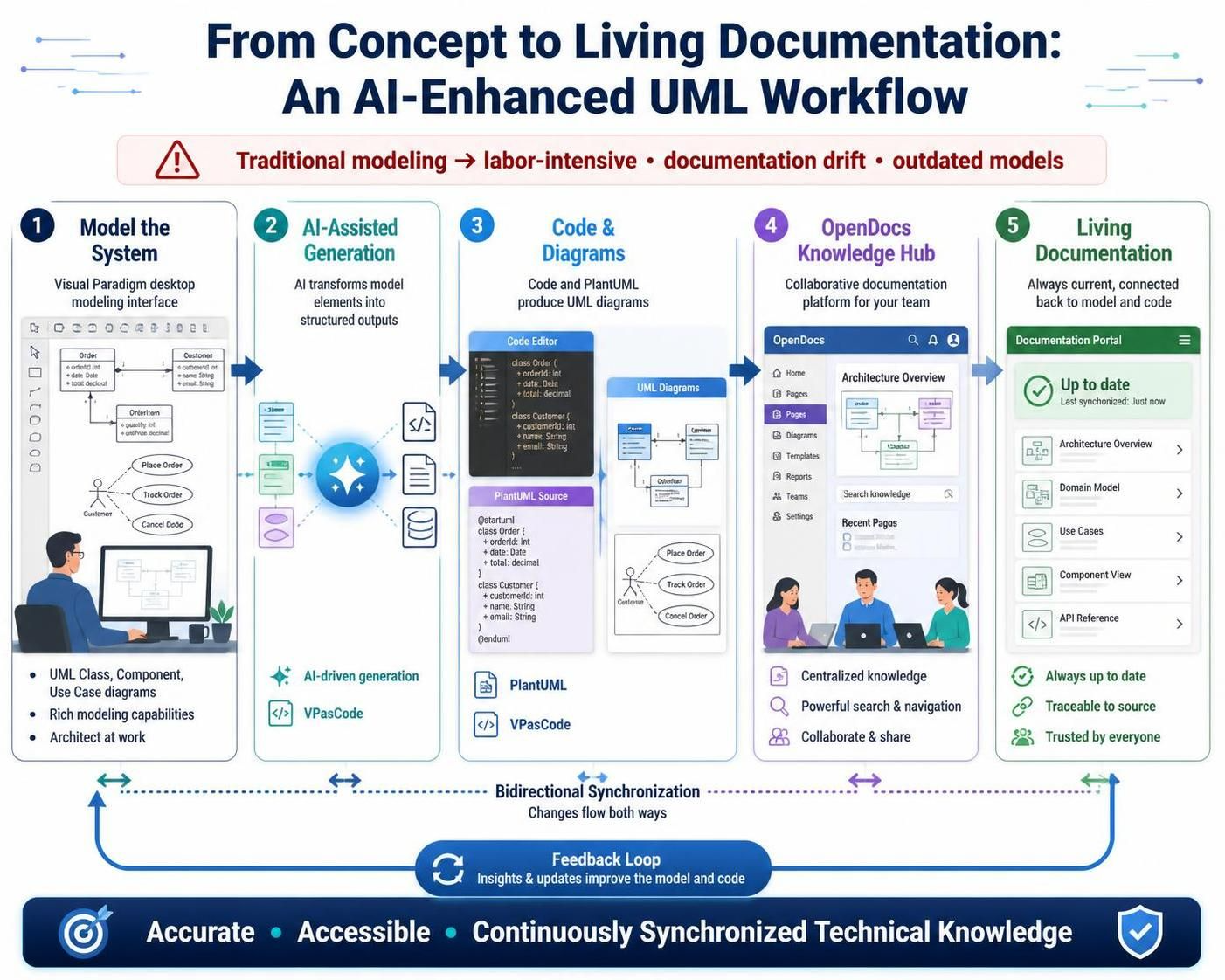
In the rapidly evolving landscape of software development, Unified Modeling Language (UML) remains a vital tool for visualizing, specifying, and documenting complex systems. However, traditional modeling methods are often labor-intensive, frequently resulting in a disconnect between architectural models and final technical documentation. Models become outdated the moment they are created, leading to “documentation drift” that undermines their value.
To bridge this gap, a modern, AI-enhanced workflow has emerged. This guide explores a cohesive ecosystem centered on the powerful integration of Visual Paradigm’s desktop modeling, AI-driven generation, and the OpenDocs knowledge management platform. We will illustrate the journey from concept to living documentation, demonstrating how teams can leverage tools like PlantUML and VPasCode to create accurate, up-to-date, and accessible technical knowledge.
The Challenge: Eliminating Documentation Drift
The primary pain point in modern software architecture is the “synchronization gap.” When developers modify code or architects update diagrams manually, the documentation often lags behind reality. This leads to a scenario where the code works, but the documentation is wrong—a critical risk for long-term maintenance and onboarding.
The solution lies in a bidirectional, automated ecosystem. By treating the model as the “source of truth” and allowing it to generate code, diagrams, and documentation automatically, teams ensure that the documentation is always a reflection of the system’s actual state.
Step 1: Model the System in Visual Paradigm
The workflow begins with the architect or developer using the Visual Paradigm Desktop interface. This is the traditional, rich modeling environment where the visual logic of the system is defined.
- Rich Capabilities: The desktop environment supports UML Class diagrams, Use Case diagrams, and Component diagrams with full drag-and-drop functionality.
- The Source of Truth: Here, the developer defines the structure. For example, an Order class is defined with attributes like
orderIdandtotal, and linked to a Customer entity.
At this stage, the model is purely visual and structural. It is the blueprint, but it exists only within the modeling tool.
Step 2: AI-Assisted Generation
Once the model is ready, the AI engine takes over. This is the pivotal step that transforms a static diagram into a multi-format output.
Instead of manually writing code or re-typing definitions, the AI engine interprets the visual model elements. It understands that a rectangle with attributes represents a Class, and an oval represents an Actor. The AI then transforms these visual elements into structured text outputs.
Why AI Generation Matters
This step bridges the gap between the visual model and the text-based tools (like VPasCode or PlantUML). It ensures that the syntax for the next steps is generated perfectly, without human error or formatting inconsistencies.
Step 3: Code & Diagrams via VPasCode and PlantUML
With the AI generating the structured output, the workflow enters the “Code & Diagrams” phase. This section highlights the power of the VPasCode and PlantUML integration.
VPasCode (Visual Paradigm as Code) allows developers to define UML diagrams using text files rather than mouse clicks. This is crucial for version control and collaboration. The AI output is converted into PlantUML Source code, which acts as a bridge between the desktop model and the documentation portal.
Here is an example of how the AI transforms the visual model into the PlantUML Source code:
@startuml
class Order {
  + orderId: int
  + date: Date
  + total: decimal
}

class Customer {
  + customerId: int
  + name: String
  + email: String
}

Order "1" -- "1" Customer

actor Customer
Customer -- (Place Order)
Customer -- (Track Order)
Customer -- (Cancel Order)
@enduml
Notice how the code perfectly mirrors the visual elements from Step 1. The class definitions include the exact attributes seen in the UML Class diagram, and the relationships (arrows) are defined using standard PlantUML syntax.
The Power of Text-Based Modeling
By using VPasCode and PlantUML, the system converts a graphical representation into a text file. This enables:
- Version Control: The diagrams can be stored in Git repositories alongside the application code.
- Automation: CI/CD pipelines can parse this code to regenerate diagrams automatically.
- Clarity: Text files are easier to review in pull requests than binary image files.
Step 4: OpenDocs Knowledge Hub
The generated PlantUML code and other structured data are then fed into the OpenDocs platform. OpenDocs acts as the collaborative “Knowledge Hub” for the team.
Unlike static PDFs or Word documents, OpenDocs provides a dynamic environment where:
- Centralized Knowledge: Architecture Overviews, Domain Models, and API References are stored in one place.
- Powerful Search: Teams can search for specific terms (e.g., “Order Total”) and instantly locate the relevant diagram or documentation page.
- Collaboration: Multiple stakeholders can access, comment, and navigate the documentation simultaneously.
In this workflow, the “Architecture Overview” page in OpenDocs is dynamically populated by the PlantUML code generated in Step 3. This means the diagram displayed is not a screenshot; it is a live rendering of the code.
Step 5: Living Documentation
The final stage is the realization of Living Documentation. The goal is to create a system where the documentation is “Always up to date, connected back to model and code.”
Because the diagram in OpenDocs is rendered from the VPasCode/PlantUML source, and that source is generated from the Visual Paradigm model, any change made in the model automatically propagates to the documentation. The “Last synchronized” timestamp in the documentation portal confirms this freshness.
The Feedback Loop
The workflow is not a straight line; it is a cycle. A “Bidirectional Synchronization” loop exists between the model, the code, and the documentation. If a developer updates the code or the model, the feedback loop ensures that insights and updates improve the model and code, keeping the entire ecosystem accurate and accessible.
Conclusion
By integrating Visual Paradigm, AI-driven generation, VPasCode, and OpenDocs, organizations can move away from labor-intensive, error-prone documentation methods. This AI-enhanced workflow ensures that technical knowledge is:
- Accurate: Driven by a single source of truth.
- Accessible: Available in a collaborative knowledge hub.
- Continuously Synchronized: Updated automatically as the system evolves.
This approach transforms documentation from a burdensome chore into a valuable, living asset that empowers teams to build better software.