
Architecting Microservices with VPasCode: A C4 Component Diagram Guide
Modern software architecture relies heavily on visualizing complex systems to ensure scalability and maintainability. The C4 model is a widely adopted industry standard for this purpose, breaking down software architecture into four levels of abstraction: Context, Container, Component, and Code. VPasCode by Visual Paradigm transforms this modeling process into a streamlined, “Diagram as Code” workflow. By leveraging the PlantUML engine, developers can define system structures using plain text, which is then rendered instantly into high-fidelity diagrams.
This tutorial will guide you through the architecture of a microservices-based “Order Service Container,” utilizing the VPasCode interface to build a robust C4 Component diagram. We will explore the code editor’s capabilities, the semantic meaning of the diagram elements, and the technical rendering engine behind the scenes.
1. The Architecture of VPasCode
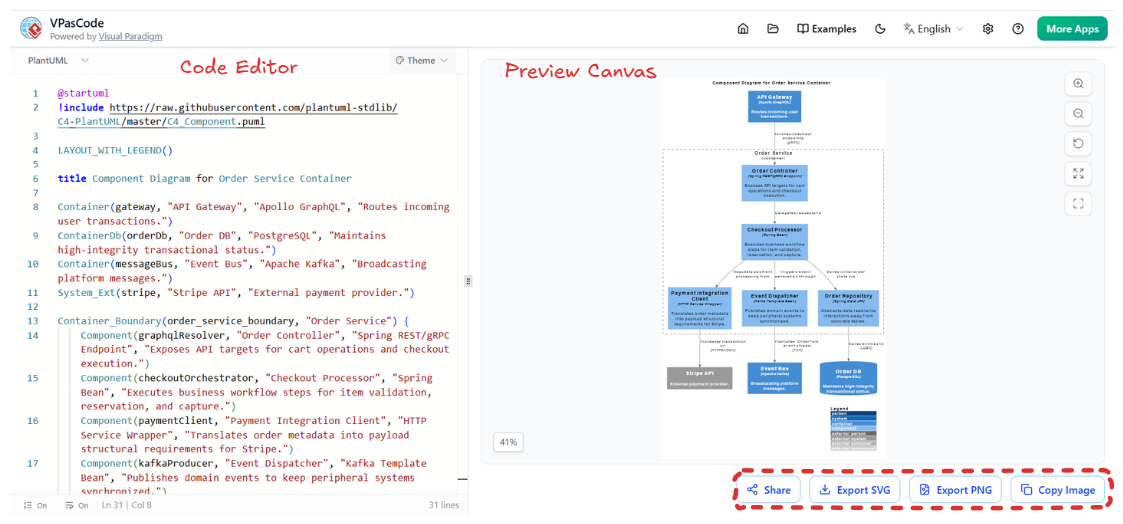
The VPasCode interface is designed around a responsive, two-column layout that separates the logic (code) from the presentation (visuals). This separation is crucial for version control and rapid iteration.
Left Panel: The Code Editor
This is the workspace where the system architecture is defined. It features a Syntax Engine Selector that allows toggling between compilers like PlantUML, Mermaid, and Graphviz. For C4 modeling, we utilize the PlantUML engine with the C4-PlantUML library.
- Semantic Definition: Instead of drawing boxes and arrows, you define relationships. For example, declaring a
Componentautomatically handles its visual styling and connection logic. - Live Validation: The Live Status Bar at the bottom of the editor provides continuous syntax validation. If a line is missing a closing parenthesis or a keyword is misspelled, the error count updates immediately, preventing compilation failures.
Right Panel: The Interactive Preview Canvas
The canvas renders the code into a vector-based output with zero lag. This panel is not static; it includes a Canvas Control Toolbar that allows for zooming, panning, and fitting the diagram to the screen. This interactivity is essential when dealing with large-scale system architectures.
2. Step-by-Step Modeling: The Order Service Container
We will now deconstruct the code shown in the provided screenshot. The goal is to model an “Order Service” that communicates with external systems (API Gateway, Database, Stripe) and internal components.
Step 1: Setup and Configuration
Before defining the diagram, the code must import the necessary libraries and configure the layout. The @startuml directive signals the start of a PlantUML document.
@startuml
!include https://raw.githubusercontent.com/plantuml-stdlib/C4-PlantUML/master/C4-PlantUML.puml
!theme flat

title Component Diagram for Order Service Container
LAYOUT_WITH_LEGEND()
Key Concepts:
!include ...: This pulls in the official C4-PlantUML library, which contains the definitions for the C4 shapes (Container, Component, Person, etc.).LAYOUTWITHLEGEND(): This command automatically positions a legend on the right side of the diagram, explaining the color coding of the relationships.
Step 2: Defining the Boundary and System
The diagram defines the system boundary and the external entities interacting with it. In C4 terminology, a Container represents a deployable unit (like a web server or a database).
Container(gateway, "API Gateway", "Apollo GraphQL", "Routes incoming user transactions.")
ContainerDb(orderDb, "Order DB", "PostgreSQL", "Maintains high-integrity transactional status.")
Container(messageBus, "Event Bus", "Apache Kafka", "Broadcasting platform messages.")
SystemExt(stripe, "Stripe API", "External payment provider.")
Analysis:
- Container(gateway): Represents the entry point for traffic. The parameters are (Tag, Name, Technology, Description).
- ContainerDb: A specialized container type for databases, ensuring the visual distinction between application logic and data storage.
- SystemExt: Marks “Stripe” as an external system outside the immediate control of the organization.
Step 3: The Core Component Logic
The most complex part of the diagram is the Container_Boundary, which encapsulates the internal components of the “Order Service”.
Container_Boundary(order_service_boundary, "Order Service") {
    Component(graphqlResolver, "Order Controller", "Spring REST/gRPC Endpoint", "Exposes API targets for cart operations and checkout execution.")
    Component(checkoutOrchestrator, "Checkout Processor", "Spring Bean", "Executes business workflow steps for item validation, reservation, and capture.")
    Component(paymentClient, "Payment Integration Client", "HTTP Service Wrapper", "Translates order metadata into payload structural requirements for Stripe.")
    Component(kafkaProducer, "Event Dispatcher", "Kafka Template Bean", "Publishes domain events to keep peripheral systems synchronized.")
}
Component Breakdown:
- Order Controller: The entry point into the service, handling incoming requests.
- Checkout Processor: The business logic core. In a microservices architecture, this represents a specific service instance.
- Payment Integration Client: An abstraction layer that handles communication with the external Stripe API defined earlier.
- Event Dispatcher: Implements the Eventual Consistency pattern, notifying other parts of the system (like the notification service) about order changes via the Kafka message bus.
Step 4: Rendering Relationships
Although not fully visible in the code snippet, the relationships between these components are defined using standard PlantUML syntax. For instance, the “Order Controller” would call the “Checkout Processor”.
graphqlResolver --> checkoutOrchestrator : "handles requests"
checkoutOrchestrator --> paymentClient : "calls"
paymentClient --> stripe : "transfers"
checkoutOrchestrator --> kafkaProducer : "publishes"
3. Technical Best Practices for VPasCode
When using VPasCode for architectural documentation, adhere to these principles to ensure your diagrams remain maintainable and readable.
- Consistent Naming Conventions: Use the first parameter (the tag) as a unique identifier. This is critical if you need to reference components later in the code.
- Descriptive Comments: Always utilize the “Description” parameter in your component definitions. This text appears in the diagram legend and provides immediate context to stakeholders without cluttering the code.
- Version Control: Because the diagram is just text, commit your code to Git. This allows you to track changes to the architecture over time using standard diff tools.
Conclusion
By using VPasCode, developers can transition from abstract architectural concepts to concrete, rendered diagrams instantly. The “Diagram as Code” approach ensures that the visual representation of your system is always synchronized with your technical documentation. Whether you are designing a simple monolith or a complex microservices ecosystem, the structured workflow of VPasCode provides the precision and speed needed for modern software engineering.