
Bridging Intent and Implementation with VP OpenDocs
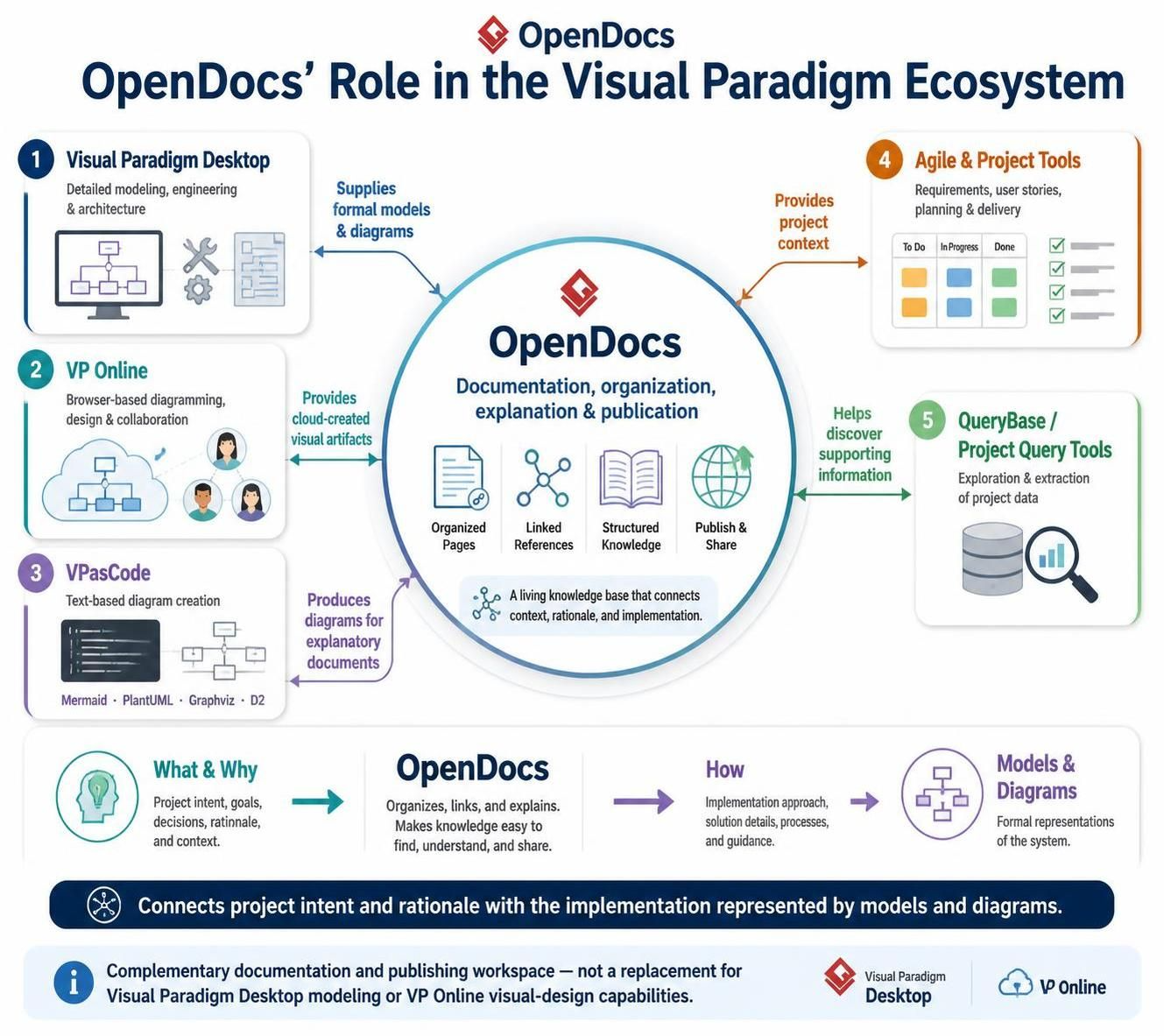
In the modern software development lifecycle, the gap between high-level business intent and low-level technical implementation often leads to misalignment. Visual Paradigm has addressed this challenge through a unified ecosystem approach, where OpenDocs serves as the critical connective tissue. Rather than acting as a standalone documentation tool, OpenDocs functions as a centralized workspace that aggregates data from modeling, agile planning, and coding environments to create a “living knowledge base.”
This tutorial explores the architectural role of OpenDocs, how it interacts with the broader Visual Paradigm suite, and the specific workflows that allow it to bridge the “What & Why” of a project with the “How” of its implementation.
The Central Hub: What is OpenDocs?
At the core of the ecosystem lies the OpenDocs workspace. Its primary function is to transform fragmented project artifacts into structured, accessible documentation. It is designed to organize pages, manage linked references, and facilitate the publication of knowledge.
Think of OpenDocs not as a repository for the actual source code or the binary model files, but as the explanatory layer. It is where the rationale, decisions, and context are documented, linking directly back to the technical artifacts that bring the project to life.
The Five Pillars of Integration
OpenDocs derives its value from its deep integration with five specific areas of the Visual Paradigm ecosystem. Understanding these relationships is key to leveraging the platform effectively.
1. Visual Paradigm Desktop: The Source of Formal Models
Visual Paradigm Desktop is the powerhouse for heavy-lifting modeling. It is where architects and engineers perform detailed work on UML diagrams, System Architecture, and business processes.
- Role: Supplies formal models and diagrams.
- Integration: OpenDocs pulls these high-fidelity diagrams to serve as the visual evidence for architectural decisions. It allows you to display a Class Diagram or Sequence Diagram within a narrative document without losing its structural integrity.
2. VP Online: Cloud-Artifact Collaboration
VP Online handles browser-based diagramming and collaborative design. It is often used for rapid prototyping and team-based design sessions.
- Role: Provides cloud-created visual artifacts.
- Integration: Because VP Online operates in the cloud, OpenDocs can reference these dynamic diagrams, ensuring that the documentation always reflects the most recent collaborative state of the design.
3. VPasCode: Text-Based Diagramming
VPasCode represents a shift towards “Diagram-as-Code,” allowing users to create diagrams using text-based formats like Mermaid, PlantUML, Graphviz, and D2.
- Role: Produces diagrams for explanatory documents.
- Integration: This is particularly powerful for OpenDocs. Since VPasCode outputs are text-based, they are often easier to embed directly into documentation workflows. OpenDocs can render these text-based diagrams to explain specific logic flows or data structures within a guide.
4. Agile and Project Tools: Contextualizing Delivery
Software development is driven by requirements, user stories, and sprints. The Agile tools within the ecosystem manage these inputs.
- Role: Provides project context.
- Integration: OpenDocs can reference specific User Stories or Requirements. This creates a traceability link where a functional requirement in OpenDocs is directly connected to the sprint task in the Agile board, explaining why a feature is being built.
5. QueryBase & Project Query Tools: Data Exploration
Large projects generate vast amounts of data. QueryBase allows for the exploration and extraction of this data.
- Role: Helps discover information that supports documentation.
- Integration: When writing documentation, you often need to verify if a specific entity exists or check the status of a database table. QueryBase tools help you find this data to support the accuracy of your OpenDocs content.
The Architectural Workflow: From Intent to Implementation
The most profound value of OpenDocs is its ability to map the flow of information from abstract goals to concrete code. This is represented by a linear workflow that connects three distinct states:
- What & Why (Project Intent): This stage covers project goals, decisions, rationale, and context. This is where OpenDocs shines, allowing writers to articulate the business need.
- OpenDocs (The Connector): Here, the intent is organized. Links are established. The knowledge is made easy to find, understand, and share.
- How (Implementation): This stage represents the implementation approach, solution details, processes, and guidance—specifically the formal models and diagrams created in Desktop or VP Online.
By bridging these stages, OpenDocs ensures that the “How” is never disconnected from the “Why.”
Best Practices for Documentation
To maximize the utility of OpenDocs, treat it as a complementary workspace. It is not intended to replace the modeling capabilities of Visual Paradigm Desktop or the visual design capabilities of VP Online. Instead, it is the publishing layer that wraps around them.
When building a project guide, follow this pattern:
- Define the requirement in the Agile Tool.
- Design the solution in Visual Paradigm Desktop.
- Create a VPasCode snippet for a specific algorithm if needed.
- Open OpenDocs to write the narrative, embedding the diagram from Desktop and the code from VPasCode to explain the solution to stakeholders.