
From Sketch to System: Mastering Visual Diagramming with the AI Chatbot
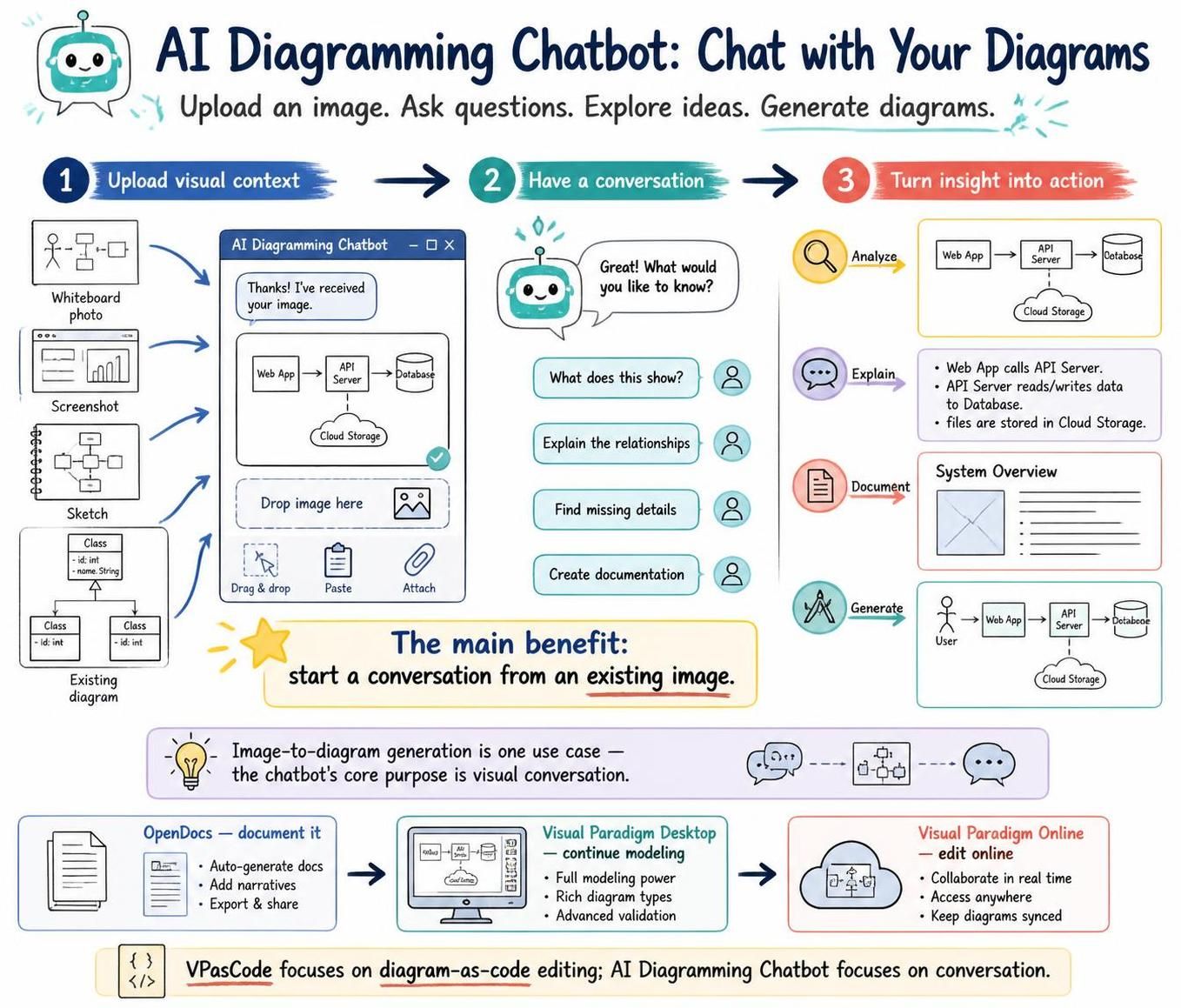
In the modern era of software engineering and business process management, the barrier between a raw idea and a formalized system diagram is often the most significant bottleneck. Traditional modeling tools require users to be proficient in syntax and drag-and-drop mechanics before they can visualize their thoughts. However, the integration of Generative AI into the Visual Paradigm ecosystem has revolutionized this workflow. This tutorial explores the “AI Diagramming Chatbot” capability, transforming how teams initiate projects by shifting from “typing code” to “having a conversation.”
1. The Core Philosophy: Visual Conversation
The central paradigm shift introduced by the AI Diagramming Chatbot is the ability to start a conversation from an existing image. Instead of staring at a blank canvas, engineers and business analysts can upload a messy whiteboard photo, a napkin sketch, or a screenshot of a legacy system. The AI acts as an intelligent interpreter, converting these unstructured visual inputs into structured, semantic data.
This “Visual Context” approach allows the AI to understand the topology of your system—identifying actors, processes, data stores, and the relationships between them—without requiring manual re-drawing.
Input Modalities: Feeding the AI
To utilize this feature effectively, you can provide context through several distinct channels:
- Whiteboard Photos: Capture a brainstorming session. The AI will identify stick figures (actors), boxes (systems), and arrows (flows).
- Screenshots: Upload a screenshot of a running application or a legacy architecture document.
- Class Diagrams: If you have a snippet of code or a partial class diagram, the AI can recognize inheritance hierarchies and attribute types.
- Existing Diagrams: Upload a low-quality diagram to refine it or convert it into a different diagram type.
2. The Workflow: From Upload to Insight
The process of leveraging the AI Chatbot follows a logical three-step journey: Upload, Analyze, and Act.
Step 1: Upload Visual Context
The user initiates the workflow by dragging and dropping an image into the chat interface. The system does not merely store the image; it performs Optical Character Recognition (OCR) and computer vision analysis to parse the visual elements.
Step 2: Have a Conversation
Once the image is processed, the AI responds with a confirmation and a prompt for direction. This is where the “Chat” aspect becomes powerful. You are not limited to a single command. You can interactively refine the model.
Common conversational prompts include:
- “What does this show?” (Generates a textual summary)
- “Explain the relationships.” (Details the data flow or logic)
- “Find missing details.” (Identifies gaps in the architecture, such as missing error handling or authentication steps)
Step 3: Turn Insight into Action
The final stage is the output. The AI can perform three primary actions based on the conversation:
- Analyze: It generates a clean, structured representation of the system (e.g., a sequence diagram or deployment diagram) based on the visual input.
- Explain: It provides natural language descriptions of the system’s behavior, such as “The Web App calls the API Server, which reads/writes data to the Database.”
- Document: It can generate a System Overview document, creating formal text artifacts that accompany the diagrams.
3. Technical Implementation & Ecosystem Integration
The AI Diagramming Chatbot is not an isolated tool; it is deeply integrated into the broader Visual Paradigm ecosystem. Once the AI has generated a diagram, it is not a static image. It is a fully editable, semantic model.
From Chat to Code
The workflow seamlessly transitions from the chat interface to the Visual Paradigm Desktop and Visual Paradigm Online.
- Desktop: For full modeling power, the generated diagram can be opened in the desktop client. Here, you can perform advanced validation, rich diagramming, and deep structural editing.
- Online: For collaboration, the diagram can be pushed to the cloud. This allows real-time editing and ensures the diagram stays synced across the team.
- OpenDocs: The documentation generated during the chat can be exported to OpenDocs, allowing you to auto-generate professional documentation with narratives and technical details.
The Role of VPasCode
It is important to distinguish between the AI Diagramming Chatbot and VPasCode. While the Chatbot focuses on conversation and image recognition, VPasCode focuses on diagram-as-code editing. The AI Chatbot can serve as a bridge, allowing you to describe a system in natural language, which the AI then converts into the code-like structure used by VPasCode for precise editing.
Conclusion
The AI Diagramming Chatbot represents a fundamental shift in how we document systems. By allowing users to “Chat with their diagrams,” it lowers the barrier to entry for complex modeling tasks. Whether you are starting with a napkin sketch or refining an existing architecture, the ability to upload, converse, and generate allows for a fluid, iterative design process that keeps the focus on system logic rather than drawing mechanics.