
The Hybrid Modeling Workflow: Bridging VPasCode and Visual Paradigm UML for Professional Software Architecture
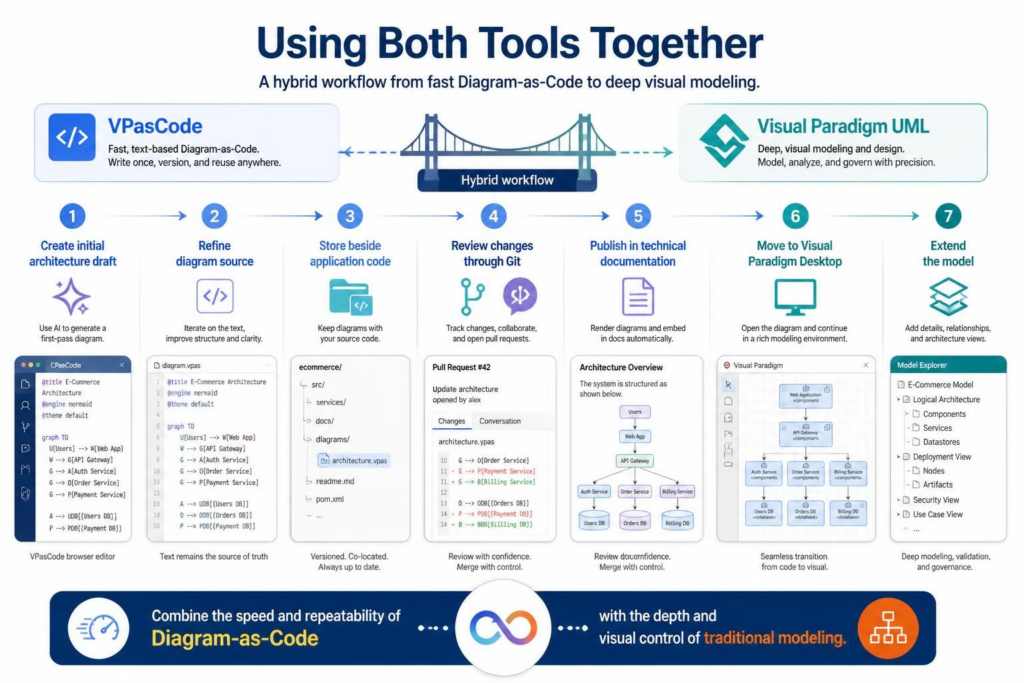
In modern software architecture, the choice between text-based “Diagram-as-Code” and traditional visual modeling tools is often presented as a binary decision. However, the most effective engineering teams do not choose sides. Instead, they leverage a hybrid workflow that utilizes the speed of VPasCode for initial drafting and the depth of Visual Paradigm UML for detailed design.
This tutorial explores how to integrate these two powerful tools into a seamless lifecycle, moving from rapid AI-assisted prototyping to rigorous, formal modeling.
Understanding the Two Pillars
To utilize this hybrid approach effectively, one must understand the distinct strengths of each tool.
VPasCode: The Agile Architect
VPasCode acts as the rapid prototyping engine. It is a text-based tool where diagrams are defined using code (such as Mermaid or PlantUML). Its primary value lies in:
- Version Control: Diagrams are stored as text files, making them diff-able, reviewable, and manageable via Git alongside your application code.
- Speed & Automation: It allows for the generation of diagrams directly from text, often with the assistance of AI to create first-pass drafts.
- Reusability: Diagram definitions can be templated and reused across documentation and codebases.
Visual Paradigm UML: The Enterprise Modeler
Visual Paradigm UML serves as the deep modeling environment. It is a comprehensive visual suite designed for complex projects. Its core advantages include:
- Visual Control: Direct manipulation of layout, alignment, and styling that is difficult to achieve in code.
- Rich Context: The ability to manage large-scale project models, including requirements, detailed logic, and enterprise governance.
- Formal Analysis: Tools for rigorous validation, simulation, and generating enterprise-grade documentation.
The 7-Step Hybrid Workflow
The following workflow demonstrates how to transition between these environments efficiently.
Phase 1: Rapid Drafting & Definition
The process begins with speed. Instead of opening a heavy modeling suite, you use an AI assistant or VPasCode to generate an initial architecture draft.
- Create Initial Draft: Use VPasCode to define the system boundaries and high-level components. For example, you might define a simple graph structure:
graph TD
    Users --> Web App
    Web App --> Auth Service
    Web App --> Order Service
    Auth Service --> Users DB
    Order Service --> Orders DB
Phase 2: Refinement & Storage
Once the structure is established, refine the diagram source directly in VPasCode. This step ensures that the source of truth is clean, readable, and logically sound.
- Iterate on Text: Improve clarity by adjusting labels and connections.
- Store Beside Code: Keep your diagram source files (e.g.,
architecture.vpas) alongside your application code (e.g., in a/docsor/diagramsfolder).
Phase 3: Collaboration & Review
Because the diagrams are code, you can utilize standard software development workflows.
- Review via Git: Use Pull Requests to review architectural changes. You can see exactly which nodes or connections were added or removed.
- Publish Documentation: Automatically render these diagrams into technical documentation (Markdown, HTML, or PDF).
Phase 4: Deep Modeling & Extension
When the architecture requires deeper visual control or formal analysis, the workflow seamlessly transitions to the desktop environment.
- Move to Visual Paradigm Desktop: Import the VPasCode file into Visual Paradigm. The tool will parse the text and convert it into a visual model.
- Extend the Model: Add complex details, relationships, and UI mockups that are cumbersome to write in text. You can now leverage the rich modeling features of the desktop suite.
Practical Decision Guide
When should you use which tool? Use this guide to make informed architectural decisions.
| Requirement | Recommended Approach |
|---|---|
| Quick Architecture Sketch | VPasCode |
| Git-based Diagram Review | VPasCode |
| Formal UML Model with Rich Context | Visual Paradigm UML |
| Natural-Language Diagram Generation | VPasCode with AI |
| Detailed Manual Layout | Visual Paradigm UML |
| Rapidly Changing Service Architecture | VPasCode |
| Enterprise Model Repository | Visual Paradigm UML |
Best Practices for Success
Regardless of the tool selected, effective modeling requires discipline. Follow these principles to maintain a healthy architecture documentation ecosystem.
General Modeling Principles
- Define Purpose: Always determine the goal of a diagram before drawing it.
- Focus: Keep diagrams focused on a single question; avoid “overview” diagrams that become unreadable.
- Consistency: Use consistent naming conventions across diagrams and source code.
- Separation of Concerns: Clearly distinguish between internal systems and external boundaries.
VPasCode Specifics
When working in a text-based environment, teams should also:
- Use Templates: Create templates for recurring diagram types to ensure consistency.
- Keep Files Small: Ensure source files are small enough to review in a code editor.
- Treat AI as a Draft: AI-generated output is a starting point; always review the rendered output for factual accuracy.
- Synchronization: Keep generated diagrams synchronized with actual architecture changes.
Conclusion
The central advantage of VPasCode is not simply that it replaces drawing with typing. It changes diagrams into maintainable technical assets that can be generated, reviewed, versioned, and connected to the software development lifecycle.
By choosing Visual Paradigm UML, you gain a rich graphical environment. By choosing VPasCode, you gain a code-centric workflow. By combining them, you achieve the speed of modern development with the precision of professional engineering.