
Mastering UML Sequence Diagrams: A Step-by-Step Guide to Modeling System Interactions
Sequence diagrams are the backbone of dynamic system modeling in software engineering. They provide a visual timeline of interactions between system components, illustrating the order of operations and the flow of data over time. Whether you are designing a microservices architecture or debugging a complex workflow, understanding these diagrams is essential.
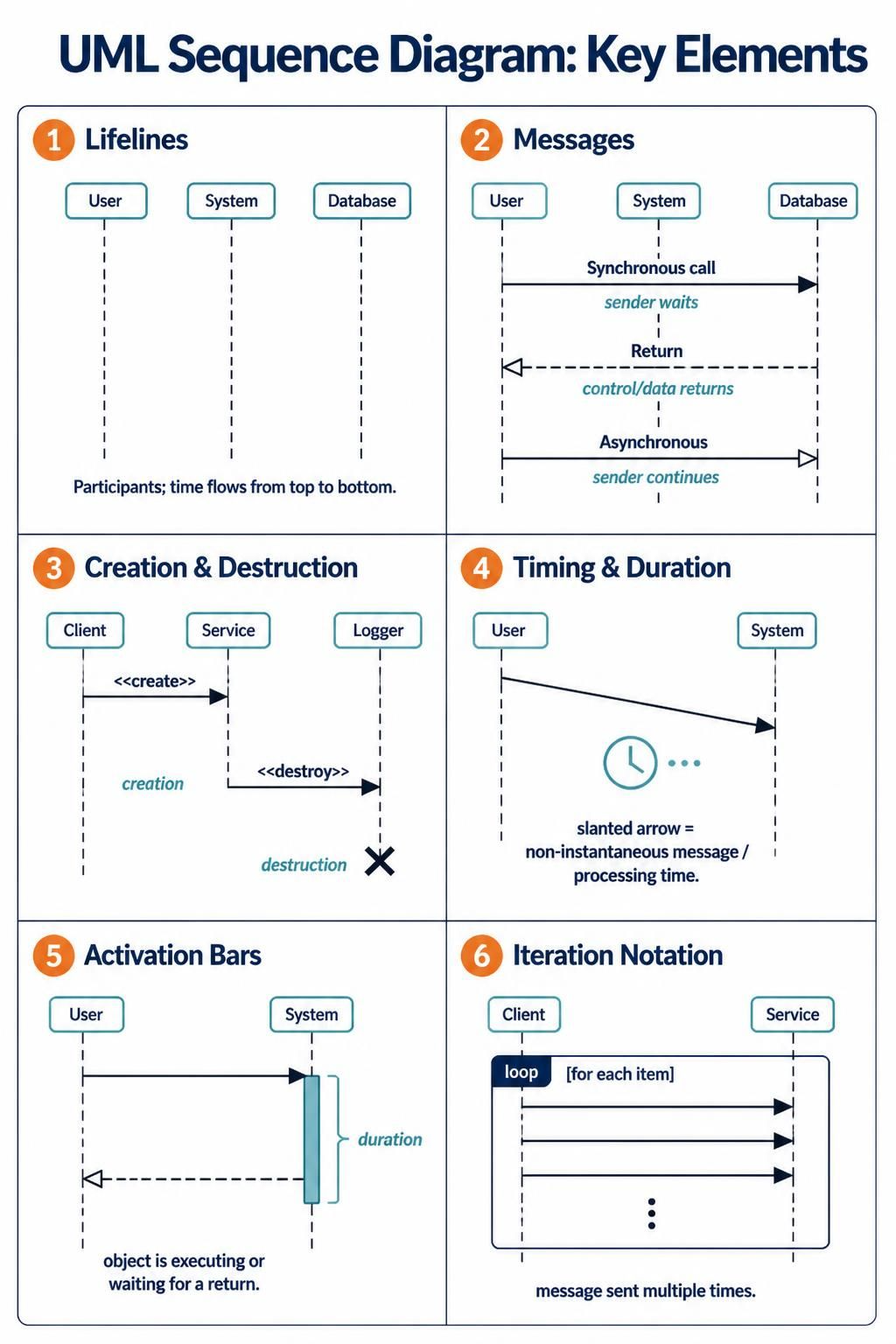
In this comprehensive tutorial, we will deconstruct the six fundamental elements of UML Sequence Diagrams as shown in the reference material. We will explore how to model participants, messages, lifecycles, timing, execution states, and iterations, all while leveraging the power of Visual Paradigm to bring your designs to life.
1. Lifelines: The Timeline of Participants
The foundation of any sequence diagram is the Lifeline. A lifeline represents a single participant or instance of a class within the system. In the diagram, these are typically represented by a rectangle at the top (the header) and a dashed vertical line extending downwards.
- Identity: The header (e.g., “User”, “System”, “Database”) identifies the object.
- Time Flow: The vertical axis represents time, flowing strictly from top to bottom.
- Persistence: The dashed line indicates that the object exists throughout this period of time.
When building your diagrams in Visual Paradigm, you simply drag and drop a Class or Component onto the canvas. The tool automatically generates the lifeline, allowing you to focus on the interactions rather than the drawing mechanics.
2. Messages: The Flow of Control
Messages represent the communication between lifelines. The direction and style of the arrow define the type of interaction. Visual Paradigm offers robust tools to define these message types accurately.
Synchronous Calls
A solid line with a filled arrowhead represents a Synchronous Call. This means the sender sends a request and waits for a response before continuing its own execution. It is a blocking operation.
Returns
Return messages are typically represented by a dashed line with an open arrowhead pointing back to the sender. This indicates that control is returning, often carrying data or a result.
Asynchronous Messages
A solid line with a filled, open arrowhead (often called a “block” arrow) represents an Asynchronous message. Here, the sender continues its execution immediately after sending the message without waiting for a response. This is crucial for modeling non-blocking I/O or fire-and-forget events.
3. Creation & Destruction: Lifecycle Management
Objects in a system are not always permanent. They are often created when needed and destroyed when their task is complete. Sequence diagrams capture this lifecycle explicitly.
- Creation: A message labeled with the stereotype
<<create>>indicates the instantiation of a new object. In Visual Paradigm, the target lifeline appears dynamically when this message is executed or drawn. - Destruction: To show that an object is removed from the system, an Activation Bar (see below) is terminated with a distinct “X” mark. This signifies the object’s destruction.
4. Timing & Duration: Visualizing Latency
Not all interactions happen instantly. Sometimes, it is vital to show that a process takes time or that a message has a specific duration. Visual Paradigm supports advanced timing annotations.
A Slanted Arrow is used to represent a non-instantaneous message or a processing delay. If a line connecting two lifelines is angled downwards, it visually communicates that the message is taking time to traverse the system or that the system is busy processing.
5. Activation Bars: Execution States
An Activation Bar (also known as a Focus of Control) is a thin, vertical rectangle placed on a lifeline. It indicates the period during which an object is performing an action or is actively executing code.
Key aspects include:
- Execution: The object is actively running logic.
- Waiting: The object may be waiting for a response from another component.
- Duration: The length of the bar corresponds to the duration of the operation.
When using Visual Paradigm, these bars are automatically generated when you draw synchronous messages between objects, providing an immediate visual cue of who is “busy.”
6. Iteration Notation: Loops and Repetition
Real-world systems rarely perform a single action once; they often iterate. The Iteration Notation allows you to model loops, such as “for each item” or “while condition is true.”
This is typically drawn as a large rectangular frame surrounding the repeated messages. Inside the frame, a label such as loop or alt (for alternative) is placed at the top left corner. This notation tells the reader that the enclosed sequence of messages is repeated multiple times.
Conclusion
Mastering these six components—Lifelines, Messages, Creation/Destruction, Timing, Activation Bars, and Iteration—allows you to create clear, professional, and technically accurate system models. By utilizing Visual Paradigm, you ensure that your diagrams are not just static images, but dynamic tools for engineering robust software architectures.