
Mastering BPMN 2.0: Bridging the Gap Between Business Strategy and Technical Execution
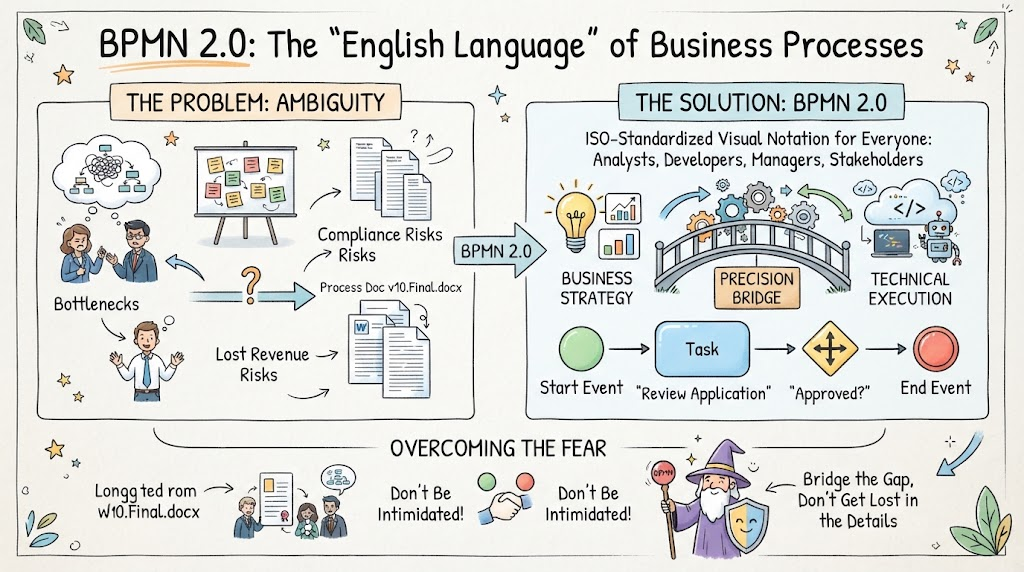
In the modern enterprise, ambiguity is a silent killer. Imagine sitting in a meeting where everyone nods in agreement, only to realize later that three different stakeholders had three completely different interpretations of the same workflow. This lack of clarity leads to bottlenecks, compliance risks, frustrated employees, and lost revenue. Historically, we have tried to solve this with sticky notes, complex flowcharts, or lengthy Word documents. While these tools have their place, they often fail to capture the nuance of modern business operations.
This is where BPMN 2.0 (Business Process Model and Notation) steps in. Think of BPMN not as a rigid set of rules for engineers, but as the “English Language” of business processes. It is an ISO-standardized visual notation designed to ensure that business analysts, developers, managers, and stakeholders all speak the same dialect. Whether you are mapping out a simple employee onboarding flow or a complex loan approval system, BPMN provides the precision needed to bridge the gap between high-level strategy and technical execution.
The Core Components of a BPMN Model
To move from confusion to clarity, we must break down the BPMN diagram into its fundamental building blocks. Every BPMN diagram is constructed using four primary types of objects that guide the reader through the logic of the process.
1. Events: The Context
Events are represented by circles. They describe something that happens during the process, not something that is done. Events are categorized by their color and shape:
- Start Event (Green Circle): The trigger. A process begins here. For example, “Customer Submits Application.”
- Intermediate Event (White Circle): Something that happens in the middle, such as a message receipt or a timer expiration.
- End Event (Red Circle): The outcome. The process concludes here, often resulting in a specific deliverable.
2. Activities: The Work
Activities are represented by rounded rectangles. These are the actual tasks performed. In a BPMN diagram, you will often see a task labeled with an infinitive verb, such as “Review Application” or “Approve Loan.”
3. Gateways: The Decisions
Gateways are the diamonds. They control the divergence and convergence of the process flow. The most common gateway is the Exclusive Gateway (often marked with an ‘X’), which asks a question like “Approved?”. If the answer is Yes, the flow goes one way; if No, it goes another.
4. Sequence Flows: The Logic
These are the solid arrows connecting the objects. They dictate the order in which tasks are performed.
Visualizing the Process: A Simple Loan Approval Example
Let’s apply these concepts to the “Loan Approval” scenario depicted in our reference material. We can visualize this logic using a standard process flow.
The journey begins at the Start Event, where a customer submits a request. The flow moves to a Task called “Review Application.” Once the review is complete, the process hits a Gateway asking, “Approved?”
- Path A: If the answer is “No,” the process might loop back to the applicant to request more information.
- Path B: If the answer is “Yes,” the process moves to a final Task (e.g., “Disburse Funds”) and concludes at an End Event.
This visual representation removes ambiguity. There is no question about what happens if the loan is denied; the diagram explicitly shows the path.
From Diagram to Execution
The true power of BPMN 2.0 lies in its ability to be executable. Unlike a static flowchart, a BPMN model can often be directly imported into a Process Management Engine. This means the diagram you draw becomes the very code that runs the business logic.
By using a toolset that supports modern modeling standards, you ensure that the “Business Strategy” (the what) and “Technical Execution” (the how) remain perfectly synchronized. The “Precision Bridge” mentioned in the infographic represents this exact alignment—ensuring that what is designed on the whiteboard is exactly what gets deployed in the software.
Overcoming the Fear of Complexity
Many professionals avoid BPMN because they fear getting bogged down in obscure symbols and rigid rules. However, you don’t need to master every single icon to start adding value. By focusing on the core building blocks—Events, Tasks, Gateways, and Flows—you can immediately create professional, clear, and actionable process models that drive real business value.
Don’t be intimidated. Start with the basics, use the right tools, and watch as your team moves from “Process Doc v10.Final.docx” to a living, breathing map of your organization’s success.