
Mastering BPMN 2.0: From Natural Language to Expert Diagrams with Visual Paradigm AI
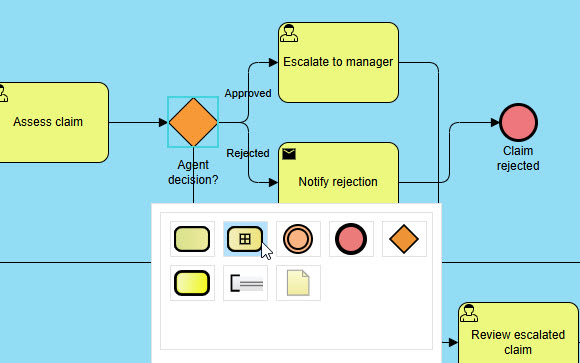
In the rapidly evolving landscape of business process management, the gap between conceptualizing a workflow and visualizing it has often been bridged by manual, time-consuming diagramming. However, the emergence of Generative AI and Large Language Models (LLMs) specifically fine-tuned for enterprise standards is changing the paradigm. This tutorial explores how Visual Paradigm’s AI Chatbot transforms plain English descriptions into rigorous, semantically correct BPMN 2.0 diagrams.
By leveraging an AI model that understands the semantics of business processes rather than just the syntax of drawing shapes, organizations can achieve a level of modeling efficiency previously unattainable. We will walk through the system architecture of this tool, the critical modeling concepts it enforces, and how to utilize its capabilities to build complex process flows.
Understanding the AI Architecture for Business Modeling
The core technology behind Visual Paradigm’s AI Chatbot is a specialized Large Language Model (LLM) that has been fine-tuned on enterprise modeling standards. Unlike generic AI assistants that might produce “plausible-looking” but syntactically incorrect diagrams, this tool possesses a deep understanding of the Object Management Group (OMG) specifications.
Core Capabilities
The system operates on several advanced principles that ensure the output is not just a picture, but a functional model:
- Natural Language to Notation: The AI interprets actors as Pools/Lanes, actions as Tasks, decisions as Gateways, and triggers as Events. It translates the “who, what, when, and how” of a process into specific BPMN symbols.
- BPMN 2.0 Compliance: The generator ensures that every element adheres to official standards. This includes the correct usage of Exclusive Gateways (XOR), Parallel Gateways (AND), and proper sequence flow connections.
- Contextual Awareness: The AI handles complex logic, such as conditional branches and exception handling, translating them into accurate visual structures that represent real-world business rules.
Step-by-Step: Generating Your First Diagram
Using the AI Chatbot is designed to be intuitive, requiring no prior expertise in diagramming software. The following steps illustrate the workflow from a raw idea to a finalized visualization.
Step 1: Describe Your Workflow
Start a new session in the AI Chatbot. The key to success here is clarity. You must describe the process naturally, covering the actors involved and the logical flow of data or work.
Example Prompt:
Imagine a scenario where an employee needs to submit a receipt for an expense. You might type the following:
“Create a BPMN diagram for an employee expense reimbursement process. The employee submits a receipt. If the amount is under $100, it is automatically approved by the system. If it is over $100, it goes to the manager for approval. If the manager rejects it, the employee must resubmit. If approved, it goes to Finance for payment.”
Step 2: AI Generation and Review
Once the prompt is submitted, the chatbot instantly generates a BPMN 2.0 diagram. In the generated output, you will observe specific modeling elements:
- Pools: The AI identifies distinct actors. In our example, it creates Pools for “Employee,” “System,” “Manager,” and “Finance.”
- Gateways: It places an Exclusive Gateway after the submission task to check the amount ($100 threshold).
- Flows: It draws clear paths for approval, rejection, and payment, ensuring the logic matches the prompt.
Step 3: Iterate and Refine
One of the most powerful features of this tool is the ability to refine the model without starting from scratch. By using the Persistent Chat Sessions feature, you can continue the conversation to update the model.
Refinement Example:
If you realize you forgot a notification step, simply type: “Add a notification email to the employee after manager approval.”
The AI will update the diagram, inserting the necessary Task and Message Flow without losing the previous context or structure. You can also utilize the Artifacts Pane to jump between different versions of your diagram to compare changes.
Deep Dive: Modeling Complex Logic and Exceptions
Visual Paradigm’s AI is particularly adept at handling the nuances of business logic that often trip up human modelers. It doesn’t just draw lines; it understands the implications of business rules.
Consider the concept of Exception Handling. In a standard diagram, a manager rejecting a claim is often treated as a dead end or a simple negative flow. However, a robust BPMN model requires a specific mechanism to handle the “Resubmit” requirement. The AI correctly identifies this as a loop back to the start of the process, ensuring the diagram is not only a visualization but a valid executable model.
Furthermore, the AI distinguishes between different types of Gateways:
- Exclusive Gateway (XOR): Used for the “Under $100” vs “Over $100” decision. Only one path is taken.
- Inclusive Gateway (I): (If required) Used when multiple paths might be taken simultaneously.
- Parallel Gateway (AND): Used when a process splits into multiple concurrent activities.
Conclusion
The integration of AI into business process modeling tools like Visual Paradigm represents a significant leap forward. By automating the translation of natural language into compliant BPMN 2.0 diagrams, organizations can focus on the optimization of their processes rather than the tedious drawing of them. Whether you are designing a simple expense workflow or a complex enterprise system, the AI Chatbot serves as a powerful partner in your modeling journey.