
Mastering BPMN 2.0 Sub-Processes: A Visual Paradigm Modeling Guide
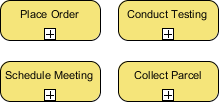
In the world of Business Process Model and Notation (BPMN), complexity is the enemy of clarity. When a business task becomes too intricate to represent with a single action, the standard solution is to decompose it. This is where the Sub-Process comes into play. Unlike a simple Task, which represents a single atomic action, a Sub-Process is a complex activity that can be broken down into smaller, more manageable work units. This article explores how to effectively model these structures using Visual Paradigm.
The Concept of Decomposition in BPMN
Visualizing a business process often requires a hierarchical approach. You start with a high-level view (Level 0) and then drill down into specific areas. A Sub-Process is the mechanism that allows you to create this drill-down capability within the same diagram or a linked diagram.
Think of a Sub-Process as a “black box” on your main map. To the outside observer, it is just a single activity with a start and an end. However, inside that box, there is a whole universe of logic, decisions, and user tasks waiting to be explored. This concept is crucial for maintaining readability. If you tried to draw every single step of a complex workflow on one canvas, the diagram would become a tangled web of lines.
Visual Paradigm: The “Plus” Symbol
When working within Visual Paradigm, identifying a Sub-Process is visually immediate. As shown in the reference diagram, a Sub-Process is depicted as a rounded rectangle (similar to a standard Task) but distinguished by a specific icon.
- The Icon: A small square containing a plus sign (+) located at the bottom center of the shape.
- The Label: The shape typically bears a title, such as “Place Order,” “Conduct Testing,” or “Collect Parcel.”
This plus sign is not merely decorative; it is the interactive trigger for the modeling tool. In Visual Paradigm, this symbol indicates that the object is expandable. It tells the viewer that the complexity contained within this box is not lost but rather hidden for the sake of high-level clarity.
Atomic Tasks vs. Non-Atomic Sub-Processes
The distinction between a standard Task and a Sub-Process is the most critical decision you will make during the modeling phase. It comes down to granularity and detail level.
1. The Atomic Task
A standard Task represents a single unit of work that is executed as one step. For example, “Click Submit” or “Send Email.” It does not contain internal logic. If you model a complex workflow as a series of tasks without sub-processes, you risk creating a diagram that is too detailed for management review.
2. The Non-Atomic Sub-Process
A Sub-Process is defined as a “non-atomic” complex work. It implies that the activity can be decomposed. It serves as a container for:
- Internal sequence flows.
- Parallel gateways (decision points).
- Other nested sub-processes.
Choosing the Right Level of Detail
When deciding whether to use a simple Task or a Sub-Process, ask yourself: “Does the audience need to see the internal logic of this step right now?”
- High-Level Management View: If you are presenting to executives, you likely only need to see that “Conduct Testing” happens. You might not need to see the specific test cases or the approval loops involved in that testing. Here, you use a Sub-Process to hide the details.
- Operational View: If you are training a new employee on how to “Schedule Meeting,” the high-level box is insufficient. They need to see the sub-tasks: checking calendar availability, sending invites, and confirming attendance. In this case, you double-click the Sub-Process to open a detailed BPMN diagram.
Visual Paradigm excels here by allowing you to create a “detailed level” diagram that is linked to the parent diagram. This creates a seamless navigation experience where the user can jump from the “Place Order” sub-process in the main view to a separate diagram containing the full order fulfillment logic.
Structuring Your BPMN Model
To build a robust architecture in Visual Paradigm, follow this logical progression:
- Create the Container: Add a Sub-Process shape to your canvas.
- Define the Boundary: Ensure the Sub-Process has a clear Start Event and End Event within its boundary. It must be able to stand alone if opened.
- Drill Down: Double-click the “Place Order” box (or similar) to open the internal view. Here, you can add the specific tasks, gateways, and data objects that make up the process.
- Iterate: If a sub-task within the sub-process is still too complex, you can nest another Sub-Process inside it. Visual Paradigm supports deep nesting, though it is best practice to limit nesting to 3-4 levels to prevent cognitive overload.