
Mastering BPMN Annotations: How to Add Context Without Breaking Your Flow
When modeling complex business processes using Business Process Model and Notation (BPMN), precision is key. However, diagrams often get cluttered with dense data or overly verbose descriptions, which can obscure the actual flow of the process. This is where Annotations become an essential tool for the visual modeler. Using the BPMN standard within a tool like Visual Paradigm, you can attach crucial details to specific elements without altering the logical path of your process.
In this tutorial, we will explore the concept of Text Annotations, specifically focusing on how to use them to clarify decision points, such as payment settlement methods. We will break down the anatomy of this feature, how to apply it to a BPMN activity, and why it is critical for maintaining clean, readable business diagrams.
Understanding the Purpose of BPMN Annotations
An annotation in BPMN is a graphical element that allows you to provide additional information about an element in the diagram. Think of it as a sticky note or a comment attached to a specific shape.
The Golden Rule: An annotation must not affect the flow of the process. It is purely informational. If a process element has an annotation, the flow continues exactly as defined by the sequence flows (arrows) connecting the elements, regardless of what the annotation says.
For example, if you have a task named “Process Order,” an annotation might say “Requires manager approval.” This text informs the reader of a constraint, but the arrow leaving the task still simply leads to the next step in the sequence.
When to Use Annotations
- Clarifying Logic: Explaining complex decision criteria that are too long to fit inside a gateway or task label.
- Adding Metadata: Including system IDs, version numbers, or regulatory references.
- Listing Options: Providing a list of acceptable values or methods for a specific activity.
Deep Dive: The “Settle Payment” Scenario
Let us apply this concept to a practical scenario often found in e-commerce or financial modeling: the Settle Payment activity.
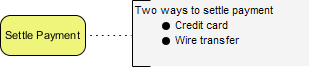
Imagine you are modeling a workflow where a customer’s order is processed. The specific task is “Settle Payment.” In the real world, this task is not a single monolithic action; it can be executed in multiple ways. If you were to write “Pay via Credit Card OR Wire Transfer” directly on the yellow task box, the diagram would look cluttered and unprofessional.
Instead, we use a Text Annotation to handle this complexity.
Step-by-Step: Creating the Annotation
Using Visual Paradigm (or any BPMN-compliant tool), follow these logical steps to implement the annotation shown in your reference diagram:
- Locate the Element: Identify the “Settle Payment” activity (the yellow rounded rectangle).
- Initiate the Connection: Use the “Text Annotation” tool. In many tools, this is done by dragging from the element to an empty space on the canvas.
- Draw the Link: Create a dashed line connecting the activity to the text box. Note that in BPMN, the connecting line must be dashed, not solid. A solid line would imply a sequence flow (a process step), whereas a dashed line implies a relationship (an annotation).
- Input the Content: Inside the rectangular text box, you can now freely format your text. This is where you add the specific details.
Analyzing the Output
In our specific case, the annotation box contains the header: “Two ways to settle payment”. Below this, a list is provided:
- Credit card
- Wire transfer
This structure is highly effective. It separates the process step (Settle Payment) from the implementation details (the payment methods). The reader immediately understands the high-level action without getting bogged down in the specific mechanics of how the money is moved.
Visual Syntax and Best Practices
When constructing your diagrams, adhere to these visual standards to ensure your models are universally understood by stakeholders:
1. The Dashed Line Rule
The connection between the BPMN element and the annotation is strictly a dashed line. This distinguishes it from the sequence flow (solid line) and the association (solid line) used for other relationships. If you use a solid line, the diagram validator might flag it as an error.
2. Hierarchy in Text
Do not just dump text into the box. Use formatting to create hierarchy. In the example, the header “Two ways to settle payment” acts as a title, while the bulleted list provides the data. This makes the diagram scannable.
3. Avoiding Flow Interference
Ensure that the annotation does not overlap with other critical elements. If the text box covers a gateway or another task, the meaning of the diagram can be lost. Position the annotation nearby, connected by the dashed line, to keep the main flow clear.
Conclusion
Mastering annotations is a hallmark of a skilled BPMN modeler. It demonstrates an understanding that a diagram is not just a map of the process, but a communication tool that requires context. By separating the “what” (the activity) from the “how” (the annotation details), you create models that are both technically accurate and easy to read.
Whether you are documenting a simple approval workflow or a complex financial transaction, always remember to use annotations to offload complexity from your process flow.