
Mastering BPMN Connectivity: The Critical Distinction Between Sequence Flow and Message Flow
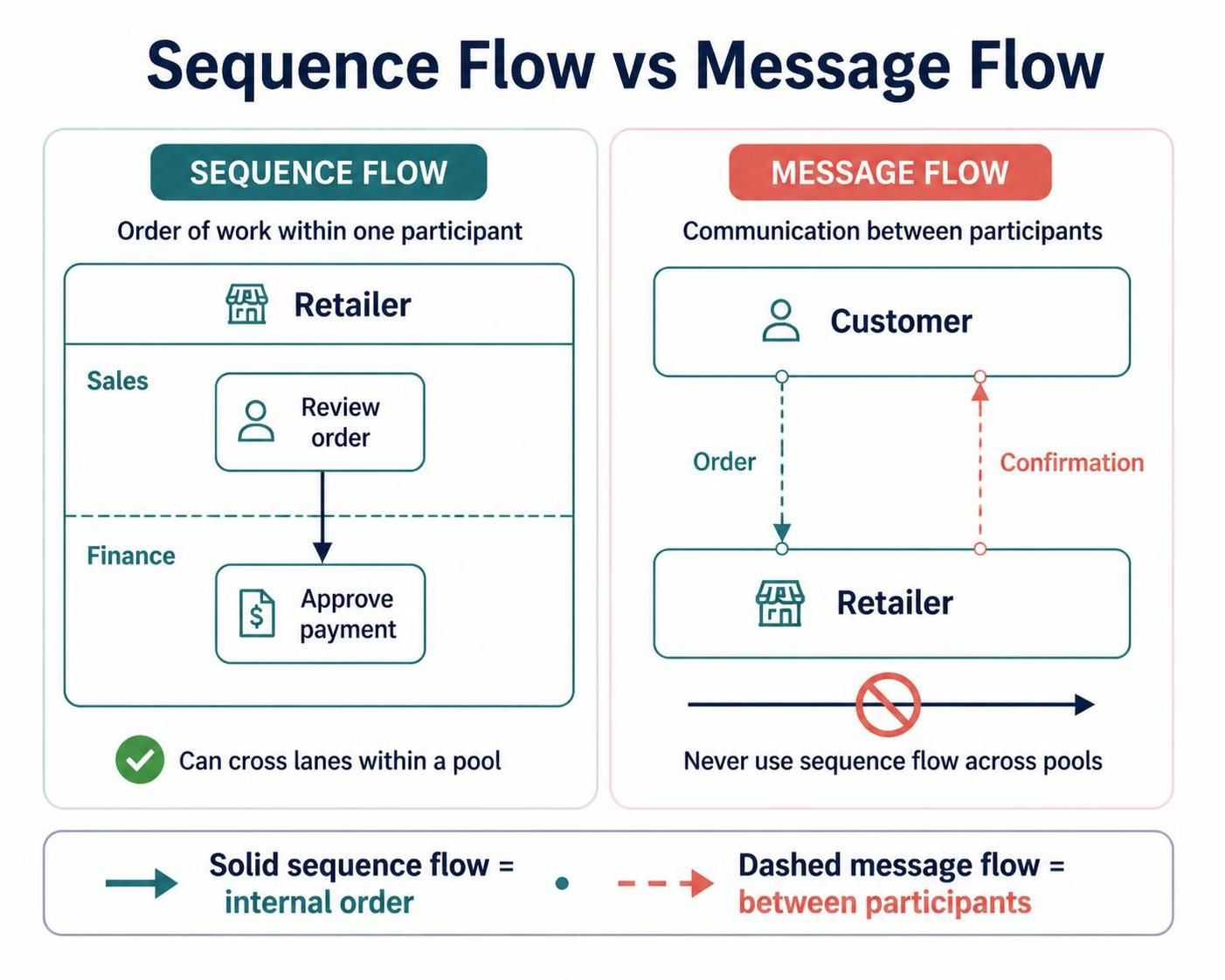
In Business Process Model and Notation (BPMN), the visual language of connectivity is the most critical element for defining how a process actually moves. Without a clear understanding of connectors, a diagram becomes merely a collection of shapes rather than a functional workflow. Two specific connectors often confuse beginners and intermediate modelers alike: Sequence Flow and Message Flow. While they may appear similar in function—moving the process from point A to point B—they represent fundamentally different architectural relationships.
The Architecture of Internal Logic: Sequence Flow
Sequence Flow represents the internal heartbeat of a process. It dictates the chronological order of tasks and events within a single participant’s environment. In BPMN terms, a “Participant” is usually represented by a Pool, and a Sequence Flow operates exclusively inside that container.
Visual Characteristics and Usage
Visually, sequence flow is depicted as a solid line with a single, filled arrowhead. It signifies control flow, meaning that once the preceding activity is complete, the process must move to the next step immediately.
Crossing Lanes within a Pool
One of the most powerful features of a Pool is the ability to divide it into Swimlanes. These lanes typically represent different departments, roles, or systems (e.g., “Sales” vs. “Finance”). Sequence flows are not restricted to staying within a single lane; they are designed to cross the horizontal boundaries of lanes to pass control between different entities within the same organization.
Consider the logic of an internal order review:
1. Sales Department receives an order.
2. Sequence Flow: Control moves from Sales to Finance.
3. Finance Department approves the payment.
4. Sequence Flow: Control returns to Sales for fulfillment.
This flow is internal. The “Sales” department and the “Finance” department are working together as a single unit (the Retailer). Therefore, the transition is a direct handover of work, not a communication request.
The Architecture of External Communication: Message Flow
Message Flow represents the exchange of information between distinct participants. It is used when one business entity needs to send a request, document, or notification to another independent business entity.
Visual Characteristics and Usage
Unlike sequence flow, a Message Flow is depicted as a dashed line with an open arrowhead. This visual distinction is crucial: it tells the viewer that the connection is asynchronous or represents a message being sent, rather than an immediate control transition.
Communication Across Pools
Message flows are the “bridges” that connect separate pools. They are used to model interactions such as:
- Customer to Retailer: A customer places an order.
- Supplier to Manufacturer: A supplier sends a shipping confirmation.
- System to Human: A system sends an alert notification to a user.
When you draw a message flow, you are acknowledging that the sender and the receiver are separate entities with their own independent processes. The sender does not “know” when the receiver has processed the message unless a specific response message flow is drawn back.
The Golden Rule: The Pool Boundary
The most common error in BPMN modeling is attempting to draw a sequence flow across pools. Do not draw sequence flows across pools.
Imagine the Pool boundary as a physical wall. Inside the wall, you have a chain of command (Sequence Flow). Outside the wall, you have communication (Message Flow). If you try to connect two different pools with a solid line, you are technically claiming that the two separate companies are the same entity, which is logically incorrect.
To correctly model the exchange between the Customer and the Retailer:
- Draw the Customer in one pool.
- Draw the Retailer in a separate pool.
- Connect the “Place Order” event to the “Receive Order” event using a Message Flow.
Comparative Summary
To ensure your diagrams are technically accurate, refer to this comparison of the two flow types:
| Feature | Sequence Flow | Message Flow |
|---|---|---|
| Visual Style | Solid line, filled arrow | Dashed line, open arrow |
| Scope | Internal (Inside a Pool) | External (Between Pools) |
| Meaning | Control/Order of Work | Communication/Exchange |
| Can Cross Lanes? | Yes (within same pool) | N/A (Connects Pools) |
Conclusion
Mastering the distinction between Sequence Flow and Message Flow is the foundation of professional BPMN modeling. By strictly adhering to the rule that Sequence Flow stays inside the pool and Message Flow crosses between pools, you create diagrams that are not only visually clear but also logically sound and executable.