
Mastering BPMN: An eCommerce Order Fulfillment Architecture Guide
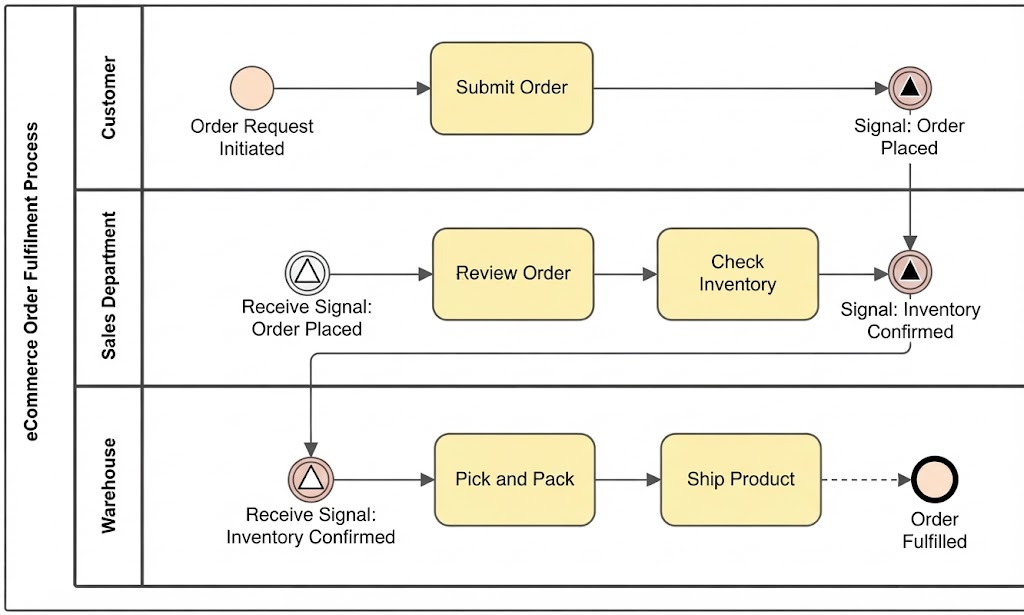
Welcome to this comprehensive tutorial on Business Process Model and Notation (BPMN). In the world of software architecture and business analysis, clarity is king. BPMN serves as the universal language that bridges the gap between business requirements and technical implementation. This guide dissects a standard eCommerce Order Fulfillment process, breaking down how information flows between the Customer, Sales Department, and Warehouse using industry-standard modeling symbols.
Understanding the Architecture: Swimlanes and Roles
Before diving into the specific tasks, it is crucial to understand the structural layout of the diagram. The visual representation uses Swimlanes (also known as Pools and Lanes) to assign responsibility. This ensures that every step in the process is clearly attributed to a specific actor or department.
- Customer Lane: The initiator of the process. This lane represents the external actor triggering the workflow.
- Sales Department Lane: The intermediary. This lane handles the validation, financials, and inventory checks.
- Warehouse Lane: The execution unit. This lane is responsible for the physical handling and shipping of goods.
Step-by-Step Process Flow
The following walkthrough analyzes the specific sequence of events depicted in the diagram, moving from the initial request to final fulfillment.
1. The Initiation Phase (Customer)
The process begins with an Event represented by a circle. In BPMN, a circle with a thin border usually denotes a “Start Event.” Here, the circle is labeled “Order Request Initiated.” This signifies that the process is waiting for an external trigger—the customer deciding to buy.
Once triggered, the flow moves to a Task, represented by a rectangle with rounded corners. The task is labeled “Submit Order.” This is a single unit of work performed by the customer, such as clicking the “Buy Now” button on a website.
2. The Handshake Mechanism: Signal Events
One of the most critical aspects of this architecture is how the departments communicate without direct interaction. Notice the Signal Events (the circle with the triangle inside). In BPMN, a signal event is used to indicate that a process is triggered by a message or signal from another part of the system.
- Signal: Order Placed: Once the customer submits the order, a signal is broadcast. This allows the Sales Department to react asynchronously. The Sales lane picks up this signal at the “Receive Signal: Order Placed” event.
- Signal: Inventory Confirmed: After the Sales Department checks stock, they generate a new signal. This acts as the trigger for the Warehouse team to begin their work.
3. Validation and Verification (Sales Department)
Upon receiving the order signal, the Sales Department performs two critical tasks:
- Review Order: This ensures the order details are correct and payment methods are valid.
- Check Inventory: This is a logic gate. The system verifies if the requested items are in stock. If the inventory check fails, the process typically terminates or loops back (though not explicitly shown, this is standard logic). If successful, the flow proceeds to the next signal event.
4. Execution and Completion (Warehouse)
The Warehouse lane operates on the premise of physical fulfillment. Once the “Receive Signal: Inventory Confirmed” is received, the workflow branches into:
- Pick and Pack: Physical retrieval and packaging of items.
- Ship Product: The handover to logistics carriers.
The process concludes with a End Event, represented by a circle with a thick border. The label “Order Fulfilled” indicates a successful termination of the process.
Modeling Best Practices
When designing systems like this, it is essential to maintain a clear separation of concerns. Using signal events rather than direct message flows allows the Sales and Warehouse departments to operate independently. If the Warehouse is down, the Sales team can still process orders; the signal simply queues until the Warehouse lane is ready to consume it.
Conclusion
This eCommerce Order Fulfillment process demonstrates the power of BPMN in creating a transparent, auditable, and robust system architecture. By clearly defining triggers, tasks, and communication channels via signals, organizations can streamline operations and reduce errors between departments.
To bring this level of precision to your own enterprise architecture, we highly recommend using Visual Paradigm BPMN for your modeling needs. Its intuitive drag-and-drop interface supports the full BPMN 2.0 specification. Furthermore, integrating AI capabilities within these tools can significantly accelerate the design phase, allowing you to generate complex diagrams from natural language descriptions instantly.