
Mastering BPMN Flow Objects: A Visual Paradigm Architecture Guide
In the world of Business Process Management (BPM), clarity is currency. Before a developer can write a single line of code or a business analyst can automate a workflow, the process must be visually defined. The BPMN 2.0 (Business Process Model and Notation) standard serves as the universal language for these definitions, and the foundation of this language lies within its “Flow Objects.”
This tutorial provides a deep dive into the structural architecture of BPMN, specifically focusing on the three core components that drive process logic: Events, Activities, and Gateways. We will explore how these elements translate real-world business scenarios—such as order fulfillment—into executable diagrams using industry-standard tooling like Visual Paradigm.
The Three Pillars of BPMN Flow
Imagine a process diagram as a map. To navigate this map successfully, you need to understand the landmarks. In BPMN, these landmarks are collectively known as Flow Objects. They are the only elements that can be connected by sequence flows (arrows), making them the central nervous system of any model.
1. Events: The Process Triggers and Terminators
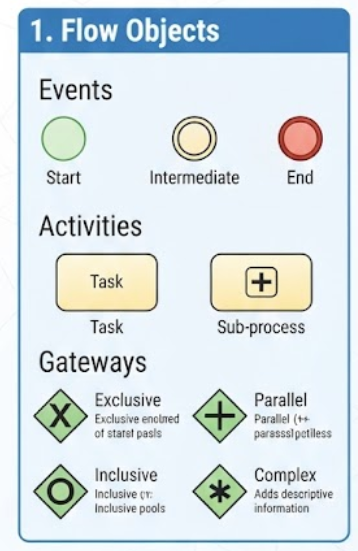
Events are the “happenings” within a process. They do not perform work themselves but rather signify that something has occurred or will occur. Visually, they are represented by circles. The thickness of the circle’s border often indicates the severity or type of the event.
- Start Event (Green Circle): This is the genesis of the process. It signifies that the process is ready to begin. In a system, this might be triggered by a “Submit Order” button click.
- Intermediate Event (Double Line Circle): These occur between the start and the end. They represent something that happens while the process is running, such as waiting for a payment confirmation or a timeout.
- End Event (Red Circle): This marks the termination of the process. It signifies that the work is complete and data is ready for storage or reporting.
2. Activities: The Work Being Done
Activities are the “tasks” or work steps where value is added. They are the meat of the process diagram. In Visual Paradigm, these are typically rendered as rounded rectangles.
- Task: The smallest unit of work. This is an atomic action that cannot be meaningfully decomposed further in the context of the current diagram. For example, “Check Inventory.”
- Sub-process: A complex activity that contains its own internal logic. Instead of cluttering the main diagram with a dozen steps, you can group them into a sub-process (indicated by the + sign) to maintain a high-level view of the architecture.
3. Gateways: The Logic Controllers
If Activities are the muscles of the process, Gateways are the brain. They determine the flow path based on decision logic. Without gateways, a process is linear and boring; with them, it becomes dynamic.
- Exclusive Gateway (X): The classic “If/Else” decision. It splits the flow into mutually exclusive paths (only one path is taken) or joins them back together. Example: Is the item in stock? (Yes -> Ship; No -> Notify).
- Inclusive Gateway (Diamond with Circle): A flexible decision point where multiple paths can be taken simultaneously, or only one. It is used for complex conditions.
- Parallel Gateway (+): The “AND” logic. It splits the flow into multiple branches that must all execute (fanning out) and waits for all of them to complete before joining back together (fanning in).
Architecting an Order Fulfillment Flow
Let’s apply these concepts to a real-world scenario: Order Fulfillment. By mapping these Flow Objects, we create a system architecture that dictates data flow and execution logic.
- Trigger: A Start Event is activated when the customer submits an order.
- Work Step: A Task is assigned to check inventory levels.
- Decision: An Exclusive Gateway evaluates the result.
- If available: The flow moves to a Task to “Prepare Order.”
- If unavailable: The flow moves to a Task to “Notify Customer.”
- Convergence: The paths merge (or the unavailable path loops back), eventually leading to the End Event.
Code Representation: BPMN XML Structure
While Visual Paradigm allows you to draw these visually, the underlying system architecture is often stored in XML. Understanding this structure helps when debugging or integrating with external systems.
<bpmndi:BPMNDiagram>
  <bpmndi:BPMNPlane>


    <bpmndi:BPMNShape bpmnElement="StartEvent_1">
      <di:bounds x="162" y="100" width="36" height="36" />
    </bpmndi:BPMNShape>


    <bpmndi:BPMNShape bpmnElement="Gateway_1">
      <di:bounds x="300" y="100" width="50" height="50" />
      <di:style><![CDATA[BPMNStyle=exclusive;]]></di:style>
    </bpmndi:BPMNShape>


    <bpmndi:BPMNShape bpmnElement="Task_1">
      <di:bounds x="400" y="100" width="100" height="80" />
    </bpmndi:BPMNShape>

  </bpmndi:BPMNPlane>
</bpmndi:BPMNDiagram>Conclusion
Mastering Flow Objects is the first step toward mastering BPMN. By correctly distinguishing between the triggers (Events), the work (Activities), and the logic (Gateways), you ensure that your process models are not just drawings, but robust architectural blueprints ready for implementation.