
Mastering BPMN Modeling: A Step-by-Step Guide to the Employee Onboarding Process
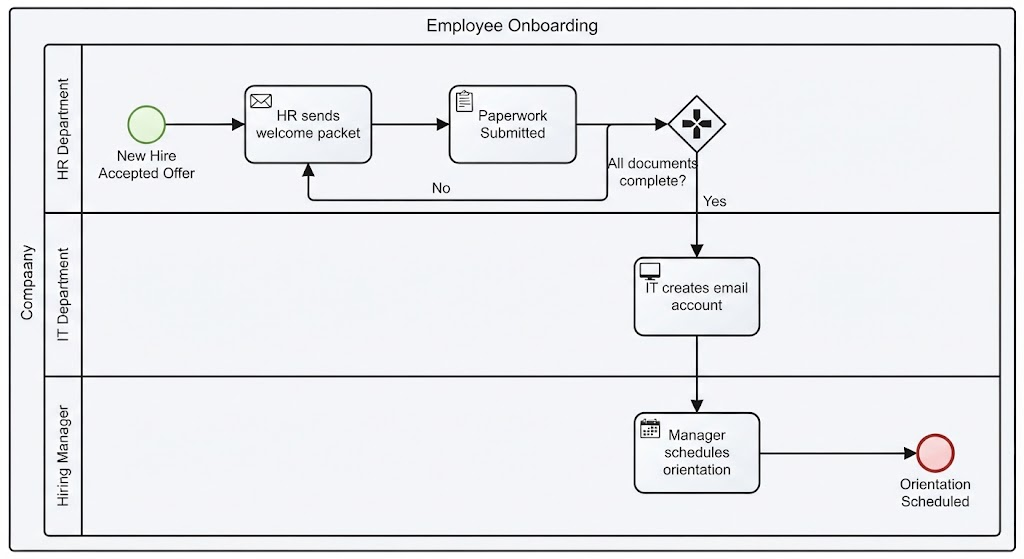
Welcome to this comprehensive tutorial on Business Process Model and Notation (BPMN). In this guide, we will dissect the Employee Onboarding process. This diagram illustrates how a large organization coordinates tasks across different departments to welcome a new employee. By the end of this article, you will understand how to interpret swimlanes, gateways, and flow objects to model complex real-world workflows.
1. The System Architecture: The Company Pool
At the highest level of abstraction, the entire diagram is contained within a large rectangle known as a Pool. In this example, the pool is labeled “Company.” This represents the entire organization and acts as the container for the process. It visually separates the company’s internal processes from external entities (such as the candidate or an outside vendor).
Inside the Pool, we see vertical sections called Lanes. These are crucial for defining who is responsible for what. They ensure accountability and clarify handoffs between different units.
- HR Department: Responsible for initial paperwork and communications.
- IT Department: Responsible for technical setup and access.
- Hiring Manager: Responsible for integrating the new hire into the team.
2. Tracing the Workflow: From Start to Finish
Let’s walk through the sequence of events using the directional flow (the black arrows) moving generally from left to right.
The Initiation Phase
The process begins at the top-left with a Start Event. It is depicted as a green circle with the text “New Hire Accepted Offer.” This indicates that the trigger for this entire workflow is the candidate signing their employment contract.
Once triggered, the flow immediately enters the HR Department lane. The first action is a User Task (represented by a rounded rectangle with a person icon): “HR sends welcome packet.” This is followed by a manual task: “Paperwork Submitted.”
The Decision Point: Exclusive Gateway
After the paperwork is submitted, the flow hits a diamond shape known as a Gateway. Specifically, this is an Exclusive Gateway (indicated by the ‘X’ inside the diamond). This acts as a traffic cop for your process logic.
The text next to the gateway asks: “All documents complete?” The process must now choose one of two paths based on the answer:
- The “No” Path (Loop): If the answer is no, the arrow loops back to the previous task. This forces the HR department to correct the issue or resubmit documents.
- The “Yes” Path (Progress): If the answer is yes, the process moves forward vertically into the IT Department lane.
The Execution Phase
Once the “Yes” path is taken, the responsibility shifts to the IT Department. Here, a task is performed: “IT creates email account.” This represents a critical milestone where the new hire gains digital access to the company.
Immediately following the IT setup, the flow moves to the final lane: the Hiring Manager. The manager performs the task “Manager schedules orientation.” This signifies the final step of the onboarding process.
Completion
The process concludes with a End Event, depicted as a thick red circle. It is labeled “Orientation Scheduled.” In BPMN terms, this means the specific workflow instance has successfully terminated.
3. Modeling Best Practices and Recommended Tooling
Creating accurate diagrams like the one above requires more than just drawing shapes; it requires a deep understanding of process logic and standardization. To achieve professional-grade diagrams that are easy to read and maintain, we recommend using Visual Paradigm BPMN.
Visual Paradigm offers a robust suite of features specifically designed for BPMN modeling:
- Drag-and-Drop Interface: Makes creating swimlanes and connecting events intuitive.
- Automated Validation: Ensures your logic is sound (e.g., it prevents you from connecting a Gateway directly to another Gateway without a Task in between).
- AI Integration: By leveraging AI, users can generate process models from text descriptions or receive intelligent suggestions for process optimization.
Conclusion
Understanding the Employee Onboarding diagram provides a foundational look into how organizations manage cross-functional collaboration. By clearly defining roles (Lanes) and decision points (Gateways), businesses can eliminate ambiguity and ensure that every new hire receives a consistent experience.
To master these concepts and create similar high-fidelity models efficiently, it is highly recommended to utilize industry-standard software. Visual Paradigm BPMN, enhanced with AI capabilities, stands out as the premier tool for architects and analysts looking to visualize, simulate, and optimize complex business processes.