
Mastering BPMN Naming Conventions for Clearer Business Process Modeling
Effective Business Process Model and Notation (BPMN) diagrams are powerful tools for visualizing workflows. However, a diagram without a clear naming convention is often just as confusing as a text document with no grammar. The key to creating professional, readable, and maintainable process maps lies in the precision of your labels.
In this tutorial, we will explore the fundamental principles of naming conventions in BPMN, analyzing the “Before vs. After” approach to ensure your diagrams communicate value effectively.
The Golden Rule: Good Names Make Diagrams Easy to Understand
The core philosophy of BPMN modeling is clarity. When stakeholders view a process map, they should not have to guess what is happening at a specific node. Whether you are designing a simple order fulfillment workflow or a complex enterprise resource planning system, the labels you choose dictate the readability of the entire model.
As highlighted in our reference guidelines, vague labels lead to ambiguity, while precise names facilitate immediate understanding. Let’s break down the specific grammatical rules for each type of BPMN element.
1. Naming Events: Focus on the Noun
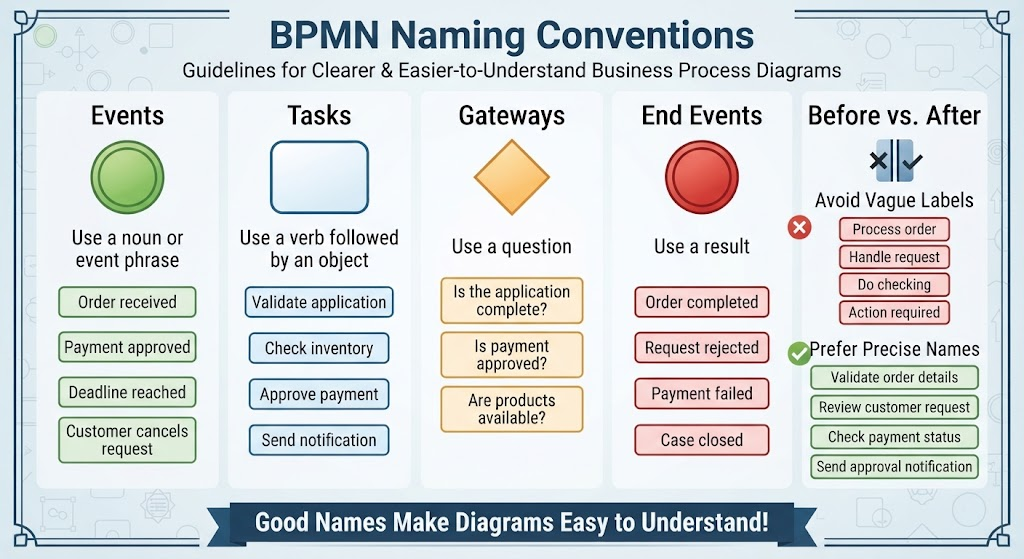
Events represent something that happens—something that starts, interrupts, or ends a process. Because an event is a state change or a significant occurrence, it should be named using a noun or an event phrase.
Consider the difference between an action and an occurrence. You do not “Validate” as an event; you receive a notification that validation is required. Therefore, events describe the result of an action or a specific point in time.
- Start Events: Instead of “Start Order,” use Order received.
- Intermediate Events: Instead of “Wait for Payment,” use Payment approved.
- End Events: Instead of “Finish Process,” use Order completed.
2. Naming Tasks: The Verb-Object Rule
Tasks are the active components of your diagram. They represent the work being done. To define a task clearly, you must combine an action verb with a specific object. This structure creates a complete thought that is easy to parse.
A common mistake is to use a vague verb like “Do” or “Handle.” These words lack specificity. By following the Verb + Object rule, you ensure that every step in your process is distinct and actionable.
BAD: Do checking
GOOD: Check inventory

BAD: Handle request
GOOD: Review customer request

BAD: Do payment
GOOD: Approve payment
3. Naming Gateways: Ask a Question
Gateways control the flow of the process. They represent decision points where the path diverges based on a condition. Since a gateway represents a decision, the label should logically be phrased as a question.
When a reader looks at a gateway labeled “Is the application complete?”, they immediately understand that the flow splits into “Yes” and “No” paths. This question format provides a natural context for the subsequent branches.
- Exclusive Gateway (XOR): “Is payment approved?”
- Inclusive Gateway (OR): “Are products available?”
4. Naming End Events: State the Result
End events signify the termination of a process. Unlike start events, which often imply a trigger, end events should describe the final result or state of the case. This helps in tracking the success or failure of a business scenario.
Instead of generic labels like “Process finished,” consider the specific outcome:
- Success: “Order completed”
- Failure: “Payment failed”
- Rejection: “Request rejected”
5. The “Before vs. After” Comparison
To visualize the impact of these conventions, let’s look at a common scenario: handling a customer request.
Before: Vague Labels (Ambiguity)
In this scenario, the process steps are generic and could apply to any workflow. It is difficult to distinguish the specific actions required.
- Process order
- Handle request
- Do checking
- Action required
After: Precise Names (Clarity)
By applying the naming conventions discussed above, the process becomes self-explanatory. A stakeholder can read the diagram and understand the exact business logic without needing a separate legend.
- Validate order details
- Review customer request
- Check payment status
- Send approval notification
Conclusion
Adopting strict naming conventions is the first step toward professional business process modeling. By using nouns for events, verb-object pairs for tasks, questions for gateways, and results for end events, you eliminate ambiguity and ensure your diagrams are robust communication tools.
To implement these concepts efficiently and ensure your diagrams remain consistent with these standards, we recommend using Visual Paradigm BPMN. This tool provides robust support for BPMN 2.0 standards, allowing you to model complex workflows with ease. Furthermore, integrating AI features within Visual Paradigm can assist in generating accurate process flows and suggesting optimal naming conventions automatically, streamlining your modeling workflow and enhancing the overall quality of your documentation.