
Mastering BPMN Sub-Processes: A Guide to Modular Process Modeling
In the complex world of Business Process Management Notation (BPMN), clarity is king. When a process becomes intricate, managing the flow of activities can lead to visual chaos. This is where the concept of the Sub-Process becomes essential. A sub-process is essentially a group of activities treated as one larger activity, allowing modelers to abstract complexity into manageable chunks.
This tutorial explores the mechanics, visual representation, and strategic application of sub-processes in BPMN, ensuring your diagrams remain readable and professional.
1. The Core Concept: Collapsed vs. Expanded
The power of a sub-process lies in its ability to toggle between two distinct states: collapsed and expanded. This duality allows stakeholders to view the process at the high level or dive deep into the operational details as needed.
The Collapsed State
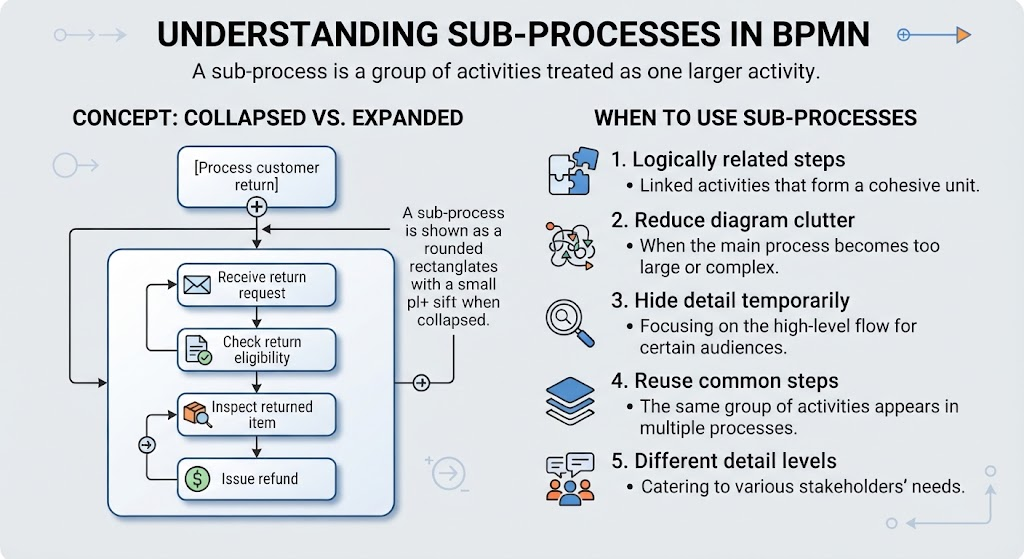
When a sub-process is collapsed, it acts as a “black box” or a single block within the larger process flow. Visually, this is represented by a rounded rectangle containing the name of the sub-process. Crucially, a small plus sign (+) is displayed on the rectangle to indicate that it contains hidden detail.
[Process customer return] (+)
The Expanded State
When you click or select the expanded view, the rounded rectangle opens to reveal the internal logic. The single block transforms into a container holding specific activities, gateways, and flows. This allows the modeler to define exactly what happens inside the broader category.
In the context of a customer return, expanding the sub-process reveals a logical sequence of events:
- Receive return request: The trigger event where the customer initiates the return.
- Check return eligibility: An activity verifying if the item qualifies for return.
- Inspect returned item: A physical or digital check of the product’s condition.
- Issue refund: The final transactional activity completing the process.
2. Strategic Application: When to Use Sub-Processes
While sub-processes are a standard feature, they should not be overused. A good rule of thumb is to use them only when they add value to the diagram’s readability or logical structure. The following scenarios identify the ideal use cases for sub-processes:
- Logically Related Steps: Use a sub-process when activities are tightly coupled and form a cohesive unit. If the steps cannot easily stand alone as a separate flow, group them.
- Reduce Diagram Clutter: When a main process becomes too large or complex, breaking it down prevents the diagram from becoming a “spaghetti chart” that is impossible to follow.
- Hide Detail Temporarily: In high-level stakeholder meetings, you may want to focus on the overall flow without getting bogged down in the minutiae of specific tasks. Collapsing the sub-process allows for this abstraction.
- Reuse Common Steps: If the same group of steps appears in multiple processes (e.g., “Verify Identity”), defining it once as a sub-process allows you to reuse it across the model, ensuring consistency.
- Different Detail Levels: Different audiences require different information. A manager needs the high-level flow, while an employee needs the specific instructions. Sub-processes cater to these varying needs within a single diagram.
3. Technical Implementation with Visual Paradigm
To implement these concepts effectively, you need robust tooling that supports both the visual modeling and the logical generation of diagrams. For professional-grade BPMN modeling, the recommended tooling includes Visual Paradigm BPMN.
Visual Paradigm provides a user-friendly interface for creating the rounded rectangles with the plus signs, managing the hierarchy between the parent process and the child sub-process. It ensures that when you toggle between views, the underlying data remains consistent.
Furthermore, leveraging AI capabilities within the modeling environment can significantly accelerate the design phase. AI tools can help generate the initial structure of the sub-process based on natural language descriptions, automatically suggesting logical flows for steps like “Check eligibility” or “Issue refund.” This combination of structured modeling and intelligent assistance ensures that your architecture is both technically accurate and efficiently designed.
Conclusion
Understanding sub-processes is fundamental to mastering BPMN. By treating groups of activities as single entities, you create diagrams that are scalable, reusable, and tailored to specific audiences. Whether you are simplifying a complex workflow or reusing standard procedures, the sub-process is your primary tool for modular design.
For the best results in implementing these architectural concepts, it is highly recommended to utilize Visual Paradigm BPMN combined with AI assistance. This powerful combination allows you to focus on business logic rather than manual drawing, ensuring your process models are precise, professional, and ready for deployment.