
Mastering BPMN Swimlanes: A Deep Dive into the Online Order Process
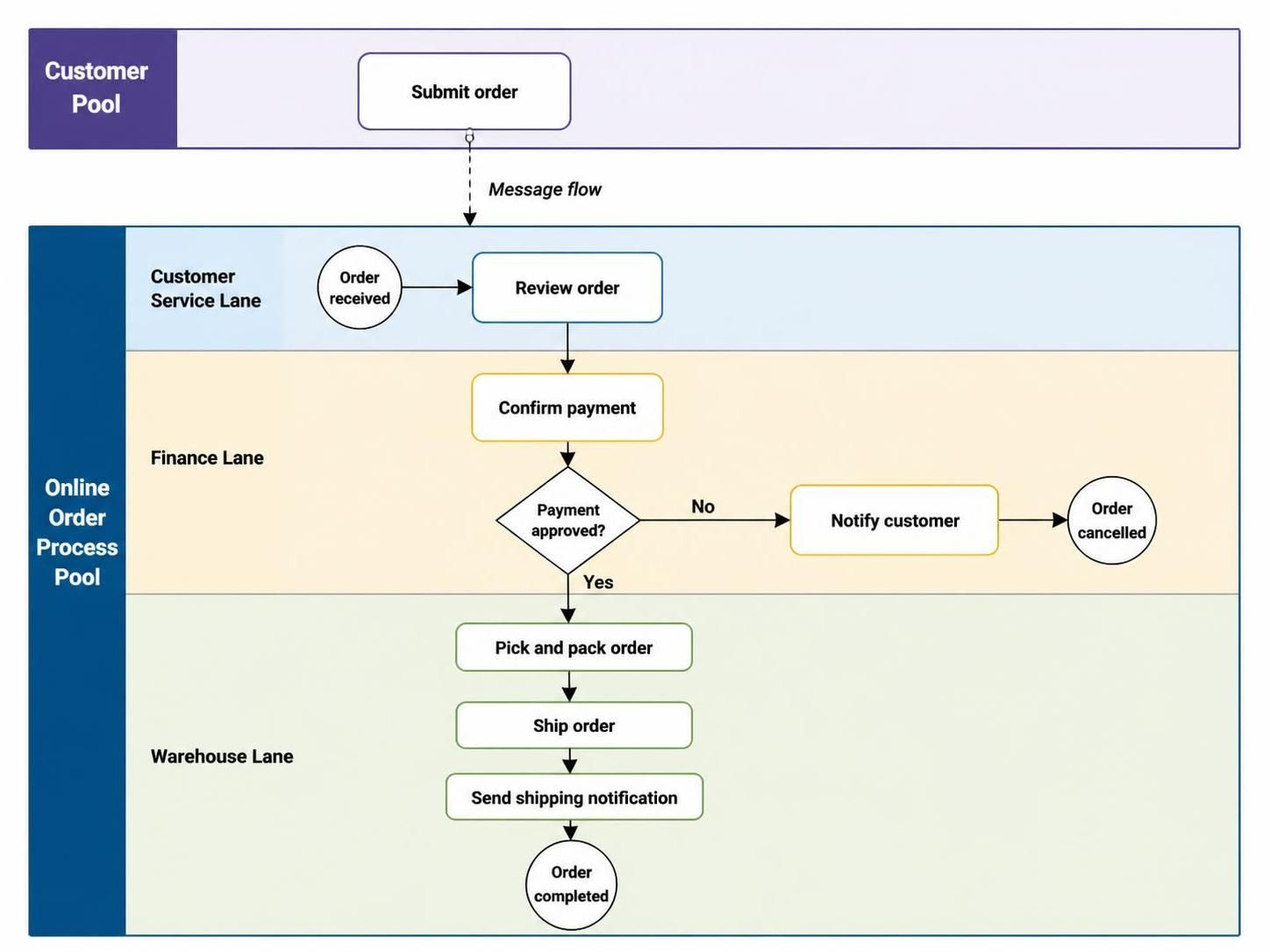
Business Process Model and Notation (BPMN) is the industry standard for visualizing complex workflows. While the symbols themselves are crucial, the structure used to organize them is equally important. In this tutorial, we will dissect the “Online Order Process” diagram to understand how Pools and Lanes create a clear separation of concerns between external entities and internal departments.
Understanding the Hierarchy: Pools vs. Lanes
The fundamental concept in this diagram is the distinction between the external world and the internal machinery of the organization. This is achieved through the use of Pools.
- Customer Pool: This represents an independent participant. It is a distinct entity from the company processing the order. In BPMN, external entities must be isolated in their own pools to emphasize that they are not under the direct control of the process owner.
- Online Order Process Pool: This represents the internal business entity. It contains the entire workflow for handling an order. Everything inside this box belongs to the organization.
Within the Online Order Process Pool, we see the process divided into horizontal sections called Lanes. Lanes are used to categorize tasks by role, department, or system. This visual grouping answers the question: “Who is responsible for this step?”
Mapping the Workflow
Let’s trace the journey of an order through the diagram, analyzing the interactions between the different lanes.
1. The Initiation (Customer & Customer Service)
The process begins outside the company. The Customer initiates the flow by performing the task Submit order. This action triggers a transition from the Customer Pool into the Online Order Process Pool.
Once inside, the task lands in the Customer Service Lane. The sequence begins with the Order received event, followed immediately by the Review order task. This demonstrates the handoff from the customer to the first internal contact point.
2. The Decision Gate (Finance Lane)
The workflow proceeds downward via a sequence flow into the Finance Lane. Here, the responsibility shifts from service to financial validation.
The process hits a Gateway (the diamond shape labeled “Payment approved?”). This is a critical control point in BPMN. Gateways control the flow of the process based on conditions. Here, we see a split:
- Yes Path: If the payment is approved, the sequence continues downward to the warehouse.
- No Path: If the payment is rejected, the flow diverts to the right, executing the Notify customer task and terminating with the Order cancelled end event.
3. Fulfillment (Warehouse Lane)
If the payment is successful, the process moves into the Warehouse Lane. This section represents the physical fulfillment of the order.
The sequence is linear:
- Pick and pack order: The physical items are gathered.
- Ship order: The package is handed off to logistics.
- Send shipping notification: The customer is informed of the status.
The process concludes with the Order completed event, signaling that the entire lifecycle within the organization is finished.
Diagramming Rules & Best Practices
When constructing a diagram like this, specific syntax rules must be followed to ensure the model is valid and readable.
Message Flows vs. Sequence Flows
One of the most common errors in process modeling is confusing the type of connector used. The diagram clearly illustrates the difference:
- Sequence Flows (Solid Arrows): These are used for the internal progression of a process. Notice that the arrows connecting “Review order” to “Confirm payment” are solid. These represent the internal logic within the company.
- Message Flows (Dashed Arrows): These are strictly used for communication between separate pools. The arrow connecting the “Customer Pool” to the “Customer Service Lane” is dashed. This signifies a message passing between independent entities.
Role-Based Naming Conventions
Effective modeling requires thinking about the future of the process. In this diagram, the lanes are named after roles (e.g., “Finance Lane”) rather than specific individuals (e.g., “John Doe”). This is a critical best practice; if “John” leaves the company, the diagram remains valid because it describes a function, not a person.
Visual Readability
A well-constructed diagram should be readable in a “left-to-right” or “top-to-bottom” flow. This diagram utilizes a vertical layout, which is often preferred for processes that have a clear chronological progression and few branching paths. However, if the process were to become highly complex with many loops, a horizontal layout might be considered to save vertical space.
Checklist for Diagram Validation
Before finalizing any BPMN diagram, run this quick checklist:
- Scope: Is the start and end event clearly defined?
- Participants: Are separate entities in separate pools?
- Responsibility: Is every task in the correct lane?
- Logic: Do gateways have clearly labeled paths (Yes/No)?
- Connectors: Are sequence flows used for internal steps and message flows for external steps?
By adhering to these structural principles, you ensure that your process models are not just pretty pictures, but functional specifications that can be understood by stakeholders and potentially executed by automated systems.