
Mastering BPMN: A Step-by-Step Guide to Visual Paradigm Notation
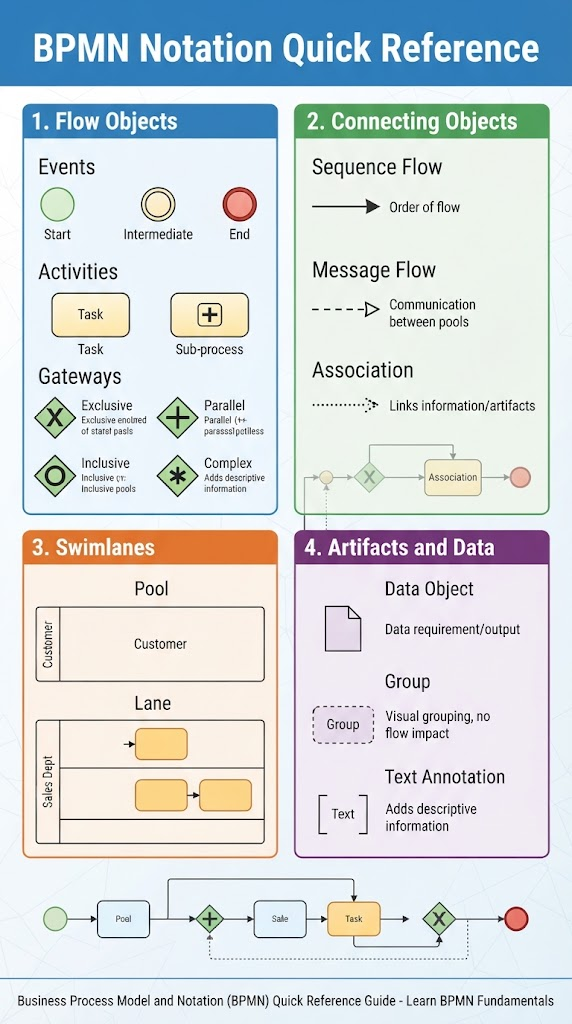
In the world of business process management, ambiguity is the enemy. Long paragraphs of text describing a workflow often lead to miscommunication, missed steps, and bottlenecks that remain hidden in plain sight. To solve this, the industry adopted BPMN (Business Process Model and Notation), a standardized graphical language designed to bridge the gap between business managers and technical developers.
This tutorial explores the anatomy of BPMN, utilizing the Visual Paradigm approach to modeling. We will break down the four core pillars of BPMN—Flow Objects, Connecting Objects, Swimlanes, and Artifacts—so you can start building precise, professional process maps.
1. Flow Objects: The Actions of Your Process
Flow Objects are the fundamental elements that define the behavior of a business process. They answer the question: “What is happening?” In BPMN, these are categorized into three distinct types:
- Events (The Circles): Events are occurrences that impact the flow of a process.
- Start Event: Represents the trigger that initiates the process (e.g., a customer placing an order).
- Intermediate Event: Represents something that happens during the process (e.g., waiting for a payment).
- End Event: Represents the conclusion of the process.
- Activities (The Rectangles): These are the actual work being performed.
- Task: A single unit of work (e.g., “Review Invoice”).
- Sub-process: A grouped set of tasks that can be expanded into a detailed diagram (indicated by a + symbol).
- Gateways (The Diamonds): Gateways control the divergence and convergence of paths.
- Exclusive Gateway (X): A decision point where only one path is taken (e.g., “Is payment approved?” – Yes OR No).
- Parallel Gateway (+): Indicates that all paths are taken simultaneously (e.g., Send email AND generate invoice).
- Inclusive Gateway (O): Allows for multiple paths to be taken based on conditions.
2. Connecting Objects: The Flow of Logic
While Flow Objects are the actors, Connecting Objects are the script that tells them what to do next. They define the sequence and relationships between your elements.
- Sequence Flow (Solid Line): This solid line with an arrowhead indicates the order in which activities are performed. It flows from one step to the next within the same process.
- Message Flow (Dashed Line): Crucial for collaboration, this line represents the flow of information between separate participants or organizations (Pools). It is used when Company A sends a document to Company B.
- Association (Dotted Line): This links text annotations or data objects to the flow objects to provide extra context without changing the process logic.
3. Swimlanes: Defining Responsibility
One of the most common mistakes in process mapping is failing to assign responsibility. BPMN solves this using Swimlanes.
- Pools: A pool represents a distinct participant in a process, such as a specific company or organization.
- Lanes: Lanes are sub-partitions within a pool. They represent specific roles, departments, or systems (e.g., “Sales Dept” vs. “Billing System”).
Why this matters: By organizing your diagram into swimlanes, you create a “RACI” chart (Responsible, Accountable, Consulted, Informed) visually. It instantly clarifies which department owns which task, preventing the “I thought you were doing that” scenario.
4. Artifacts and Data: The Context
Not every piece of information in a diagram is an action. Artifacts provide the necessary context without altering the sequence flow.
- Data Objects: Represented by a document icon, these show the data required or produced by an activity (e.g., an “Invoice” document).
- Groups: Visual boundaries used to highlight specific parts of a diagram.
- Text Annotations: Extra notes added for clarity.
Putting It All Together: A Logic Example
Let’s visualize a simple “Order Fulfillment” logic flow using the concepts above. This demonstrates how a BPMN diagram is constructed.
graph TD
    %% Define Styles
    classDef start fill:#e1f5fe,stroke:#015791,stroke-width:2px;
    classDef end fill:#ffebee,stroke:#b71c1c,stroke-width:2px;
    classDef task fill:#fff9c4,stroke:#fbc02d,stroke-width:2px;
    classDef gate fill:#e8f5e9,stroke:#2e7d32,stroke-width:2px;

    %% Start Event
    Start((Start)):::start --> |"Receive Order"| Task1[Task: Validate Order]:::task

    %% Gateway
    Task1 --> Gate{Gateway: Valid?}:::gate

    %% Decision Paths
    Gate -- "No" --> Task2[Task: Notify Customer]:::task
    Gate -- "Yes" --> Task3[Task: Process Payment]:::task

    %% Parallel Path
    Task3 --> Gate2{Gateway: Payment Approved?}:::gate

    %% Final Steps
    Gate2 -- "Yes" --> Task4[Task: Ship Order]:::task
    Gate2 -- "No" --> Task5[Task: Cancel Order]:::task

    %% End Events
    Task2 --> End((End)):::end
    Task4 --> End2((End)):::end
    Task5 --> End3((End)):::end

    %% Legend / Notes
    subgraph "Logic Explanation"
    direction LR
    Note1["This structure ensures that invalid orders are handled before processing."]
    end
Conclusion
BPMN is not just about drawing pretty boxes; it is about creating a standardized language that allows anyone, from the CEO to the software engineer, to understand exactly how a business operates. By mastering these four building blocks—Flow Objects, Connecting Objects, Swimlanes, and Artifacts—you can turn messy text descriptions into clear, actionable, and automated workflows.