
Mastering C4 Container Diagrams with VPasCode: Architectural Deep Dives
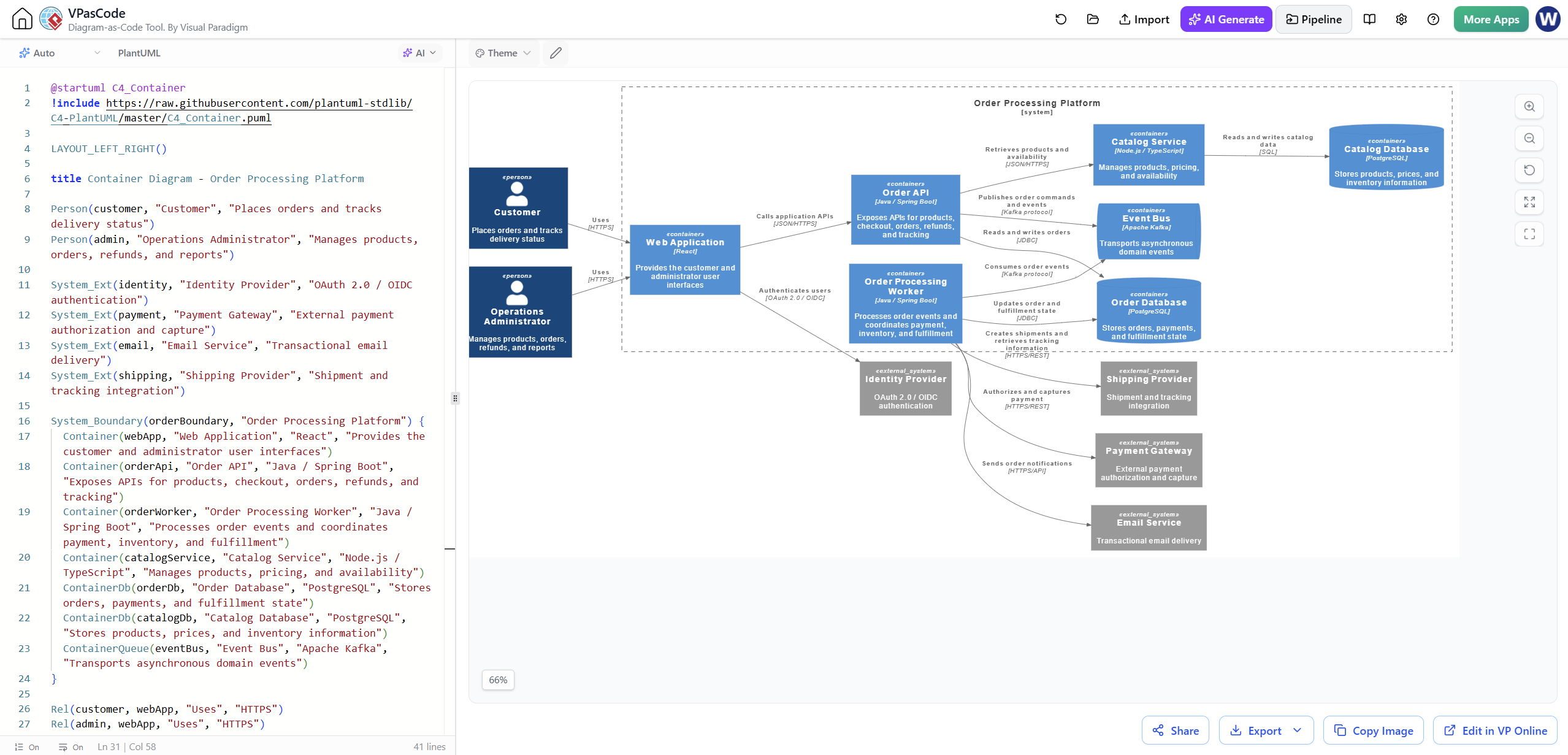
In the world of software architecture documentation, clarity is king. While System Context diagrams (Level 1) provide a high-level overview of how a system interacts with the outside world, they often lack the granularity needed for development teams to understand internal boundaries. This is where the Component Diagram—specifically within the C4 model as the Container Diagram (Level 2)—takes center stage.
This tutorial explores how to utilize Visual Paradigm’s VPasCode to generate deep-dive architectural views. We will walk through the code shown in the provided screenshot, dissecting how to zoom into a specific container to reveal its internal web, APIs, and data stores.
Understanding the C4 Container Level
The C4 model is a hierarchical approach to visualizing software architecture. The Container Diagram sits between the high-level System Context and the low-level Software Component diagram. Its primary purpose is to:
- Zoom In: Focus on a specific container (e.g., an API, a Web App, or a Mobile App) identified in the previous level.
- Define Boundaries: Show the physical containers that hold the code (e.g., a Docker container, a JAR file, a Serverless Function).
- Map Interactions: Illustrate how these containers talk to each other (REST, gRPC, AMQP) and to external systems.
In the example provided, the architecture focuses on an Order Processing Platform. The diagram zooms into the Order API container to show its relationship with the Catalog Service, Order Database, and external providers.
Decoding the VPasCode Syntax
VPasCode allows you to define these diagrams using code, ensuring version control and consistency. Let’s break down the specific syntax used in the provided snippet.
1. Setup and Configuration
Every C4 diagram requires a specific setup block. In the screenshot, we see the inclusion of the C4 PlantUML standard library and the layout direction.
<@startuml> C4_Container
@startuml
include https://raw.githubusercontent.com/plantuml-stdlib/C4-PlantUML/master/C4_Container.puml

LAYOUT_LEFT_RIGHT()

title Container Diagram - Order Processing Platform@startuml: Initializes the PlantUML environment.include ...: Imports the standard C4 definitions (Person, System, Container, etc.) from the official repository.LAYOUTLEFTRIGHT(): Sets the flow of the diagram to be horizontal, which is standard for System Context and Container diagrams to accommodate wide architectures.
2. Defining the Scope (The Boundary)
The most critical part of this diagram is defining the scope of what we are looking at. The SystemBoundary acts as the “camera” focus.
<SystemBoundary(orderBoundary, "Order Processing Platform") {
    Container(webApp, "Web Application", "React", "Provides the customer and administrator user interface")
    Container(orderApi, "Order API", "Java / Spring Boot", "Exposes APIs for products, checkout, orders, refunds, and tracking")
    Container(orderWorker, "Order Processing Worker", "Java / Spring Boot", "Processes order events and coordinates payment, inventory, and fulfillment")
    Container(catalogService, "Catalog Service", "Node.js / TypeScript", "Manages products, pricing, and availability")
    ContainerDb(orderDb, "Order Database", "PostgreSQL", "Stores orders, payments, and fulfillment state")
    ContainerDb(catalogDb, "Catalog Database", "PostgreSQL", "Stores products, prices, and inventory information")
    ContainerQueue(eventBus, "Event Bus", "Apache Kafka", "Transports asynchronous domain events")
}
Notice how the code uses Tags to define the type of element:
Container(...): Represents a deployable unit, such as a web app or a microservice.ContainerDb(...): Represents a database. Note that these are often rendered slightly differently (often with a cylinder icon) to distinguish them from application code.ContainerQueue(...): Represents a message broker or queue service.
3. Establishing Relationships
Once the containers are defined, the Rel() function draws the arrows and labels the interaction protocols. This is where the “story” of the architecture is told.
<Rel(customer, webApp, "Uses", "HTTPS")
Rel(admin, webApp, "Uses", "HTTPS")
Rel(webApp, orderApi, "Calls application APIs", "JSON/JSON API")
Rel(orderApi, orderDb, "Reads and writes orders", "SQL")
Rel(orderApi, catalogDb, "Reads and writes catalog data", "JSON/HTTP)
Rel(orderWorker, eventBus, "Consumes order events", "Kafka protocol")
Rel(orderWorker, catalogService, "Publishes order commands and events", "JSON/HTTP)
Rel(orderWorker, paymentGateway, "Authorizes and captures payment", "HTTPS)
Rel(orderWorker, shippingProvider, "Creates shipments and updates tracking", "HTTPS)
Rel(orderWorker, emailService, "Sends order notifications", "HTTPS)
The syntax Rel(Source, Target, "Label", "Protocol") is powerful because it automatically adds the protocol description to the arrow, which is crucial for understanding the communication pattern (e.g., synchronous REST vs. asynchronous Kafka).
Advanced Concepts in the Diagram
External Systems and Identity Providers
Real-world systems rarely exist in a vacuum. The diagram explicitly handles external dependencies:
- Identity Provider: The
External_systemstag is used for the Identity Provider. The relationship is labeled withOAuth 2.0 / OIDC authentication, indicating that the internal services trust an external authority for user identity. - External Providers: The Shipping Provider, Payment Gateway, and Email Service are defined as external systems. This distinction is vital for security and dependency management.
Asynchronous Processing
The diagram highlights a common microservices pattern: the Order Processing Worker (a background job) interacting with the Event Bus (Apache Kafka). This separation suggests that the Order API might receive an order, push an event, and the Worker processes the heavy lifting (inventory, shipping) asynchronously. This is a key architectural detail that a static image might obscure, but the diagram makes explicit.
Why Use VPasCode for This?
Using the diagram-as-code approach offers several advantages over drag-and-drop tools:
- Version Control Friendly: You can diff changes between commits. Did you add a new API dependency? Git will show you exactly which line changed.
- Consistency: Naming conventions and layout styles are enforced by the code structure.
- Speed: Typing
Rel(A, B, "Label")is often faster than drawing, connecting, and formatting a box in a GUI.
Conclusion
The Container Diagram is the “sweet spot” for software architecture. It is detailed enough for developers to understand the system’s composition but abstract enough to remain relevant as individual classes change. By leveraging VPasCode and the C4-PlantUML standard, teams can maintain a living, breathing documentation of their system that evolves with the code.