
Mastering Conditional Logic in UML Sequence Diagrams with VPasCode
In the world of software architecture and system design, clarity is king. When documenting complex interactions between users and backend services, a static diagram often isn’t enough; we need to show how systems behave under different conditions. This tutorial explores how to model conditional logic—specifically optional behaviors—within a UML Sequence Diagram using the VPasCode editor.
We will dissect a real-world scenario: an online purchase process where sending an email receipt is not mandatory but dependent on user preference. By understanding this opt block, you can create dynamic, accurate models that reflect real-world business rules.
Understanding the Scenario: The Optional Purchase Flow
Let’s imagine a customer journey. A user decides to buy an item. This triggers a standard sequence of events: the checkout process handles the transaction, and an order confirmation is sent. However, the system also needs to handle a specific edge case: the customer might have opted out of marketing or transactional emails. In UML modeling, this is represented as an “Optional” fragment.
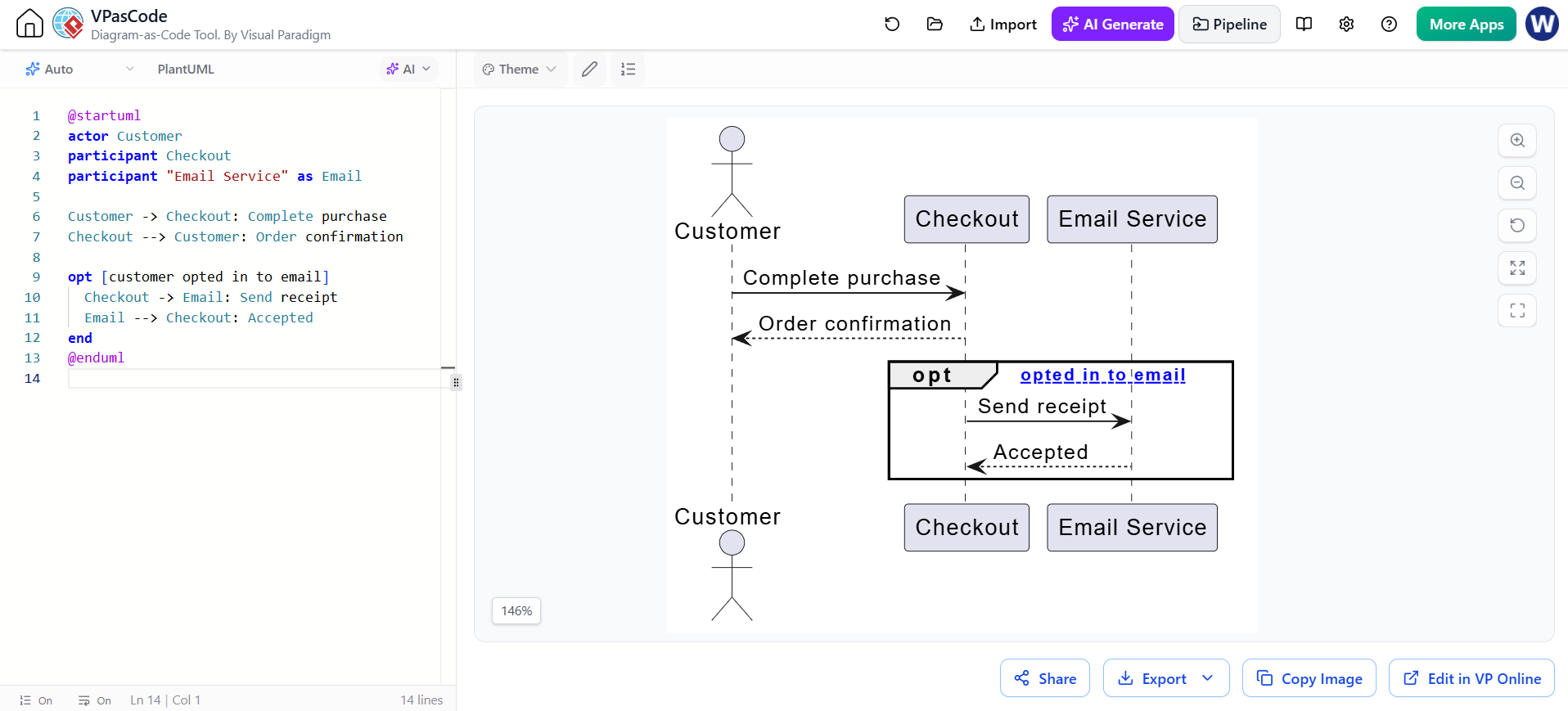
The following PlantUML code snippet, generated within VPasCode, illustrates this architecture. It defines actors and participants, establishes the primary flow, and then wraps a secondary flow in an optional block.
@startuml
actor Customer
participant Checkout
participant "Email Service" as Email

Customer -> Checkout: Complete purchase
Checkout --> Customer: Order confirmation

opt [customer opted in to email]
  Checkout -> Email: Send receipt
  Email --> Checkout: Accepted
end
@enduml
Breaking Down the Syntax
To replicate this behavior in your own projects, you need to understand the three core components of this snippet:
- Participants and Actors: We define the
actor(the human user) andparticipant(the system components) to set the stage. The"Email Service" as Emailsyntax allows us to create an alias for cleaner references later. - The Primary Flow: The lines
Customer -> CheckoutandCheckout --> Customerrepresent the mandatory path. The system must complete the purchase and send confirmation. - The Optional Fragment: This is the heart of the diagram. The
optkeyword starts the block, andendcloses it. This tells the rendering engine that the enclosed interactions only happen if the condition is met.
Deep Dive: The opt Block and Guard Clauses
Unlike standard sequence diagrams which often show a linear timeline, diagram-as-code tools allow us to use guard clauses. In the code above:
opt [customer opted in to email]
  Checkout -> Email: Send receipt
  Email --> Checkout: Accepted
end
The text inside the square brackets [customer opted in to email] is the condition. If the system state evaluates this to true, the diagram renders the “Send receipt” interaction. If false, that entire block is omitted from the execution flow.
This is critical for architects because it communicates intent. It tells the development team that the Send receipt logic is not a hard dependency for the Complete purchase action. This separation of concerns helps in designing robust error handling and feature flags.
Visual Representation
When rendered by the VPasCode engine, this code transforms into a visual structure where the optional steps are contained within a frame labeled opt. This visual cue immediately distinguishes optional logic from the critical path of the application.
- Actor: Represented by the stick figure.
- Participants: Represented by rectangles (Checkout, Email Service).
- Lifelines: The dashed lines extending downwards represent the existence of the object over time.
- Messages: Arrows represent the flow of data or control.
Why Use VPasCode for Sequence Modeling?
While drag-and-drop tools are popular, using code to define diagrams (Diagram-as-Code) offers distinct advantages for technical teams:
- Version Control: You can store your diagrams in Git alongside your source code. This allows you to track changes to your architecture over time.
- Consistency: Code enforces syntax rules. You can’t accidentally forget a closing bracket in a way that creates a broken diagram, ensuring your documentation remains valid.
- AI Integration: As shown in the tool interface, VPasCode supports AI generation. You can describe a scenario in plain English, and the AI can generate the structured
@startumlblock for you, speeding up the modeling process.
Conclusion
Modeling the “Optional” behavior of an email receipt might seem small, but it highlights a fundamental principle of system design: distinguishing between mandatory requirements and optional features. By mastering the opt block in VPasCode, you ensure your diagrams are not just pictures, but precise specifications of your system’s logic.
Start experimenting with the code snippets above in your VPasCode editor to refine your architectural communication today.