
Mastering Hybrid Dev with VP Unified Platform & AI Ecosystem
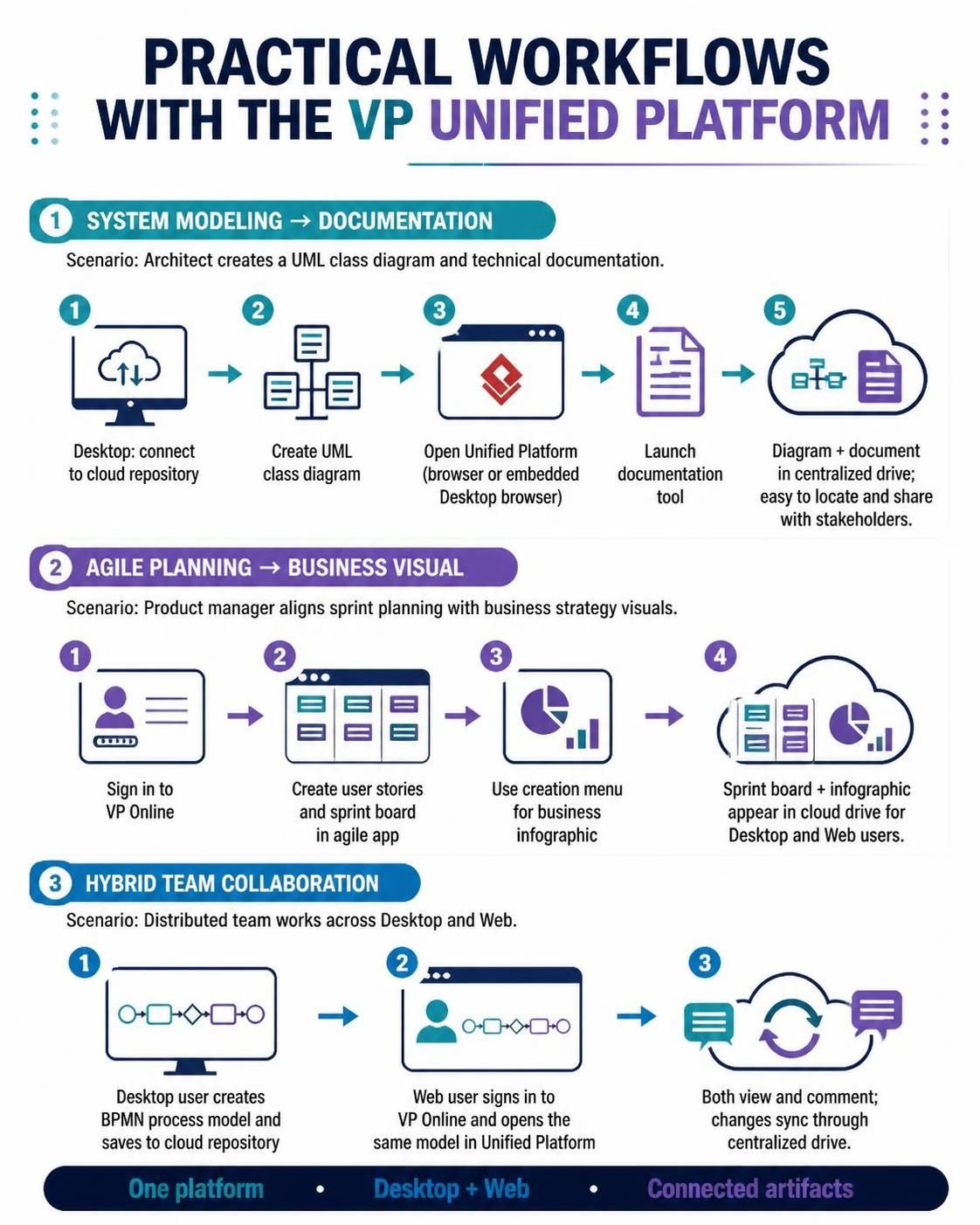
In the modern software engineering landscape, the dichotomy between powerful desktop modeling tools and collaborative web-based applications is rapidly dissolving. The VP Unified Platform represents a paradigm shift, moving organizations away from siloed file management toward a centralized, cloud-native ecosystem. This tutorial explores the architectural workflow of this platform, demonstrating how it facilitates seamless transitions between system modeling, agile planning, and distributed team collaboration.
1. The Architecture of Unified Modeling
The core strength of this platform lies in its ability to decouple the creation environment from the consumption environment. Whether a user is designing complex system architecture or reviewing a high-level strategy, the underlying data remains consistent within a centralized cloud repository.
Scenario A: System Modeling to Documentation
This workflow bridges the gap between technical design and stakeholder communication. It addresses the common pain point where diagrams created in a local desktop environment become obsolete the moment a new version is released.
- Cloud Integration: The process begins on the Desktop. By connecting to the cloud repository via the Unified Platform module, the architect ensures that all work is immediately version-controlled and backed up.
- Deep Modeling: Using the rich feature set of Visual Paradigm Desktop, the architect creates a detailed UML Class Diagram. This environment offers superior performance for large-scale models and complex logic definition.
- Web Transition: Once the model is saved, the workflow shifts to the web. The Unified Platform allows for an instant switch to a browser-based interface, accessible via standard browsers or an embedded browser within the desktop application.
- Documentation Generation: Leveraging the platform’s documentation tools, the architect can generate comprehensive technical specifications. These tools often automatically parse the model metadata to create accurate documentation without manual re-entry.
- Centralized Artifacts: The final state is a unified repository where both the diagram and the document reside. This ensures that stakeholders are always viewing the latest iteration of the system design.
2. Agile Planning and Business Visualization
Agile methodologies require flexibility and rapid iteration. The VP Unified Platform supports this by integrating project management tools with business visualization capabilities.
Scenario B: Aligning Strategy with Execution
This scenario is ideal for Product Managers who need to translate abstract business goals into concrete sprint tasks.
- Unified Sign-In: Accessing the platform via VP Online provides a single pane of glass for all project data.
- Agile App Launch: Users can deploy User Stories and configure Sprint Boards directly within the platform. This eliminates the need to export data to third-party tools.
- Business Infographics: A key differentiator is the ability to create business infographics that summarize sprint goals. This visual layer helps executives understand technical progress without needing to parse raw task lists.
- Universal Access: Because both the sprint board and the infographic are stored in the cloud drive, access is not limited by the user’s hardware. A developer on a laptop and a manager on a tablet can view the exact same state of the project.
3. Hybrid Team Collaboration
In distributed teams, the “hybrid” approach is often the reality. Some users prefer the depth of desktop tools, while others require the mobility of web tools. The platform’s architecture supports simultaneous, real-time collaboration.
Scenario C: BPMN Process Modeling
This scenario highlights the synchronization capabilities of the platform when dealing with complex business processes.
- Desktop Creation: A team member uses Visual Paradigm Desktop to design a detailed BPMN (Business Process Model and Notation) model. They save this artifact to the cloud repository.
- Web Review: A second team member, located in a different time zone or using a different device, signs into VP Online. They access the Unified Platform and open the same BPMN model.
- Real-Time Sync: The platform ensures that changes made by the desktop user are instantly available to the web user. This includes metadata, layout changes, and process logic.
- Collaborative Editing: Both users can view and comment on the artifact. The centralized drive acts as the single source of truth, preventing version conflicts.
Conclusion
The transition to a Unified Platform workflow is not just about convenience; it is about architectural integrity. By centralizing artifacts—whether they are UML diagrams, sprint boards, or BPMN processes—organizations reduce the risk of data loss and ensure that their documentation remains in lockstep with their development reality.