
Mastering Large-Scale Architecture with UML Package Diagrams in Visual Paradigm
When software systems grow from simple scripts into complex enterprise applications, the “big ball of mud” problem often arises. Without clear boundaries, modules become tightly coupled, making maintenance a nightmare. This is where the Package Diagram becomes your most valuable architectural tool. In Visual Paradigm, package diagrams are not just for organizing code files; they are the blueprint for defining the structural integrity of a system.
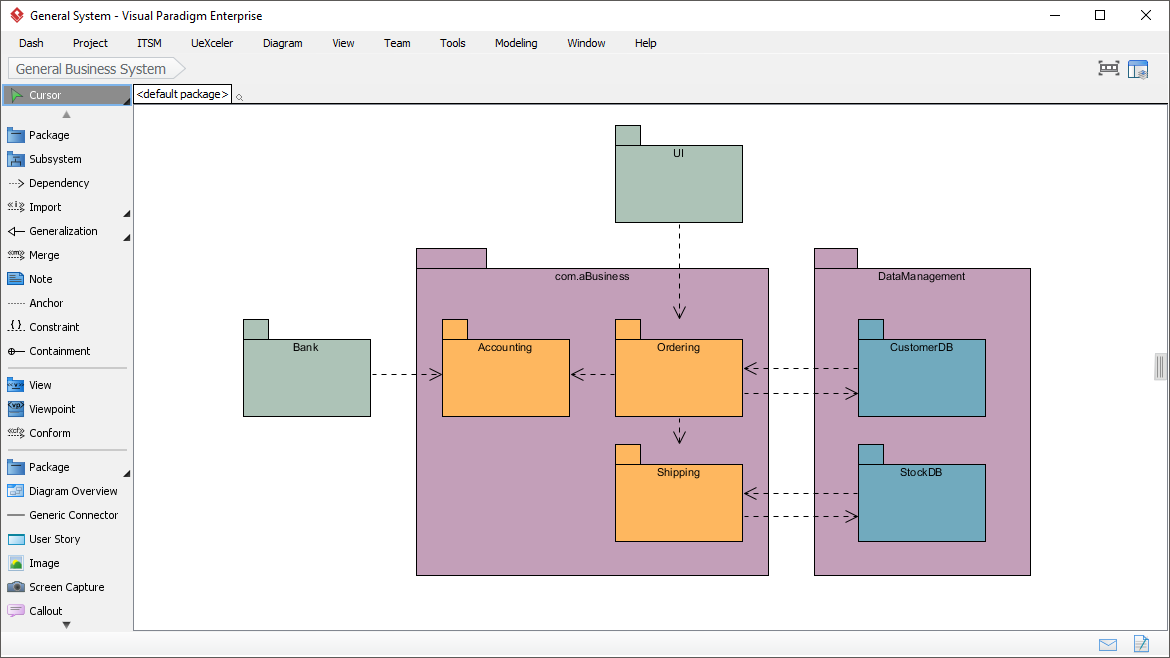
In this tutorial, we will analyze a real-world architecture scenario using Visual Paradigm’s Enterprise environment. We will deconstruct how to model a General Business System, separating concerns into logical layers, managing dependencies, and ensuring a clean separation between business logic and data persistence.
Understanding the Core Concept: Packages as Subsystems
Unlike a standard class diagram that focuses on detailed attributes and methods, a Package Diagram (also known as a component diagram in some contexts, though distinct in UML) focuses on high-level abstraction. In the diagram shown, notice the use of the standard UML folder notation (the small rectangle tab in the corner) to represent logical groupings.
Key Modeling Concepts:
- Encapsulation of Complexity: Instead of showing every class inside the “Accounting” module, we encapsulate that logic within a single container. This allows the architect to focus on how modules talk to each other, rather than what they contain internally.
- Namespace Management: The package
com.aBusinessacts as a namespace, preventing naming conflicts and organizing the project structure logically. - Dependency Visualization: The dashed lines with open arrows represent a “Uses” or “Dependency” relationship. If Package A depends on Package B, changing B might require changes in A.
Step-by-Step: Analyzing the Architecture Layers
Let’s walk through the specific architecture depicted in the Visual Paradigm screenshot. This design follows a classic layered architecture pattern, which is essential for scalability.
1. The Presentation Layer (UI)
At the top of the hierarchy, we have the UI package. In a robust architecture, the User Interface should generally have no knowledge of the database structure. It only knows how to trigger actions. Notice the dashed line pointing from UI down to the com.aBusiness package. This indicates that the UI invokes business logic but does not contain the logic itself.
2. The Business Logic Layer (com.aBusiness)
This is the heart of the application. The package com.aBusiness contains three critical sub-modules:
- Accounting: Handles financial calculations and records.
- Ordering: Manages the flow of customer requests and transaction states.
- Shipping: Handles logistics and fulfillment logic.
Observe the dependency flow: Ordering likely triggers Accounting (to charge a card) and Shipping (to deliver goods). The diagram shows Ordering pointing to Accounting, and Ordering pointing to Shipping. This creates a clear “Orchestrator” pattern where Ordering is the central coordinator.
3. The Data Management Layer (DataManagement)
On the right, we have the DataManagement package. This layer is dedicated solely to persistence. It contains:
- CustomerDB: The repository for customer data.
- StockDB: The repository for inventory data.
Notice that the Ordering module depends on CustomerDB (to look up the user) and StockDB (to verify availability). Crucially, the DataManagement package does not depend on the business logic. This ensures that your database schema can evolve without breaking the business rules.
4. External Systems (Bank)
On the left, we see the Bank package. This represents an external actor or a third-party service. The dashed line connecting Bank to Accounting indicates that the accounting module needs to interact with an external banking API to process payments. This highlights the importance of modeling interfaces for external dependencies.
Best Practices for Package Modeling
When using Visual Paradigm to create these diagrams, keep the following rules in mind to maintain a healthy system architecture:
- Minimize Cross-Layer Dependencies: A good rule of thumb is that lower layers (Data) should never depend on upper layers (UI). If you see a dependency arrow pointing “up” the hierarchy, it is a potential architectural smell (Circular Dependency).
- Granularity Balance: A package should not be too small (e.g., one package per class) or too large (e.g., one package for the whole system). Aim for “cohesive” packages where the internal elements are related by a single responsibility.
- Use Stereotypes: In Visual Paradigm, you can add stereotypes (like <<Controller>> or <<Repository>>) to your packages to make the intent of the diagram immediately clear to other developers.
Conclusion
By utilizing the Package Diagram in Visual Paradigm, you transform a chaotic collection of classes into a structured, maintainable system. The separation of UI, Business Logic, and Data Management allows teams to work in parallel—frontend developers can build the UI while backend developers refine the database schema, knowing that the package boundaries define the contract between them.
Whether you are designing a microservices architecture or a monolithic application, start with the package. It is the foundation of a scalable, robust enterprise system.