
Mastering Microservices Architecture Modeling with PlantUML in VPasCode
In modern software engineering, the shift from monolithic applications to Microservices Architecture is a fundamental transition. This architectural style allows teams to build, deploy, and scale applications by breaking them down into smaller, loosely coupled services. But how do we effectively communicate and document this complex structure? The answer lies in visual modeling, specifically using Component Diagrams via PlantUML within tools like VPasCode.
This tutorial explores the architecture of a standard E-commerce system, demonstrating how to define boundaries, establish dependencies, and visualize the separation of concerns using code-first modeling.
The Core Concept: The Component Diagram
A Component Diagram is a UML diagram that describes the structure and organization of the software system. In the context of microservices, it serves as a high-level blueprint. It abstracts away the code details to focus on the “building blocks” of the system:
- Components: Represent functional modules or services (e.g., User Service, Order Service).
- Interfaces: Define how components interact.
- Dependencies: Show the flow of data or control between components.
- Package/Grouping: Organize components into logical clusters.
Step-by-Step: Modeling the Architecture
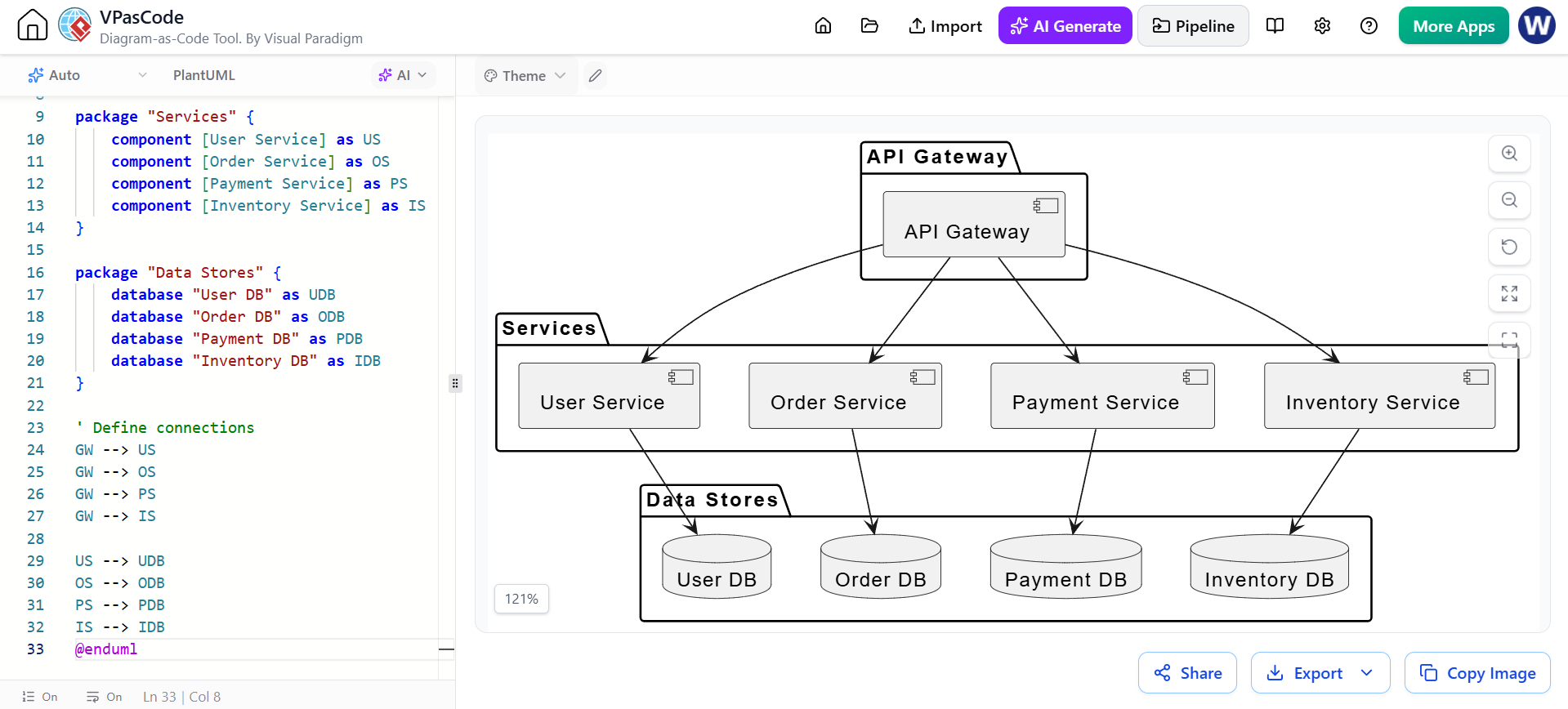
Let’s break down the diagram shown in the image, which models a microservices topology. The diagram is divided into three distinct logical layers, managed through the package directive in PlantUML.
1. The API Gateway (The Entry Point)
The diagram begins with an API Gateway. In microservices, this acts as the single entry point for all client requests. It handles tasks like authentication, rate limiting, and request routing.
In PlantUML, this is defined as a standalone component:
[API Gateway]
Notice in the generated visual how it sits at the top, receiving requests and directing them to the appropriate backend services.
2. The Service Layer (Business Logic)
The heart of the architecture is the Services package. Here, we define the specific functional domains of the application. This follows the “Domain-Driven Design” (DDD) principle where services are split by business capability.
The code snippet:
package "Services" {
[User Service] [Order Service] [Payment Service] [Inventory Service] }
This creates a logical grouping. The visual output shows these services as distinct boxes, emphasizing that they operate independently. For instance, the Order Service is not responsible for processing credit cards; that is the job of the Payment Service.
3. The Data Layer (Persistence)
A key characteristic of microservices is the Database per Service pattern. This ensures that services are isolated; the User Service cannot directly query the Order Service’s database. This prevents tight coupling and data corruption.
We define this layer using the database keyword:
package "Data Stores" {
database "User DB" database "Order DB" database "Payment DB" database "Inventory DB" }
The visual representation uses a cylinder icon, universally recognized in system architecture to denote persistent storage.
Defining Relationships and Dependencies
Visualizing the components is only half the battle. We must define how they interact. The arrows in the diagram represent the flow of data.
Horizontal vs. Vertical Communication
There are two distinct types of dependencies shown in this model:
- Top-Down (Request Flow): The
[API Gateway] --> [User Service]lines show that the Gateway routes requests to the specific services based on the API path. - Vertical (Persistence): The lines connecting
[Order Service] --> "Order DB"indicate that a service only accesses its own dedicated database.
Why Use VPasCode for This?
The screenshot provided illustrates the power of VPasCode, a “Diagram-as-Code” tool. Instead of dragging and dropping boxes with a mouse, you write code.
- Version Control Friendly: Since the diagram is text-based, you can use Git to track changes to your architecture over time.
- Refactoring: Renaming a service or moving it to a different package is as simple as editing a line of text.
- AI Integration: As noted in the workflow, AI assistants can help generate these PlantUML snippets, accelerating the design process.
Conclusion
By combining the clarity of Component Diagrams with the efficiency of PlantUML in VPasCode, software architects can create living documentation. This documentation is not static; it evolves with your code, ensuring that your team always has a clear, accurate map of your microservices ecosystem.