
Mastering Model-Driven Development with VP Unified Platform
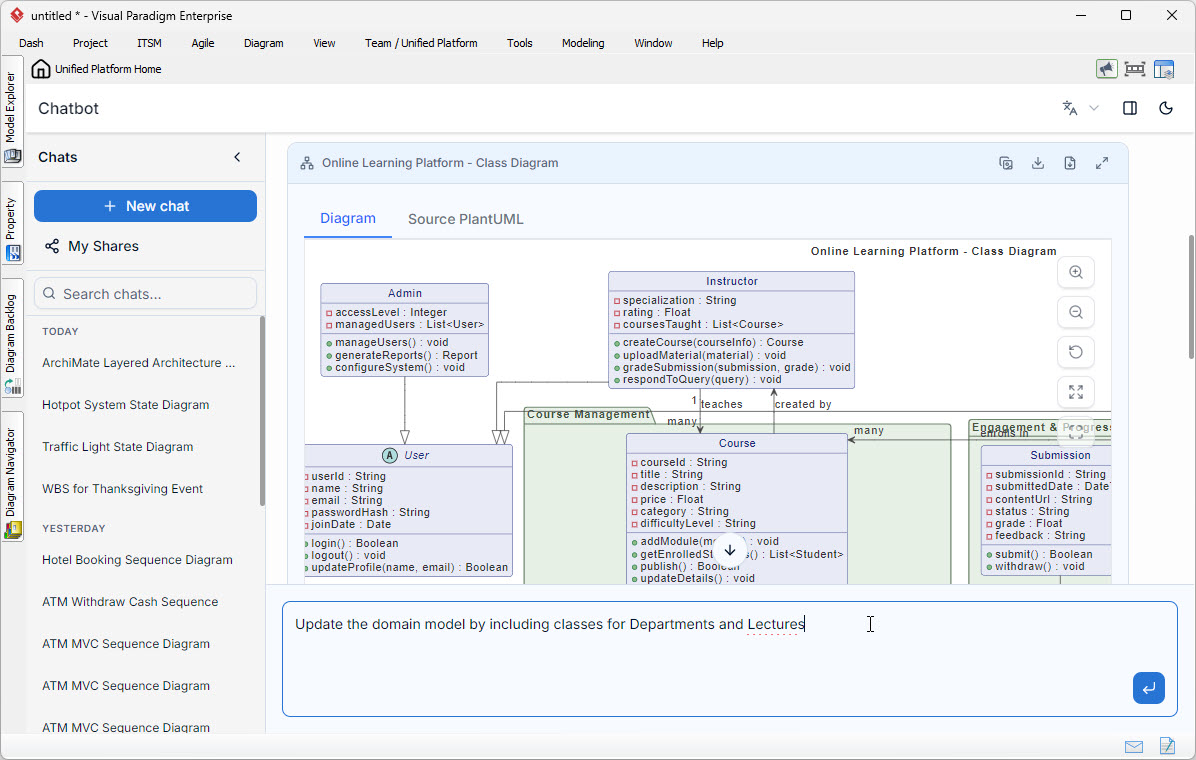
In modern software engineering, the gap between conceptual design and implementation is often bridged by Model-Driven Development (MDD) tools. The Visual Paradigm Unified Platform exemplifies this evolution by integrating Generative AI directly into the modeling workflow. As demonstrated in the screenshot, the system allows users to transition from natural language requests to formal software architecture instantly.
This tutorial explores the technical architecture behind this AI-driven diagramming tool. We will analyze the domain model shown in the “Online Learning Platform” example, breaking down the class structure, relationships, and the underlying PlantUML syntax that powers the generation process.
1. The AI-to-Model Workflow
The core innovation in the Visual Paradigm interface is the bidirectional flow between the user’s intent and the system’s execution. Unlike traditional modeling where a user must manually drag and drop classes, the AI acts as a “transpiler” for natural language.
- Natural Language Input: The user provides a prompt, such as “Update the domain model by including classes for Departments and Lectures.”
- Contextual Awareness: The AI analyzes the existing diagram (Admin, Instructor, Course) to understand the current domain boundaries.
- Syntax Generation: The system converts the semantic meaning of the prompt into executable code (specifically PlantUML).
- Visual Rendering: The code is parsed and rendered into the UML Class Diagram, complete with relationships and constraints.
2. Analyzing the Domain Model
The screenshot displays a robust domain model for an Online Learning Platform. Let’s dissect the specific entities and their interactions to understand the system architecture.
The User Hierarchy
The model utilizes a classic inheritance pattern. We see a base User class acting as a superclass for specific roles. This promotes code reusability in the actual implementation.
- User (Abstract/Concrete): Contains common attributes like
userId,name, andemail, along with authentication methods likelogin(). - Admin: Extends
Userto gain system-wide privileges such asmanageUsers()andconfigureSystem(). - Instructor: Extends
Userto manage academic content, featuring methods likeuploadMaterial()andgradeSubmission().
The Course Management System
The heart of the application is the Course Management subsystem. This is modeled as a container or package holding the core business entities.
- Course: The central entity with attributes like
courseId,price, anddifficultyLevel. It also manages the lifecycle of the course viaaddModule()andpublish(). - Submission: Represents the student’s interaction with the course, tracking
submittedDate,status, andgrade.
3. Relationship Logic
The diagram illustrates the cardinality and directionality of the data flow between these classes.
- Teacher-Student Relationship: The
InstructorandUser(student) classes are linked to theCourse. The line labeled “teaches” connects Instructor to Course, while “created by” connects Course back to Instructor. The “many” labels indicate that one instructor can teach many courses, and a course can be created by many instructors (in a collaborative setting). - Encapsulation: The use of the
+symbol (public) and-symbol (private) in the class boxes (e.g.,-passwordHash) adheres strictly to Object-Oriented Design (OOD) principles, ensuring data integrity.
4. The Underlying Syntax (PlantUML)
Behind the visual interface, the AI generates valid PlantUML code. This is the standard markup language used by the Unified Platform to render diagrams. To understand how the AI constructs the diagram, we can look at the expected syntax for the entities shown in the image.
@startuml
class User {
  + userId: String
  + name: String
  + email: String
  - passwordHash: String
  + joinDate: Date
  + login(): Boolean
  + logout(): void
  + updateProfile(name, email): Boolean
}

class Admin {
  + accessLevel: Integer
  + managedUsers: List
  + manageUsers(): void
  + generateReports(): Report
  + configureSystem(): void
}

class Instructor {
  + specialization: String
  + rating: Float
  + coursesTaught: List
  + createCourse(courseInfo): Course
  + uploadMaterial(material): void
  + gradeSubmission(submission, grade): void
  + respondToQuery(query): void
}

User <|-- Admin
User <|-- Instructor

package "Course Management" {
  class Course {
    + courseId: String
    + title: String
    + description: String
    + price: Float
    + category: String
    + difficultyLevel: String
    + addModule(module): void
    + getEnrolledStudents(): List
    + publish(): Boolean
    + updateDetails(details): void
  }

  class Submission {
    + submissionId: String
    + submittedDate: Date
    + contentUrl: String
    + status: String
    + grade: Float
    + feedback: String
    + submit(): Boolean
    + withdraw(): void
  }
}

Instructor "1" -- "many" Course : teaches
Course "1" -- "many" Submission : contains
@enduml
5. Extending the Model
The prompt in the screenshot suggests a future step: “Update the domain model by including classes for Departments and Lectures.” This demonstrates how the AI can expand an existing architecture.
To implement this change, the AI would need to:
- Create a new
Departmentclass to hold organizational data. - Create a
Lectureclass (likely a child or association ofCourse) to represent specific time-bound sessions. - Establish a relationship where
Department“contains”CourseorInstructor. - Update the
Instructorclass to link them to a specificDepartment.
Conclusion
The integration of AI into the Visual Paradigm Unified Platform significantly reduces the time-to-model for software architects. By translating high-level requirements into a structured Class Diagram, the system ensures that the initial design phase is both accurate and aligned with UML standards. As shown in the “Online Learning Platform” example, the resulting model is not just a drawing but a blueprint ready for code generation or further refinement.