
Mastering Complex Payment Flows with VPasCode: Alt and Loop Logic in Mermaid
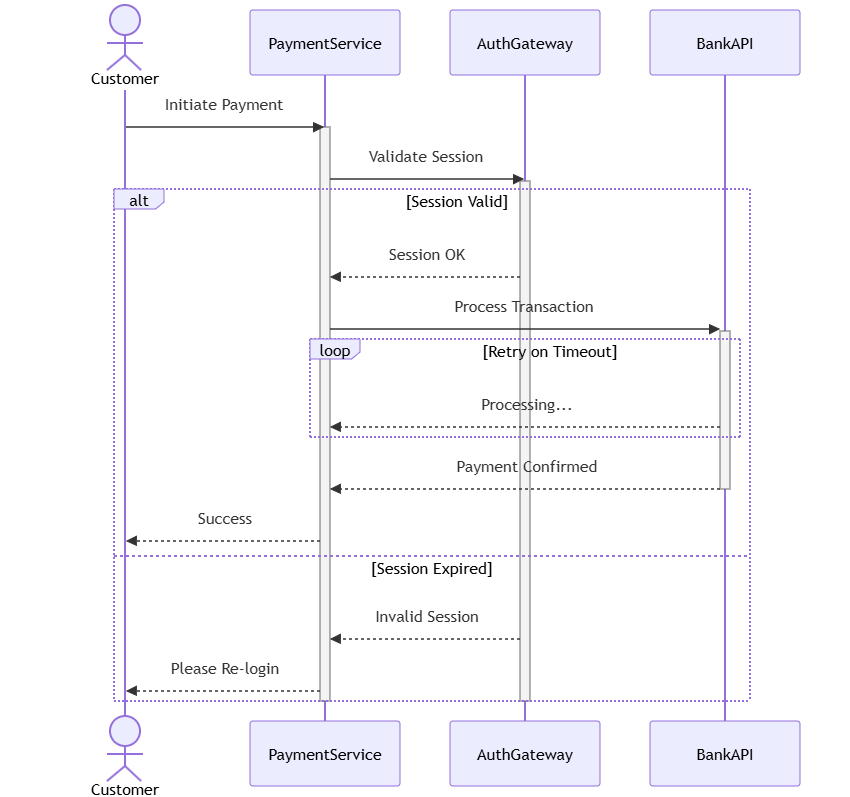
In the world of system architecture and software design, visualizing the flow of data is just as critical as the code itself. This tutorial explores a sophisticated sequence diagram representing a Payment Processing System. Unlike simple linear interactions, real-world enterprise systems often involve conditional logic—such as user authentication—and iterative processes, like handling network timeouts. We will break down the architecture and the specific modeling techniques used to represent these complex behaviors using the alt and loop operators in Mermaid.
System Architecture Overview
The diagram models a secure transaction workflow involving four distinct entities. Understanding the role of each participant is the first step to mastering this sequence diagram:
- Customer (Actor): The initiator of the transaction. In sequence diagrams, actors are typically represented by stick figures at the top and bottom of the frame.
- PaymentService (System Component): The central orchestrator. It receives the payment request, manages the session state, and coordinates with external banking APIs.
- AuthGateway (Security Component): A dedicated service responsible for validating the user’s session before sensitive financial operations are allowed to proceed.
- BankAPI (External System): The external interface to the banking network. It performs the actual transaction processing and may be subject to network latency.
Step-by-Step Modeling Logic
Let’s walk through the logic flow presented in the diagram, moving from the initial request to the conditional outcomes.
1. Initiation and Activation
The sequence begins when the Customer initiates a payment. The diagram uses an activation bar (the thin rectangle on the lifeline) to indicate when a participant is actively executing code. The PaymentService becomes active and immediately delegates a task to the AuthGateway to Validate Session.
2. The Alt (Alternative) Block
This is the most critical structural element of the diagram. The alt keyword creates a conditional branch, effectively splitting the timeline into mutually exclusive paths based on the result of the session validation.
The diagram defines two specific scenarios:
- Session Valid: If the
AuthGatewayreturns a “Session OK,” the flow continues to the banking API. - Session Expired: If the session is invalid, the flow diverts to a fallback path where the user is prompted to re-login.
3. The Loop Block
Within the “Session Valid” path, the diagram introduces a loop operator. This is used to model iterative behavior. Here, it represents a Retry Mechanism.
In distributed systems, network calls to external APIs (like the BankAPI) can be unreliable. The diagram illustrates that if the system times out while waiting for a response, it does not fail immediately. Instead, it enters a loop to Process Transaction again until a confirmation is received or a limit is reached.
Visual Syntax Breakdown
To replicate this diagram or create similar ones, you must understand the specific syntax rules for complex interactions. The following code block demonstrates how the logic is structured in Mermaid.
sequenceDiagram
    actor Customer
    participant PaymentService
    participant AuthGateway
    participant BankAPI

    Customer->>PaymentService: Initiate Payment
    activate PaymentService

    PaymentService->>AuthGateway: Validate Session
    activate AuthGateway

    alt Session Valid
        AuthGateway-->>PaymentService: Session OK
        PaymentService->>+BankAPI: Process Transaction

        loop Retry on Timeout
            BankAPI-->>PaymentService: Processing...
        end

        BankAPI-->>-PaymentService: Payment Confirmed
        PaymentService-->>Customer: Success
    else Session Expired
        AuthGateway-->>PaymentService: Invalid Session
        PaymentService-->>Customer: Please Re-login
    end

    deactivate AuthGateway
    deactivate PaymentService
Key Syntax Concepts
When working with sequence diagrams in VPasCode or standard Mermaid renderers, keep these rules in mind:
- Activation Bars: The
activateanddeactivatecommands (or the shorthand->+and-->) are essential for readability. They visually demonstrate the duration of a process, distinguishing between a quick message send and a long-running operation. - Conditional Frames: The
altblock requires anelseclause (unless there is anoptfor optional paths). The condition is placed in brackets, e.g.,[Session Valid]. - Iterative Frames: The
loopblock wraps the operations that repeat. The condition, such as[Retry on Timeout], defines the loop guard.
Conclusion
By combining alt and loop constructs, we can transform a static diagram into a dynamic representation of system behavior. This diagram does more than show “who talks to whom”; it documents the business rules (session validation) and the reliability strategies (retry loops) that are crucial for building robust financial applications.