
Mastering Responsibility Assignment in BPMN: A Deep Dive into RACI & CRUD Charts in Visual Paradigm
In the complex world of Business Process Management (BPMN), a common pitfall is defining the “What” of a process without clearly defining the “Who.” You can have a perfectly syntactically correct BPMN diagram, but if it is unclear who executes a task, who approves it, or who is merely kept in the loop, the process will fail to implement correctly.
This is where Visual Paradigm’s advanced modeling capabilities shine. By integrating Responsibility Assignment Matrices (RACI) and CRUD (Create, Read, Update, Delete) Charts directly into your Business Process Diagram (BPD), you can eliminate role ambiguity and ensure that every actor in your system has a clearly defined function.
The Power of the Responsibility Assignment Matrix (RACI)
A RACI chart is a grid that maps out the specific roles and their responsibilities for each activity or deliverable within a process. In Visual Paradigm, this is not a separate spreadsheet; it is an intelligent view linked directly to your BPMN elements.
The acronym stands for:
- R – Responsible: The person or role who actually performs the work. (There should usually be at least one “R” for every task).
- A – Accountable: The person who is ultimately answerable for the correct and thorough completion of the deliverable. This person has veto power. There must be exactly one “A” per task.
- C – Consulted: Those whose opinions are sought. This is a two-way communication.
- I – Informed: Those who must be told about decisions or progress. This is a one-way communication.
How Visual Paradigm Generates RACI
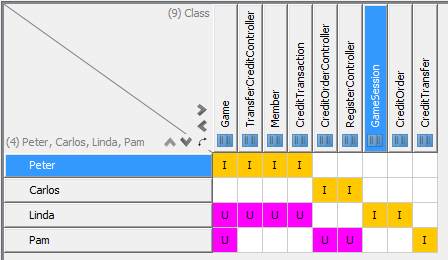
When you define roles in your BPMN model, you can assign specific users or groups to specific activities. Visual Paradigm then automatically generates the matrix shown in the screenshot above.
In the provided diagram, we can see a mapping of specific individuals—Peter, Carlos, Linda, and Pam—against various system classes or controllers like TransferCreditController, RegisterController, and GameSession.
For instance, look at the row for Peter. He is marked with an I (Informed) for Game, TransferCreditController, and Member. This tells us that Peter does not build or manage these specific controllers but needs to know when they are updated.
Interpreting the Matrix
The matrix provides a high-level “sanity check” for your process design. It helps identify:
- Role Ambiguity: If a column has no “R” or “A”, nobody knows who is in charge of that task.
- Overload: If a single row has “A” for every single task, that individual is a bottleneck.
- Communication Gaps: If a stakeholder is marked “I” for critical updates, are they actually being notified?
CRUD Charts: Tracking Data State
While RACI focuses on human or role-based responsibility, the CRUD Chart focuses on data integrity and object lifecycle management. In the context of your BPMN model, you might have processes that create, read, update, or delete specific data entities (like a “Credit” object or a “User” record).
The CRUD matrix in Visual Paradigm visualizes which process elements interact with which data objects:
- C (Create): The process creates a new instance of the data object.
- R (Read): The process reads or views the data.
- U (Update): The process modifies the data.
- D (Delete): The process removes the data.
Looking at the screenshot, the magenta squares marked with ‘U’ indicate that Linda and Pam are responsible for Updating specific controllers (like TransferCreditController or RegisterController), while the yellow ‘I’ indicates they are merely Informed of other activities.
Best Practices for Modeling Roles in Visual Paradigm
To get the most out of these charts, follow these steps:
- Define Roles Explicitly: Do not leave roles as generic placeholders. Assign specific users or distinct job titles to your swimlanes.
- Link Tasks to Roles: Ensure every Task in your BPMN diagram is explicitly assigned to a Role. Visual Paradigm will flag unassigned tasks if configured to do so.
- Validate Before Deployment: Use the “Generate RACI” feature as a final step before handing off your process model to stakeholders. It is a powerful tool for validation meetings.
Conclusion
By utilizing the RACI and CRUD features within Visual Paradigm, you move beyond simple diagramming to true process governance. You ensure that your BPMN diagrams are not just pictures, but actionable blueprints that clearly define who does what and how data is managed throughout the lifecycle.