
Mastering System Architecture with VPasCode: A Guide to AI-Assisted Modeling
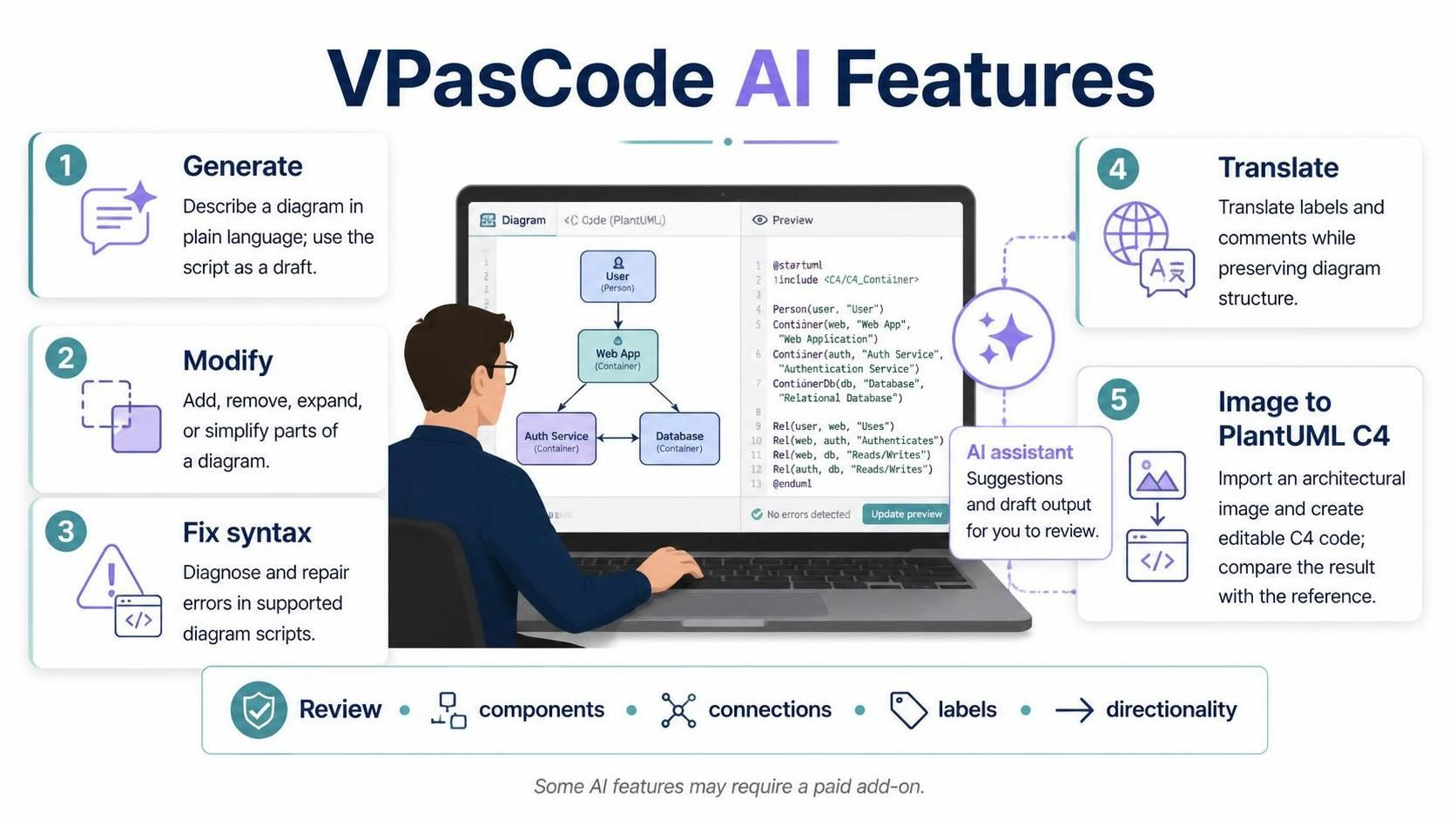
In modern software engineering, the gap between high-level architectural concepts and executable code is often bridged by clear documentation. Visual Paradigm has revolutionized this workflow with VPasCode, a powerful text-based modeling tool that allows developers to define complex system diagrams using code, now supercharged with Artificial Intelligence. This tutorial explores how to leverage VPasCode’s AI features to generate, modify, and maintain C4 (Container, Component, Code) architecture models efficiently.
The Paradigm Shift: From Drag-and-Drop to Code
Traditionally, creating system architecture diagrams involved tedious drag-and-drop operations in GUI-based tools. While visual editors are intuitive, they often become difficult to manage as projects scale. VPasCode introduces a “diagram-as-code” approach. By writing plain text scripts, you gain version control compatibility, faster editing, and the ability to programmatically generate diagrams.
The core syntax used in VPasCode is based on PlantUML, specifically tailored for the C4 model. This allows you to describe your system’s structure—people, containers, components, and databases—using simple text definitions.
Understanding the C4 Model in VPasCode
The C4 model is a hierarchy of diagrams used to describe software architecture at different levels of detail. In VPasCode, you typically start with a Context Diagram (Level 1) or a Container Diagram (Level 2).
Here is a foundational example of a C4 Container Diagram script describing a basic web application:
@startuml
!include

Person(user, "User", "The person using the system")
Container(web, "Web App", "A web application built with Java/Spring", "The user-facing interface")
ContainerDb(db, "Database", "A relational database", "Stores user data and application state")

Rel(user, web, "Uses")
Rel(web, db, "Reads/Writes")

title Container Diagram
@enduml
Leveraging AI to Accelerate Modeling
VPasCode integrates AI tools directly into the workflow to assist with the four critical stages of diagram work: Generation, Modification, Syntax Correction, and Translation. This ensures that your architectural documentation remains up-to-date with minimal effort.
1. Generate: From Plain Language to Script
One of the most powerful features is the ability to Generate a diagram script from a plain language description. Instead of manually typing syntax, you can describe your system in natural language.
Scenario: You need to document a login sequence involving a user, a web application, an authentication service, and a database.
AI Prompt: “Generate a PlantUML C4 Container diagram for a login system. It should include a User, a Web App, an Auth Service, and a Database. The user uses the web app, which authenticates via the auth service, and the auth service reads from the database.”
Result: The AI will output the following code structure, which you can then copy directly into your editor:
@startuml
!include

Person(user, "User")
Container(web, "Web App", "Web Application")
Container(auth, "Auth Service", "Authentication Service")
ContainerDb(db, "Database", "Relational Database")

Rel(user, web, "Uses")
Rel(web, auth, "Authenticates")
Rel(auth, db, "Reads/Writes")
@enduml
2. Modify: Iterative Refinement
Architecture rarely stays static. VPasCode allows you to Modify existing scripts by asking the assistant to add, remove, expand, or simplify parts of the diagram. This is particularly useful for refactoring or expanding scope without breaking existing relationships.
Example Interaction: “Add a new component called ‘Payment Gateway’ and connect the Web App to it.” The AI will update the script, adding the new container definition and the necessary relationship line.
3. Fix Syntax: Error Diagnosis
Even with autocomplete, syntax errors can occur, especially when dealing with complex C4 directives. The Fix Syntax feature acts as an intelligent debugger. You can highlight an error or paste a problematic script, and the AI will diagnose the issue—often suggesting the correct PlantUML directive or fixing missing brackets.
4. Translate: Global Documentation
For international teams, maintaining diagrams in multiple languages is a challenge. VPasCode supports Translate functionality. This feature translates diagram labels and comments while strictly preserving the surrounding diagram structure and code logic. This ensures that your visual representation remains intact while the text becomes accessible to global stakeholders.
Image-to-Code: Converting Legacy Diagrams
Perhaps the most innovative feature is the ability to convert an architectural image into editable PlantUML C4 code. This is invaluable when migrating documentation from legacy tools or capturing brainstorming sessions.
- Import: Upload an image of your current architecture (e.g., a PNG or JPG of a system design).
- Interpret: The AI analyzes the image and attempts to generate a corresponding script.
- Review: Compare the generated code with the reference image. Note: Image interpretation may miss or misread details, so always verify the output.
Sample Workflow for Image Conversion
' AI Generated Output based on an image
Person(user, "User")
Container(web, "Web App", "Web Application")
ContainerDb(db, "Database", "Relational Database")

Rel(user, web, "Uses")
Rel(web, db, "Reads/Writes")
Once the AI produces the code, you can treat it as a starting point. You must review the components, connections, labels, and directionality to ensure they match the system you intend to describe.
Best Practices for AI-Assisted Modeling
While AI tools significantly speed up the modeling process, they are assistants, not replacements for architectural oversight. When using VPasCode AI features, keep the following in mind:
- Review Before Commit: AI-generated output should always be reviewed before being used as technical documentation. Ensure that the logic (e.g., data flow direction) is correct.
- Understand the Syntax: Familiarize yourself with basic PlantUML C4 syntax so you can validate the AI’s output effectively.
- Check Licensing: Some advanced AI features are listed as paid add-ons. Do not assume every capability is included in the free editor version.
Conclusion
VPasCode represents the future of system architecture documentation. By combining the precision of code-based modeling with the efficiency of AI, developers can create accurate, maintainable, and scalable architecture diagrams. Whether you are generating a diagram from scratch or converting legacy images, the AI tools provided by Visual Paradigm ensure that your documentation is always aligned with your system’s reality.