
Mastering System Architecture with Visual Paradigm NoteKeep
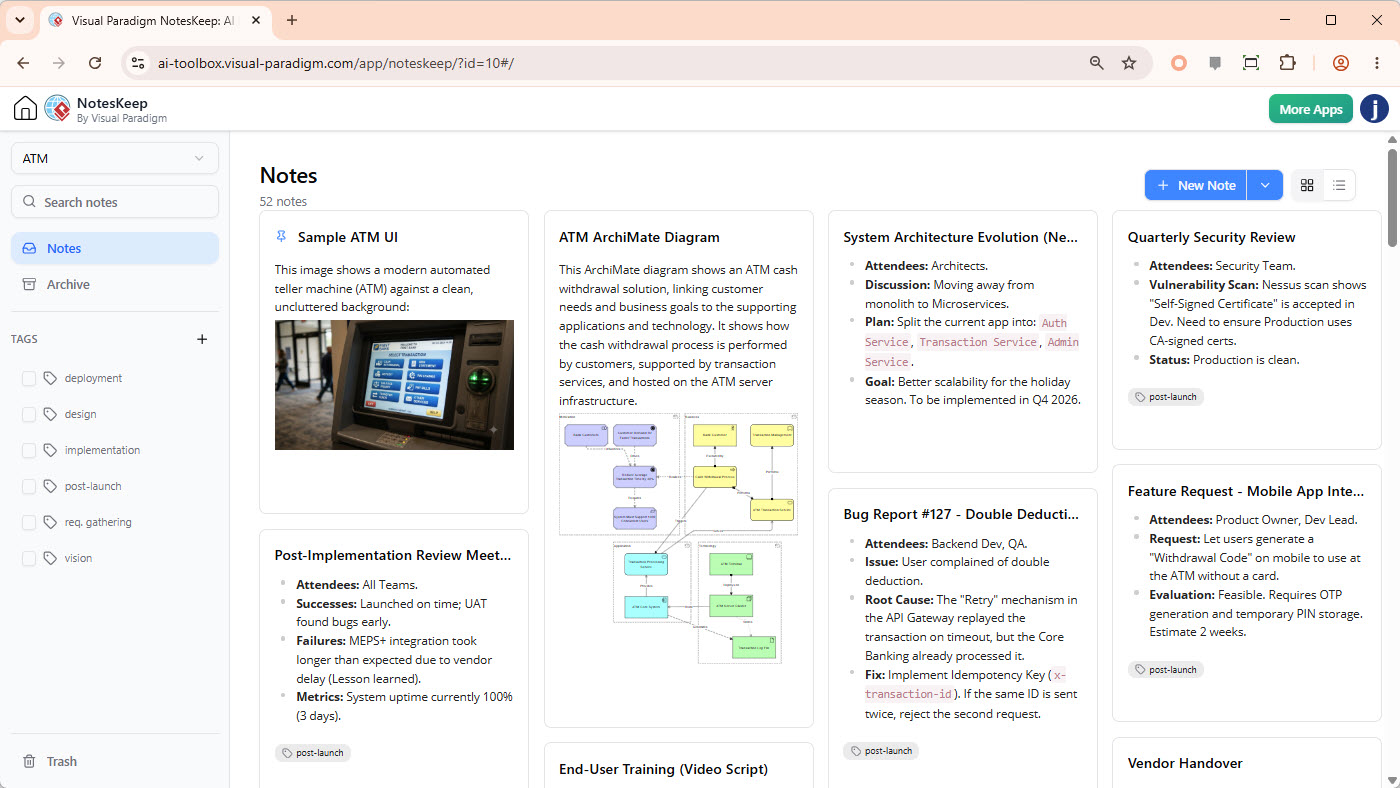
In the complex world of software development and system engineering, documentation often suffers from fragmentation. Requirements live in Word docs, diagrams in Visio, meeting notes in email threads, and bug reports in Jira. This disconnect creates a “knowledge silo” effect where architects and developers struggle to see the full picture.
Enter Visual Paradigm NotesKeep, a centralized workspace designed to unify these disparate information sources. This tutorial explores how to leverage NotesKeep to build a cohesive system architecture, utilizing the ATM (Automated Teller Machine) case study visible in the reference interface. We will walk through the methodology of importing, organizing, and modeling system behaviors.
Step 1: The Foundation – Aggregating Project Context
The first step in any architecture documentation process is gathering the raw material. In a traditional workflow, this might involve manually copying text from a spreadsheet into a design document. However, NotesKeep streamlines this by allowing direct import of existing project artifacts.
The goal is to create a “common workspace.” For example, consider the Sample ATM UI card shown in the interface. Instead of viewing a static image in a separate folder, this visual asset is imported directly into the notes system. This allows the architecture to be discussed directly alongside the visual representation of the user interface.
- Import Diverse Formats: Convert Word requirements, Excel matrices, and even photographed whiteboards into searchable, editable notes.
- Preserve Informal Context: Don’t just import polished specs. Informal notes often contain the “why” behind a decision, which is crucial for maintaining architectural integrity.
Step 2: Structuring the Knowledge Base
Once content is imported, the chaos of raw data must be tamed. The interface demonstrates a robust tagging system that is critical for context-aware querying.
By tagging notes with categories like deployment, design, implementation, or req-gathering, you create a logical hierarchy. This structure is not just for human navigation; it is the backbone of the system’s AI capabilities.
When you ask an AI assistant, “Summarize the current onboarding requirements,” it relies on these tags to limit its search scope. Without this organization, the AI would be querying the entire organization’s data, leading to vague and inaccurate answers.
Step 3: The Power of the Architectural Model
The centerpiece of the interface is the ATM ArchiMate Diagram. This is where raw notes transform into technical reality. ArchiMate is a powerful enterprise architecture modeling language that allows you to link business needs with technology solutions.
Understanding the ArchiMate Flow
In the referenced diagram, we see a clear separation of concerns:
- Business Layer (Top): Represents the high-level goals, such as “ATM Cash Withdrawal.” This links to the customer’s business need.
- Application Layer (Middle): The “ATM Application” is the software component that interacts with the user.
- Technology Layer (Bottom): The “ATM Server” represents the physical infrastructure hosting the application.
This layered approach ensures that when you change a business requirement, you can instantly trace how it impacts the application and the underlying server infrastructure.
%% A simplified representation of the ArchiMate layers shown in the image
graph TD
    subgraph Business
    A[Business Goal: Cash Withdrawal]
    end

    subgraph Application
    B[ATM Application]
    C[Transaction Service]
    end

    subgraph Technology
    D[ATM Server]
    E[Network]
    end

    A -->|Uses| B
    B -->|Executes| C
    C -->|Hosted On| D
    D -->|Uses| E
Step 4: Traceability and Change Management
Architecture is never static. The “System Architecture Evolution” note in the interface highlights a critical concept: Traceability. The note outlines a plan to split a current app into specific services like “Auth Service” and “Transaction Service.”
Visual Paradigm allows you to link these text-based decisions back to the visual model. If a diagram element (like the “Risk Assessment” process) is linked to a specific requirement or an Architecture Decision Record (ADR), you create a single source of truth.
Handling Issues with Precision
The Bug Report #127 card demonstrates how to handle technical debt or defects within the architecture context. Instead of a generic bug report, this note details:
- Root Cause: “The ‘Retry’ mechanism in the API Gateway replayed the transaction on timeout.”
- Fix: “Implement Idempotency Key.”
This level of detail allows developers to immediately understand the system behavior that caused the bug and the architectural fix required.
Step 5: Leveraging AI for System Synthesis
One of the most advanced features of NotesKeep is its ability to synthesize information. By organizing your notes and diagrams, you can engage in a dialogue with the system to generate new insights.
Instead of manually scanning through 50 different documents, you can prompt the AI:
- “Identify conflicts between the API notes and the database model.”
- “List all security requirements related to customer authentication.”
The AI acts as a contextual analyst, pulling from the tagged data to provide precise answers that help architects spot inconsistencies early in the design phase.
Conclusion
The transition from fragmented documents to a unified system architecture is essential for modern engineering teams. By using Visual Paradigm NotesKeep to centralize requirements, manage changes, and visualize architecture, teams can ensure that their systems remain robust, traceable, and aligned with business goals. The ATM case study serves as a perfect example of how a simple interface can bridge the gap between business strategy and technical execution.