
Mastering UML Class Diagrams: A Visual Guide to Order Processing Architecture
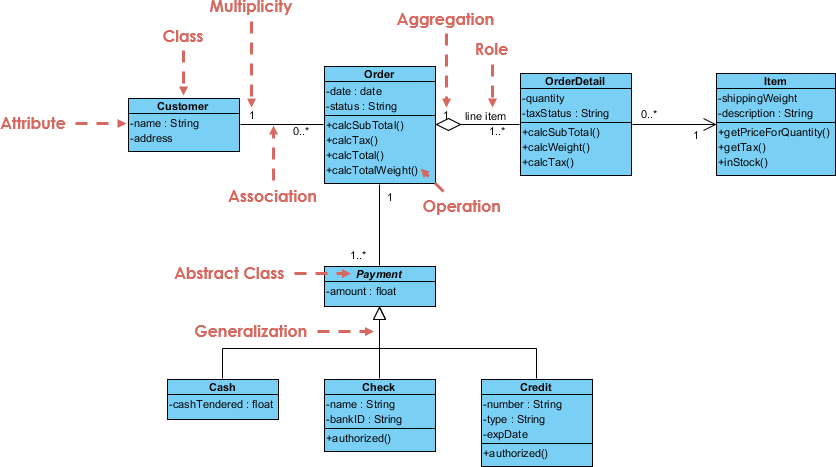
In the realm of software engineering, the Class Diagram stands as the most fundamental artifact of the Unified Modeling Language (UML). It serves as the static blueprint for your system, detailing the objects that make up the software, their attributes, methods, and the complex web of relationships connecting them. This tutorial dissects the provided Order Processing system architecture to demonstrate how abstract modeling concepts translate into concrete system design.
The Anatomy of a Class
At the heart of every class diagram is the Class itself—a blueprint for creating objects. As seen in the Customer and Order classes, a standard UML class is visually represented as a rectangle divided into three distinct compartments:
- Top Section (Name): The class name, such as
CustomerorPayment, is displayed here. In professional modeling, this is often capitalized (e.g.,PascalCase). - Middle Section (Attributes): This compartment lists the properties or state data. Notice the Customer class has
-name : String. The minus sign (-) denotes private visibility, meaning this data is encapsulated and not directly accessible from outside the class. - Bottom Section (Operations): This lists the methods or behaviors. For the Customer class, we see
login()andupdateProfile(). The plus sign (+) indicates public visibility.
Modeling Relationships and Roles
Classes rarely exist in isolation. The diagram illustrates how the Customer and Order classes interact through an Association. This is not just a line; it carries semantic weight defined by specific modeling elements:
- Multiplicity: The numbers at the ends of the lines define the cardinality. The
1near the Customer indicates that an Order must be placed by exactly one Customer. The0..*near the Order indicates that a Customer can place zero or many orders. - Role Names: The association line is labeled
line itemin the relationship between Order and OrderDetail. This clarifies the specific context of the relationship. - Aggregation: The “hollow diamond” shape connecting Order and OrderDetail represents Aggregation. This is a “whole-part” relationship where the parts (OrderDetails) can exist independently of the whole (Order). If the Order is deleted, the OrderDetail objects might still exist in the database.
Inheritance and Polymorphism
One of the most powerful features of Object-Oriented Programming is inheritance, which is clearly depicted at the bottom of the diagram under the Payment hierarchy.
The diagram shows Payment as an Abstract Class. This is indicated by the italicized name and the abstract tag. An abstract class cannot be instantiated directly; it serves as a template for specific types of payments. The solid line with a large, hollow triangular arrowhead pointing to Payment represents Generalization (Inheritance).
Through this mechanism, the subclasses Cash, Check, and Credit automatically inherit the structure of the parent but define their own specific attributes (like bankID for Check) and behaviors (like authorized()).
classDiagram
    class Customer {
        -name : String
        -address
        +login()
        +updateProfile()
    }
    class Order {
        -date : date
        -status : String
        +calcSubTotal()
        +calcTax()
    }
    class Payment {
        <>
        +authorize()
    }

    Customer "1" --> "0..*" Order : places
    Order "1" *-- "1..*" OrderDetail : contains
    Payment <|-- Cash
    Payment <|-- Check
    Payment <|-- Credit
Key Takeaways
Understanding this diagram requires recognizing the balance between structure and behavior. The Customer and Order classes represent the structural backbone of the application, while the Payment hierarchy demonstrates how to manage polymorphic behavior efficiently. By mastering these components—Attributes, Operations, Associations, and Inheritance—you gain the ability to design scalable, maintainable systems.