
Mastering UML Data Modeling in Visual Paradigm & VPa Code
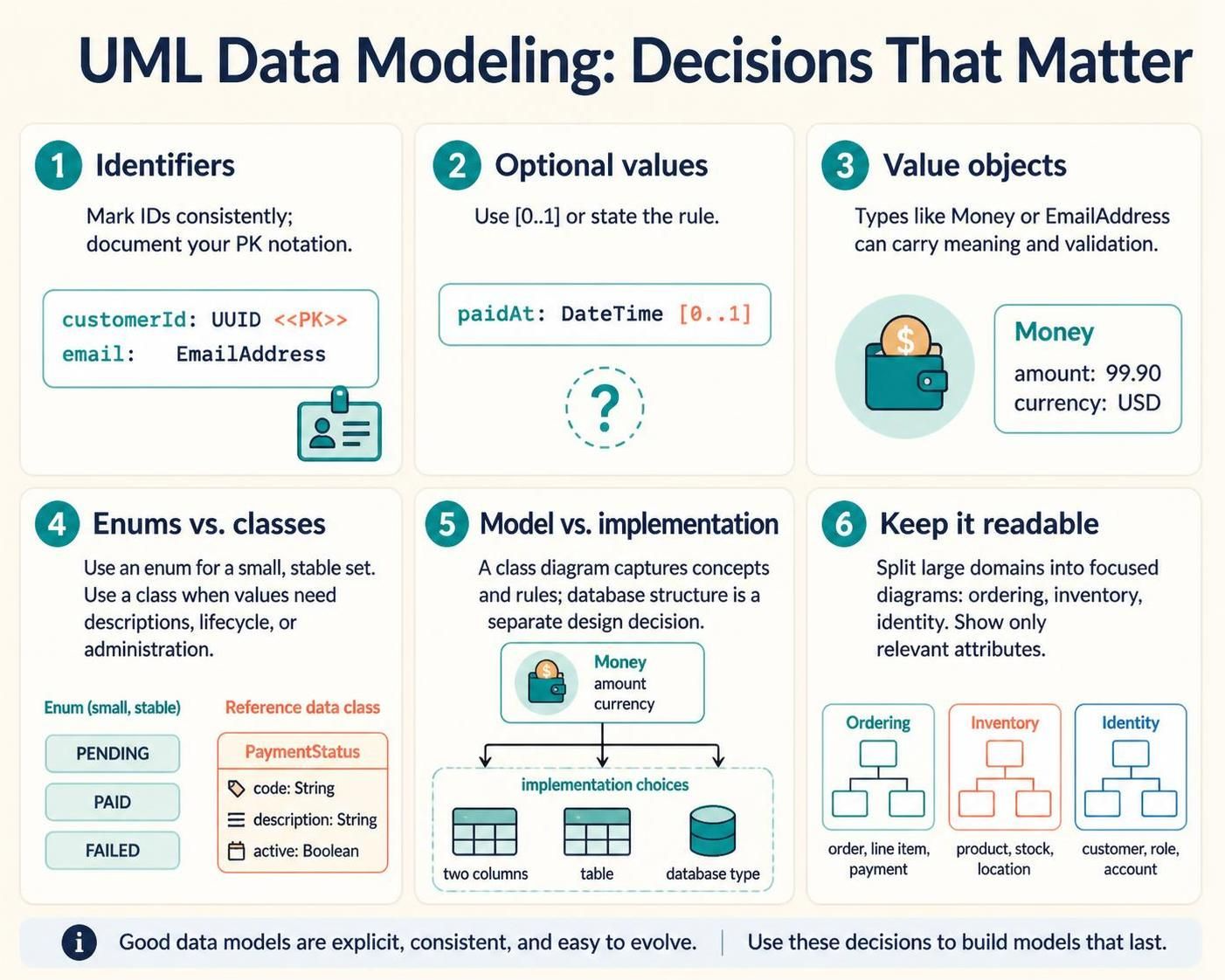
In the world of software architecture, the difference between a maintainable system and a technical nightmare often lies in the details of your data model. Whether you are using Visual Paradigm or a code-based editor like VPasCode, the way you represent your domain concepts dictates how easily your team can evolve the system.
This tutorial breaks down six critical modeling decisions that transform a simple diagram into a robust blueprint for your application. We will explore how to handle identifiers, value objects, and the often-confusing line between modeling and implementation.
1. Consistency is Key: Identifiers and Primary Keys
Every class in your system needs a unique identity. However, UML does not enforce a single standard notation for Primary Keys (PK). This lack of standardization means that without a convention, your diagrams can become ambiguous to new team members.
When modeling in Visual Paradigm or VPasCode, you must choose a clear convention and stick to it. The most effective approach is using stereotypes to explicitly mark your identifiers. For example, using <<PK>> alongside the attribute type makes the intent immediately clear.
Best Practice Example
class Customer {
    +customerId: UUID <>
    +email: EmailAddress
}
In this example, the stereotype <<PK>> acts as a visual flag, ensuring that anyone reading the diagram knows customerId is the unique row identifier, distinct from the email attribute.
2. Handling Optionality with Multiplicity
Real-world data is rarely absolute. A payment record might not have a completion timestamp until the transaction succeeds. If you model every attribute as mandatory, your diagrams will misrepresent the business logic.
Use the multiplicity notation [0..1] to explicitly mark optional attributes. This notation tells the developer and the architect that the field may be null or absent, preventing validation errors during the implementation phase.
Modeling Optional Timestamps
class Payment {
    +paidAt: DateTime [0..1]
}
Here, [0..1] clearly communicates that a Payment object exists but might not yet have a paidAt value.
3. The Power of Value Objects
One of the most common mistakes in data modeling is treating complex concepts as simple strings or primitives. A “Money” object, for instance, is not just a number; it carries semantics regarding currency and formatting.
Value Objects like Money or EmailAddress should be modeled to reflect their inherent validation rules. You have three choices depending on your audience:
- As a separate class: Good for showing relationships and methods.
- As an attribute type: Good for showing composition.
- As a database structure: Good for schema documentation.
Defining a Money Value Object
class Money {
    +amount: Double
    +currency: String
}
By encapsulating the amount and currency together, you ensure that the business rule “one amount belongs to one currency” is preserved in your model.
4. Enums vs. Classes: The Right Tool for the Job
When modeling controlled lists of values, such as order statuses, you often face a choice between an Enum and a Class. The decision depends on the stability and complexity of the data.
Use an Enum when: The set of values is small, stable, and requires no additional data. For example, a simple boolean or a list of fixed status codes like PENDING, PAID, FAILED.
Use a Class when: The values need independent descriptions, lifecycles, or administration. If you need to store a description for “PAID” or track when a status was last changed, a class is required.
Comparison: Simple Enum vs. Reference Class
// Simple Enum
enum OrderStatus {
    PENDING
    PAID
    FAILED
}

// Reference Data Class
class PaymentStatus {
    +code: String
    +description: String
    +active: Boolean
}
5. Separating Modeling from Implementation
A UML Class Diagram is a communication tool for concepts and rules, not a database schema generator. It is crucial to remember that the diagram does not settle every relational detail.
For instance, how is Money stored in the database? Is it two columns (amount, currency)? A separate table? Or a database-specific type (e.g., DECIMAL)? These are implementation decisions. Your class diagram should capture the concept, while the implementation plan handles the storage.
6. Keeping Diagrams Readable
The biggest enemy of a good model is a bad layout. A diagram trying to show everything will show nothing. To maintain clarity, split large domains into focused diagrams.
Consider organizing your workspace into packages or separate files for specific domains such as Ordering, Inventory, and Identity. Show only the attributes and relationships relevant to the specific question the diagram is meant to answer.
Modular Domain Organization
package Ordering {
    class Order
    class LineItem
}
package Inventory {
    class Product
    class Stock
}
package Identity {
    class Customer
    class Role
}By applying these six decisions consistently, you create models that are explicit, consistent, and easy to evolve—turning your diagrams into a living documentation of your system’s architecture.