
Mastering UML Sequence Diagrams: Modeling the Checkout Logic with VPasCode
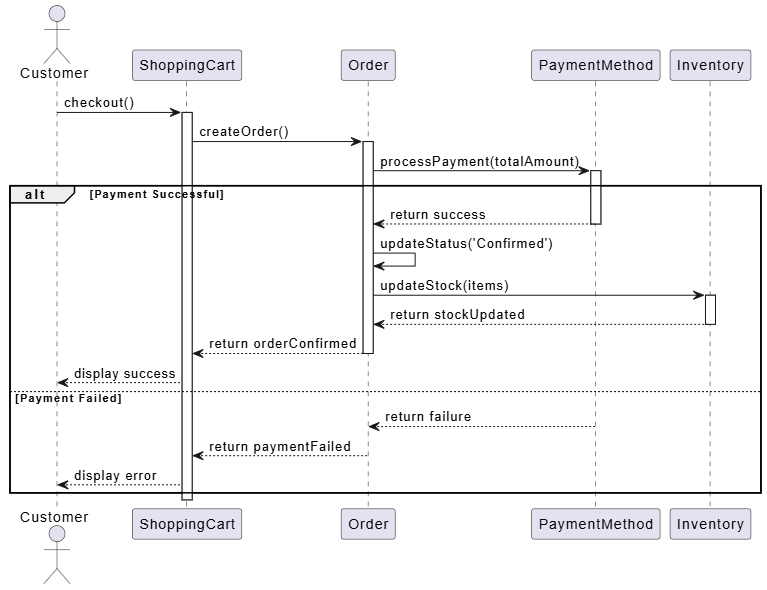
When transitioning from static structure to dynamic behavior, UML Sequence Diagrams are the industry standard for visualizing interactions between system components over time. While a Class Diagram tells you what your system is—its objects and their relationships—a Sequence Diagram explains what your system does—the flow of messages and logic that drives the application.
In this tutorial, we will dissect a complex “Checkout” process. We will explore how to model conditional logic using alt (alternative) fragments and how to visualize the synchronization of critical resources like payment processing and inventory management.
The Anatomy of a Sequence Diagram
Before diving into the logic, let’s break down the visual elements present in the diagram above. Every sequence diagram consists of three primary components:
- Lifelines: The vertical dashed lines represent objects or actors (e.g., Customer, ShoppingCart, Inventory). They represent the existence of the object over time.
- Activation Bars: The thin rectangular boxes on the lifelines indicate when an object is actively performing an operation. In our diagram, notice how the Order object is active while waiting for the payment response.
- Messages: The horizontal arrows represent the communication between objects. Solid arrows denote synchronous calls (the sender waits for a response), while dotted arrows represent return messages.
Modeling Control Flow: The ‘alt’ Fragment
Real-world systems rarely follow a straight, linear path. They must handle success and failure cases. In UML, we use Combined Fragments to handle this. The diagram utilizes an alt (alternative) fragment, which is the most common way to model if-else logic.
The large dashed box in the middle of the diagram represents a decision point based on the result of the processPayment() call. The diagram is split into two distinct regions:
- Condition [Payment Successful]: If the payment gateway confirms the transaction, the system proceeds to update the order status and check inventory.
- Condition [Payment Failed]: If the payment is rejected, the system bypasses the inventory update and triggers an error display.
Step-by-Step: The Successful Checkout Flow
Let’s trace the execution path for a successful transaction. This flow demonstrates the concept of delegation, where one object asks another to perform a task on its behalf.
- Initiation: The Customer triggers the
checkout()operation on the ShoppingCart. - Order Creation: The ShoppingCart creates an Order object and passes control to it via
createOrder(). - Payment Processing: The Order object sends a synchronous message,
processPayment(totalAmount), to the PaymentMethod service. The system pauses here, waiting for a response. - State Update: Upon receiving a “return success” message, the Order object executes its own internal logic to update its status to ‘Confirmed’ (
updateStatus()). - Inventory Management: Finally, the Order object sends a request to the Inventory system to reserve the items (
updateStock(items)).
Implementing the Logic with VPasCode
Visual Paradigm’s VPasCode allows you to generate these diagrams using text. This approach is powerful for version control and rapid prototyping. The code below strictly follows PlantUML syntax, utilizing the alt keyword to define the conditional logic we discussed.
@startuml
participant "Customer" as C
participant "ShoppingCart" as SC
participant "Order" as O
participant "PaymentMethod" as PM
participant "Inventory" as Inv

C -> SC : checkout()
SC -> O : createOrder()
O -> PM : processPayment(totalAmount)

alt [Payment Successful]
    PM --> O : return success
    O -> O : updateStatus('Confirmed')
    O -> Inv : updateStock(items)
    Inv --> O : return stockUpdated
    O --> SC : return orderConfirmed
    SC --> C : display success
else [Payment Failed]
    PM --> O : return failure
    O --> SC : return paymentFailed
    SC --> C : display error
end
@enduml
Key Syntax Rules
When writing this code, pay attention to the structural integrity of the alt block:
- The
altkeyword must be followed by a condition in brackets, e.g.,[Payment Successful]. - The
elsekeyword is optional but highly recommended for readability. It defines the fallback path (the failure case). - The
endkeyword is mandatory to close the block.
Conclusion
By separating the checkout logic into distinct “Success” and “Failure” branches, this Sequence Diagram provides a clear blueprint for developers. It ensures that the Inventory is only updated when the Payment is confirmed, preventing data inconsistencies. Whether you are drawing manually or using VPasCode, the logical structure remains the same: define the actors, establish the flow, and handle the exceptions.