
Mastering UML Sequence Diagrams: The Optional (Opt) Fragment for Conditional Logic
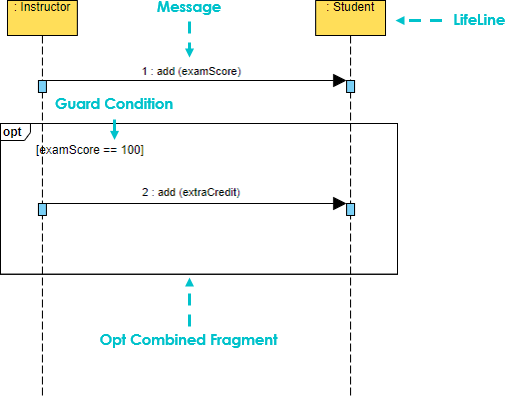
In the world of software engineering and system design, clarity is paramount. When you are defining how different components of a system interact over time, a Sequence Diagram is your most powerful tool. Today, we will dive deep into a specific but critical concept: the Opt (Optional) Combined Fragment.
Understanding how to model conditional behavior—where a specific action only happens if a certain criteria is met—is essential for creating accurate software specifications. This tutorial will guide you through the anatomy of the Opt fragment, its logical implications, and how to implement it effectively using industry-standard tools.
What is the Opt Fragment?
The Opt fragment stands for Optional. In UML (Unified Modeling Language) sequence diagrams, it represents a region of the interaction that may or may not occur. Unlike a Alt (Alternative) fragment, which forces a choice between paths, the Opt fragment implies that if the condition is not met, the system simply proceeds as if that block of logic never existed.
This concept is fundamental for modeling “happy paths” versus “exception handling” or “bonus features.” It answers the question: “Under what circumstances does this specific interaction take place?”
Key Components of an Opt Fragment
When you look at a sequence diagram containing an Opt fragment, you will notice a distinct rectangular frame. This frame contains several specific elements that define its behavior:
- The Frame Label: The top-left corner of the rectangle is labeled with the keyword
opt(or sometimesoptional). This immediately signals to the reader that the content inside is not mandatory. - The Guard Condition: Inside the frame, typically near the top, you will see a condition enclosed in square brackets, such as
[examScore == 100]. This is the “guard” that protects the logic inside. The interaction inside the box is only executed if this expression evaluates to true. - The Interaction Flow: The messages (arrows) inside the box represent the sequence of events that occur only if the guard condition is satisfied.
Walkthrough: The “Student Bonus” Scenario
To make this concept concrete, let’s analyze a specific scenario often used in educational system modeling: awarding extra credit to a student.
The Setup
Imagine a system with two primary actors:
- :Instructor (The initiator of the process)
- :Student (The recipient of the action)
The process begins with the instructor recording a standard exam score. This is a mandatory step for the system to function. In our diagram, this is represented by the message 1 : add(examScore).
The Optional Logic
Once the score is recorded, the system evaluates a specific rule. In this case, the rule is: “Does the student have a perfect score?”
This is where the Opt fragment comes into play. The diagram includes a guard condition: [examScore == 100].
- Scenario A (Score is 100): The condition is true. The system executes the optional fragment. The instructor sends a message
2 : add(extraCredit)to the student’s record. - Scenario B (Score is 95): The condition is false. The system skips the entire block. No extra credit is added, and the interaction simply ends or moves to the next standard process.
Visualizing the Guard Condition
The text inside the square brackets is known as a Guard Expression. It acts as a boolean switch. In the context of the diagram provided:
The label “Guard Condition” points to the logic gate. It dictates the flow of control. Without this guard, the message add(extraCredit) would happen every single time the exam score is added, which is logically incorrect for a bonus system.
By grouping the add(extraCredit) message inside the opt frame, you are visually enforcing the rule that this is a dependency of the previous event, not an independent one.
Tooling: Visual Paradigm
To create professional, standard-compliant diagrams like the one discussed above, you need robust modeling software. One of the leading tools in the industry is Visual Paradigm.
Visual Paradigm offers a comprehensive suite of UML tools that allow developers and architects to design system architecture, create sequence diagrams, and generate code. It supports the drag-and-drop creation of combined fragments.
Using Visual Paradigm for Opt Fragments:
- Open your Sequence Diagram editor.
- Locate the “Combined Fragment” tool in the toolbar.
- Select opt (Optional) from the type dropdown menu.
- Draw the frame over the lifelines where you want the optional behavior to occur.
- Click inside the frame to edit the guard condition (e.g., type
[examScore == 100]). - Place your messages and interactions inside the frame.
Visual Paradigm handles the syntax and formatting automatically, ensuring your diagrams are valid UML 2.x standards, making them readable by other engineers.
Why Use Opt Fragments?
The use of the Opt fragment is not just about drawing pretty lines; it is about precise communication. In software development, assumptions are expensive. If a developer assumes a “Bonus” feature is mandatory, they might code it into the core logic, leading to bugs or unnecessary database writes.
By explicitly modeling it as Opt, you are:
- Reducing Ambiguity: Stakeholders know exactly when the feature triggers.
- Optimizing Performance: It implies that the check is a conditional branch, not a linear flow.
- Improving Maintainability: Future developers can easily identify which parts of the system are “optional” or “feature-flagged.”
Conclusion
The Opt fragment is a vital component of the UML Sequence Diagram. It allows us to model the reality of software systems, where not every path is taken every time. By mastering the Guard Condition and the Optional frame, you can create diagrams that are not only visually appealing but logically rigorous.
Whether you are using Visual Paradigm or another tool, remember that the goal is to make the system’s behavior explicit. The next time you are designing a flow that involves a specific condition, reach for the opt frame to define your boundaries.