
Mastering UML State Machine Diagrams: Architecture, Logic, and Tools
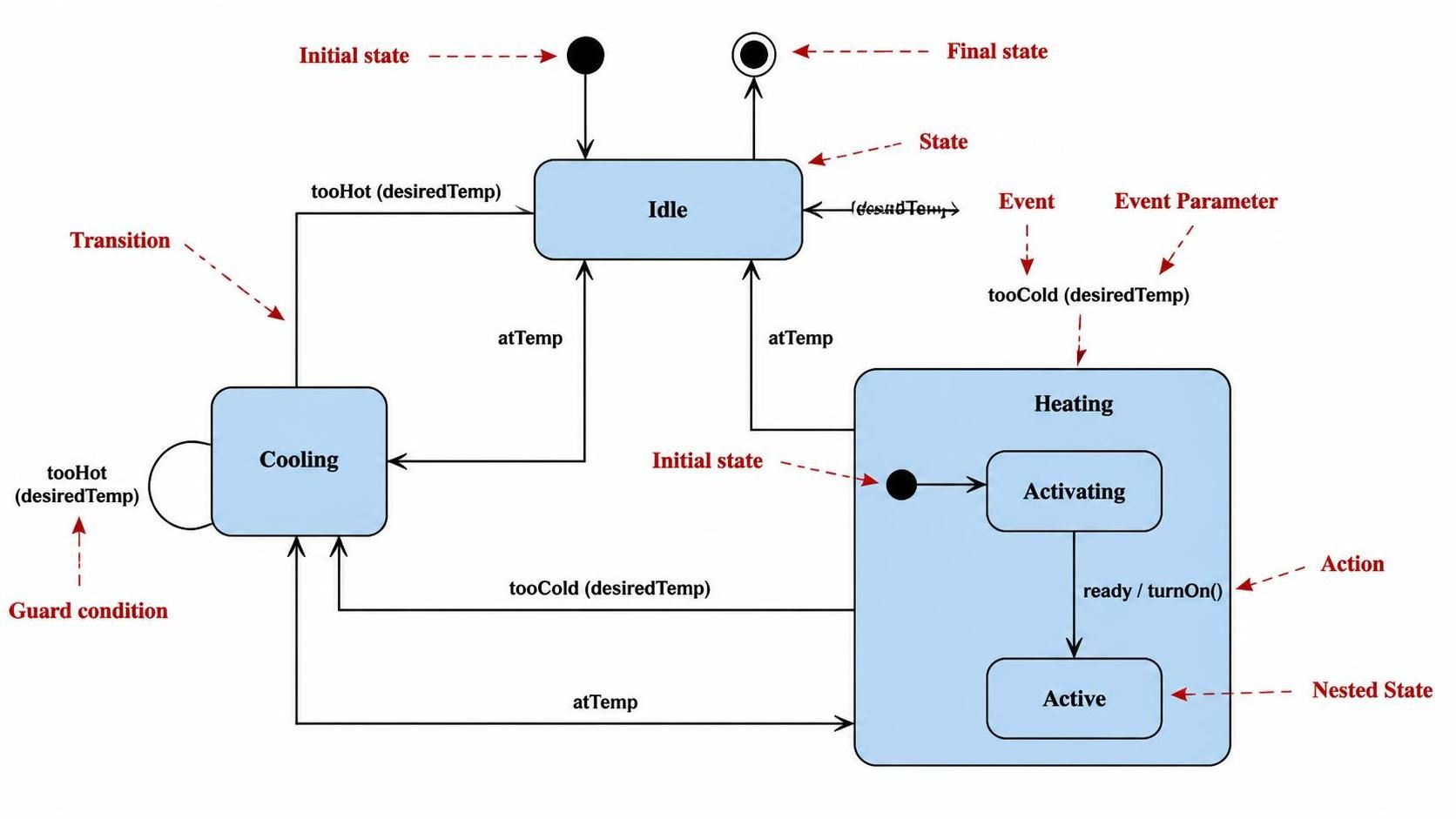
A State Machine Diagram is a powerful behavioral modeling tool used to describe the dynamic nature of a system. Unlike static diagrams that show structure, a state machine diagram illustrates how an object or system changes its status (state) in response to external events over time. It is the blueprint for the lifecycle of an object, defining exactly where it can start, what it can do, and how it transitions to its final state.
Understanding the Core Architecture
The architecture of a state machine is built upon a set of defined states and the transitions that connect them. Let’s break down the anatomy of a system like a thermostat, as depicted in our reference diagram.
1. States and Lifecycle
A state represents a condition or status during the life of an object. In the thermostat example, we see distinct states such as Idle, Cooling, and Heating. These are not just labels; they represent the active logic currently running within the system.
- Idle: The system is waiting for a trigger.
- Cooling: The system is actively lowering the temperature.
- Heating: The system is raising the temperature.
2. Transitions and Events
Transitions are the arrows connecting states. A transition occurs when a specific Event happens. Events can be signals, method calls, or conditions being met.
For instance, the transition from Idle to Cooling is triggered by the event tooHot. If the system is currently Idle and detects that the temperature is tooHot, it immediately transitions to the Cooling state.
3. Guard Conditions
Not all transitions happen automatically. Sometimes, a transition is conditional. This is represented by a Guard Condition, typically enclosed in square brackets or shown as a label on the transition path. In the diagram, the transition from Cooling back to Idle only occurs if the guard condition atTemp (the temperature has reached the desired level) is true.
4. Nested States and Hierarchy
Complex systems often require sub-states. This is known as State Hierarchy or Concurrent States. In the diagram, the Heating state is a “Composite State.” Inside it, there is a nested lifecycle:
- The system first enters
Activating. - Once ready, it triggers the action
turnOn(). - Finally, it settles into the
Activestate.
From Concept to Code: Modeling Logic
To implement this logic in a software development environment or a model-driven engineering tool, we translate the visual diagram into a formal syntax. Below is a representation of how the thermostat logic is structured using standard modeling text formats.
@startuml
[*] --> Idle

state Idle {
    [*] --> Activating
    Activating --> Active : ready / turnOn()
}

state Heating {
    state Activating
    state Active
}

Idle --> Cooling : tooHot(desiredTemp)
Idle --> Heating : tooCold(desiredTemp)

Cooling --> Idle : atTemp
Heating --> Idle : atTemp

Cooling --> Cooling : tooHot(desiredTemp)

Heating --> Cooling : tooHot(desiredTemp)

Cooling --> Heating : tooCold(desiredTemp)

Idle --> [*]
@enduml
Key Logic Breakdown
- Self-Transitions: Notice the arrow looping back on
Cooling. This represents a guard condition where the system stays in the same state but performs an internal action or check. - Parameters: Notice the
(desiredTemp)in the event labels. State machines often pass data parameters during events to update their internal variables. - Actions: The
/ turnOn()syntax indicates an action to be executed immediately upon the transition.
Tooling: Boosting Collaboration with Visual Paradigm
While the logic is straightforward, managing complex state machines across a large team requires robust tooling. The integration of Visual Paradigm and standard UML modeling creates a seamless workflow that significantly boosts team collaboration and productivity.
Seamless Integration for Real-Time Collaboration
Visual Paradigm (VP) acts as the central nervous system for your architecture team. By supporting real-time collaboration, multiple engineers can work on the same state diagram simultaneously. Whether you are defining the high-level Idle states or drilling down into the Nested States of a heating system, VP ensures that every change is instantly synchronized. This eliminates the “file version” conflict that often plagues distributed teams.
From Model to Code Generation
The true power lies in the bidirectional flow. You don’t just draw diagrams; you generate working code. Visual Paradigm allows you to export the state machine logic directly into Java, C#, or Python. This means your team spends less time manually writing boilerplate state-checking code and more time solving complex business logic problems.
Usage Cases in the Enterprise
- Legacy Modernization: Reverse engineer existing legacy codebases into state diagrams to understand the current behavior before refactoring.
- Agile Sprints: Use state diagrams as living documentation during sprint planning to ensure developers and testers agree on the expected workflow.
- IoT Device Behavior: Model the complex state transitions of IoT devices, ensuring that they handle network disconnects and power failures gracefully.
Conclusion
Mastering State Machine Diagrams is essential for any architect or developer dealing with complex workflows, user account lifecycles, or device behaviors. By combining clear architectural diagrams with powerful tools like Visual Paradigm, teams can ensure their systems are robust, scalable, and easy to maintain.