
Mastering UML with VPasCode: Text-Based Modeling via PlantUML
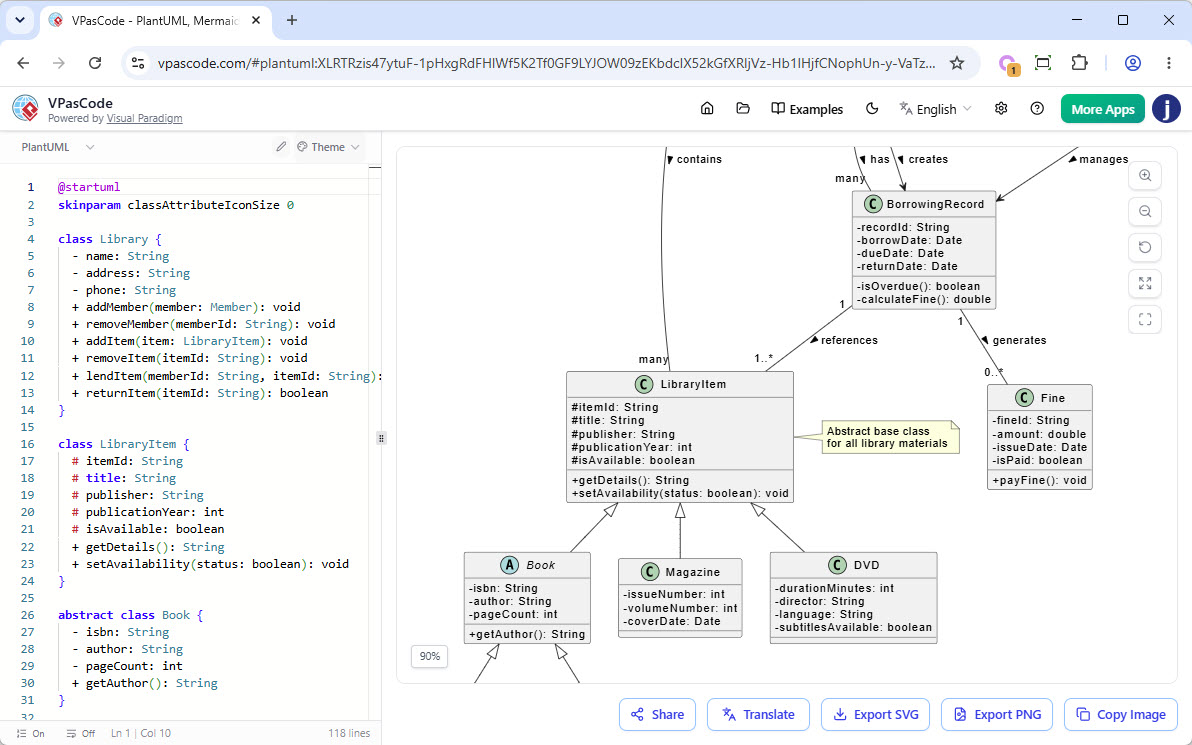
In the world of software engineering, the gap between abstract design and concrete implementation is often bridged by tools. However, relying solely on graphical drag-and-drop interfaces can sometimes hinder version control workflows and automated documentation. This is where VPasCode, the text-based modeling tool from Visual Paradigm, revolutionizes the process. By treating diagrams as code, VPasCode allows developers to leverage the power of text editors while maintaining the visual fidelity of UML diagrams.
This tutorial will guide you through the architecture of the Library Management System shown in the provided screenshot, demonstrating how to translate text-based syntax into a robust class diagram using PlantUML syntax within the VPasCode environment.
The Power of Text-Based Modeling
Traditionally, creating a Class Diagram involves clicking boxes and drawing lines. While intuitive, this method often results in files that are difficult to diff or merge in Git repositories. VPasCode flips this paradigm. As shown in the screenshot, the interface is split into two distinct views:
- The Editor (Left Pane): A clean, line-numbered text area where the logic of the system is defined using code-like syntax.
- The Canvas (Right Pane): A real-time rendering engine that visualizes the text into a professional-grade UML diagram.
This separation is crucial for modern DevOps workflows. It allows teams to review model changes just like they review source code changes, enabling precise version control, branching, and automated generation of documentation.
Step-by-Step: Building the Library Management Model
Let’s break down the code visible in the editor and map it to the visual elements in the diagram. We will analyze the syntax required to define classes, attributes, methods, and inheritance relationships.
1. Defining the Scope and Styling
Before defining the classes, the model sets up its global appearance. The first lines in the editor configure the skin parameters:
@startuml
skinparam classAttributeIconSize 0
The @startuml directive initializes the PlantUML context, while skinparam classAttributeIconSize 0 instructs the renderer to hide the default icons for attributes and methods, giving the diagram a cleaner, more minimalist look.
2. Creating Concrete and Abstract Classes
The core of the system is the Library class. The syntax class Library { ... } creates a standard class box. Inside, we define the structure using standard UML visibility modifiers:
- Private (-): Attributes like
nameandaddressare encapsulated. - Public (+): Methods like
addMemberandremoveItemare exposed for interaction.
class Library {
    - name: String
    - address: String
    - phone: String
    + addMember(member: Member): void
    + removeItem(memberId: String): void
    + addItem(item: LibraryItem): void
    + removeItem(itemId: String): void
    + lendItem(memberId: String, itemId: String): void
    + returnItem(itemId: String): boolean
}
Similarly, the LibraryItem class is defined. Notice the use of protected members (#), which are visible only within the class and its subclasses:
class LibraryItem {
    # itemId: String
    # title: String
    # publisher: String
    # publicationYear: int
    # isAvailable: boolean
    + getDetails(): String
    + setAvailability(status: boolean): void
}
3. Implementing Inheritance (Extends)
The diagram demonstrates a powerful object-oriented concept: inheritance. The LibraryItem acts as a parent class (or superclass) to three specific types of items: Book, Magazine, and DVD.
In VPasCode, this is achieved using the extends keyword (or the < arrow notation). The code snippet below defines Book as an abstract class extending LibraryItem:
abstract class Book extends LibraryItem {
    - isbn: String
    - author: String
    - pageCount: int
    + getAuthor(): String
}
When rendered, the diagram automatically draws a hollow triangle arrow pointing from Book up to LibraryItem, visually representing the "is-a" relationship. The abstract keyword ensures that the Book class is rendered with an italicized name, indicating it cannot be instantiated directly.
4. Managing Relationships and Associations
The right side of the diagram illustrates complex relationships. The BorrowingRecord class is linked to LibraryItem and Fine. In the text editor, these relationships are often defined implicitly through the context of the classes or explicitly using association keywords. The resulting diagram shows cardinalities (multiplicity) such as 1 or many, indicating that one borrowing record references one or many items.
5. Adding Annotations
Documentation is vital. The screenshot shows a sticky-note style annotation attached to LibraryItem explaining that it is an "Abstract base class for all library materials." In VPasCode, this is often rendered using the note syntax, allowing you to attach explanatory text directly to specific nodes without cluttering the main class structure.
Conclusion
By utilizing VPasCode, developers can maintain a "Single Source of Truth" for their system architecture. The text-based approach ensures that the diagram remains synchronized with the actual codebase, reducing the friction between design and development phases. Whether you are managing a library system or designing a complex microservices architecture, treating your diagrams as code provides the scalability and control needed for modern software engineering.