
Mastering Visual Paradigm’s Unified Platform: A VP AI Ecosystem Guide
In modern software development and systems engineering, fragmentation is a common challenge. Teams often find themselves switching between dozens of disconnected tools: a modeling tool for diagrams, a separate repository for code, a distinct workspace for documentation, and various chat applications for communication. This fragmentation leads to context switching and a loss of productivity.
The solution lies in the Unified Platform—the primary dashboard and “front door” for the Visual Paradigm ecosystem. This tutorial will guide you through the architectural concepts behind this platform, explaining how it serves as a centralized hub for organizing projects, launching specialized tools, and surfacing artifacts across cloud and local environments.
1. The Core Concept: The Unified Platform as an Ecosystem
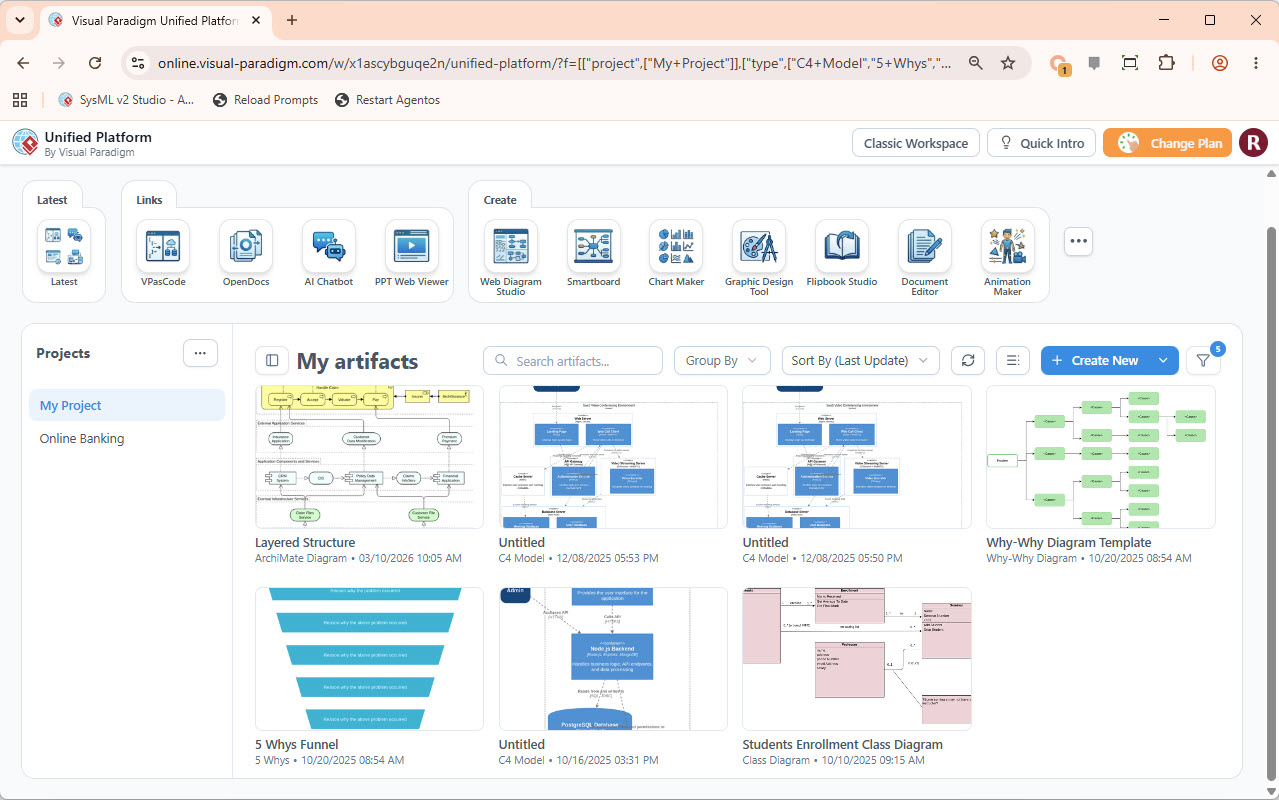
Visually, the Unified Platform acts as a command center. As shown in the interface, it aggregates complex functionalities into a single, navigable web-based environment. Instead of a user opening Visual Paradigm for Enterprise locally, then opening a browser for documentation, then opening a terminal for code, the Unified Platform brings these capabilities together.
Architecturally, it functions as a service aggregator. It does not necessarily build the models itself but acts as the coordination point for the broader engineering workflow. It provides a common entry point for diverse roles, including analysts, architects, developers, project managers, and technical writers.
Key Architectural Features
- Centralized Navigation: Users do not need to manage multiple URLs or login credentials for different tools. The platform provides a single point of access.
- Unified Workspace: It connects teams working across different modeling environments, ensuring that whether a model is created in a cloud instance or a local desktop, it is accessible here.
- Artifact Surfacing: The platform “surfaces” artifacts. This means it indexes and displays models, code snippets, and documents, making them discoverable via search and organization.
2. Launching Specialized Capabilities
One of the most critical responsibilities of the Unified Platform is to act as the launcher for specialized tools. The interface you see is not just a file manager; it is a portal to a suite of powerful engineering tools. The platform manages the context required to run these tools, allowing for a seamless transition between high-level modeling and low-level coding.
Let’s look at the specific tools available through the platform and their roles in the engineering lifecycle:
VPasCode and VP Desktop
The platform integrates VPasCode (Visual Paradigm as Code) and VP Desktop. These tools represent the bridge between graphical modeling and implementation.
- VPasCode: Allows developers to define models using code, facilitating version control and automation.
- VP Desktop: Provides a robust, offline-capable environment for heavy-duty modeling tasks.
AI and Documentation Tools
The platform also hosts AI-driven assistants and documentation tools:
- AI Chatbot: Integrated directly into the workflow, this tool assists users in generating diagrams, explaining concepts, or refining requirements using natural language.
- OpenDocs & Document Editor: These tools ensure that the “paper trail” of engineering is maintained. They allow for the creation of specifications, user stories, and technical reports that are linked directly to the models.
- PPT Web Viewer: This allows for the seamless presentation of engineering artifacts without requiring the recipient to have specialized software installed.
3. Organizing Projects and Workspaces
The “Projects” sidebar is the backbone of the organization strategy within the Unified Platform. It allows teams to create distinct containers for their work, ensuring that data is siloed correctly by project while remaining accessible to authorized users.
Example Scenario: Consider a project named “My Project” or a domain-specific project like “Online Banking.” The Unified Platform allows you to group all artifacts related to this specific initiative together.
Managing Artifacts
Once inside a project, the platform displays “My Artifacts.” This is a dynamic view of the work produced. The platform supports various diagram types, as evidenced by the interface:
- Layered Structure (ArchiMate): Used by enterprise architects to visualize business capabilities and strategy.
- C4 Model: Essential for software architects to visualize the structure of a software system (Context, Containers, Components, Code).
- Class Diagrams: The foundation for object-oriented design and code generation.
- 5 Whys Funnel: A root cause analysis tool for problem-solving.
4. Shared Repositories and Collaboration
A major advantage of the Unified Platform is its ability to provide access to shared repositories. In traditional setups, models are often saved as individual files on a local machine, making collaboration difficult.
The Unified Platform solves this by:
- Centralizing Storage: Models are stored in a cloud-based or server-based repository accessible via the dashboard.
- Version Control: It tracks changes, allowing teams to see who updated a diagram and when.
- Collaboration: By connecting teams working across different modeling environments, it ensures that an architect in New York and a developer in London are looking at the same version of the system design.
5. The “Create” Ecosystem
The dashboard features a robust “Create” section, which serves as the gateway to the platform’s generation capabilities. This is where the workflow begins. The platform supports a variety of creation tools beyond standard diagrams:
- Web Diagram Studio: For designing user interfaces and navigation flows.
- Smartboard: For collaborative brainstorming and whiteboarding sessions.
- Chart Maker & Graphic Design Tool: For creating infographics and professional visual assets.
- Flipbook Studio: For turning documents into interactive, page-flip experiences.
- Animation Maker: For creating visual explanations and tutorials.
Conclusion: The Future of Engineering Workflow
The Unified Platform represents a shift from tool-centric workflows to ecosystem-centric workflows. By acting as the coordination point for the broader engineering workflow, it reduces friction and increases visibility.
For organizations, adopting this platform means:
- Reducing the time spent searching for files.
- Ensuring that analysts, architects, and developers are always on the same page.
- Creating a single source of truth for project artifacts.
Whether you are launching a VPasCode instance, searching for a C4 model, or generating a 5 Whys funnel, the Unified Platform is the central hub that makes it all possible.