
Mastering VP NotesKeep: AI-Driven Agile Knowledge Architecture
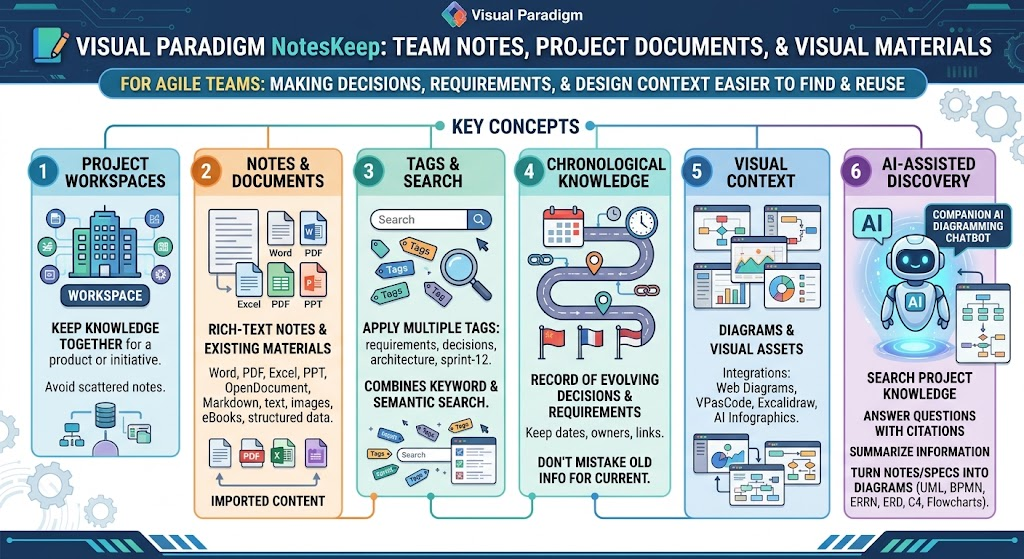
In the rapidly evolving landscape of Agile software development, information silos are the enemy. Teams often find their critical design decisions, requirements, and architectural diagrams scattered across disparate tools, leading to context loss and inefficient collaboration. Visual Paradigm NotesKeep addresses this challenge by transforming the standard “note-taking” paradigm into a comprehensive, project-centric knowledge architecture. This tutorial explores the underlying concepts of NotesKeep, demonstrating how it integrates document management, semantic search, and AI-driven discovery into a unified workflow.
The Concept of Project Workspaces
The foundational unit of NotesKeep is the Project Workspace. Unlike traditional note-taking applications where content is often linear or loosely organized, a Workspace is a container designed to hold the “single source of truth” for a specific product or initiative. It is engineered to aggregate knowledge rather than scatter it.
When you create a Workspace, you are establishing a localized data store that mimics the physical “war room” of a project. This structure allows teams to:
- Centralize Context: Store requirements, meeting minutes, and technical specifications in one location.
- Manage Lifecycle: Track the evolution of the project from inception to deployment.
- Isolate Scope: Prevent “noise” from other projects from cluttering your current focus.
Unifying Rich-Text and Document Management
A critical technical challenge in knowledge management is interoperability. NotesKeep resolves this by treating notes and external documents as first-class citizens within the same environment. It supports a robust set of import formats, allowing teams to ingest existing artifacts without friction.
The system supports the following document types:
- Office Documents: Word, Excel, PowerPoint, and OpenDocument formats.
- Technical & Web Formats: Markdown, Plain Text, and PDF.
- Media & Data: Images, eBooks, and structured data files.
Technical Insight: When you import these files, NotesKeep does not merely store a reference. It creates a managed environment where these assets can be indexed, searched, and linked directly to specific notes, effectively creating a dynamic knowledge graph.
Advanced Search: Semantic vs. Keyword
Retrieving information in a large workspace is difficult if the system relies solely on exact string matching. NotesKeep employs a dual-layer search architecture to ensure high recall and precision:
- Full-Text Keyword Search: The traditional method of finding exact words, numbers, or phrases within the document body.
- Semantic Search: A modern, AI-enhanced approach that understands the intent and meaning behind a query, rather than just the words used.
This is further enhanced by a flexible Tagging System. By applying tags such as requirements, decisions, architecture, or sprint-specific identifiers like sprint-12, users can filter the semantic search results to narrow down to specific contexts.
Maintaining Chronological Knowledge
One of the most common pitfalls in software engineering is “decision drift,” where the team forgets why a specific architectural choice was made, leading to the re-application of outdated solutions. NotesKeep addresses this through its Chronological Knowledge feature.
The system treats the Workspace as a living record. It enforces a temporal structure by:
- Timestamping: Automatically recording when information was created or modified.
- Attribution: Tracking the “owners” of specific notes or decisions.
- Linking: Creating explicit links to earlier decisions. This ensures that current team members can trace the lineage of a requirement back to its origin, preventing the confusion of outdated information with current direction.
Visual Context and Integrations
Text alone is often insufficient for complex system design. NotesKeep bridges the gap between documentation and visualization by supporting rich visual assets directly within notes. The platform integrates with several powerful diagramming tools to provide immediate context:
- Web Diagrams: For system topology.
- VPasCode: For code-centric modeling.
- Excalidraw: For hand-drawn style brainstorming.
- AI Infographics: For automated visual summarization.
AI-Assisted Discovery and Diagramming
The cutting-edge feature of NotesKeep is its AI-driven discovery engine, powered by the Companion AI Diagramming Chatbot. This tool acts as an intelligent intermediary between your text-based knowledge and visual models.
How it works:
- Knowledge Retrieval: The AI indexes your selected project knowledge.
- Querying: You can ask questions like “What are the current security requirements for the login module?”
- Citation: The AI answers with citations, pointing directly back to the source material (notes, documents) where the information was found.
- Visualization: Perhaps most impressively, the AI can convert these specifications into diagrams.
This feature supports a wide range of industry-standard modeling notations, including:
- UML: Unified Modeling Language (Sequence, Class, Use Case diagrams).
- BPMN: Business Process Model and Notation.
- ERD: Entity Relationship Diagrams.
- C4: Context, Containers, Components, Code modeling.
- Flowcharts: General process flows.
Conclusion
Visual Paradigm NotesKeep represents a shift from static document storage to dynamic knowledge management. By combining rich-text editing, semantic search, chronological tracking, and AI-driven visualization, it provides Agile teams with the tools necessary to make decisions faster and keep design context alive throughout the project lifecycle.