
Mastering VP OpenDocs: AI Diagramming to Synchronized Knowledge
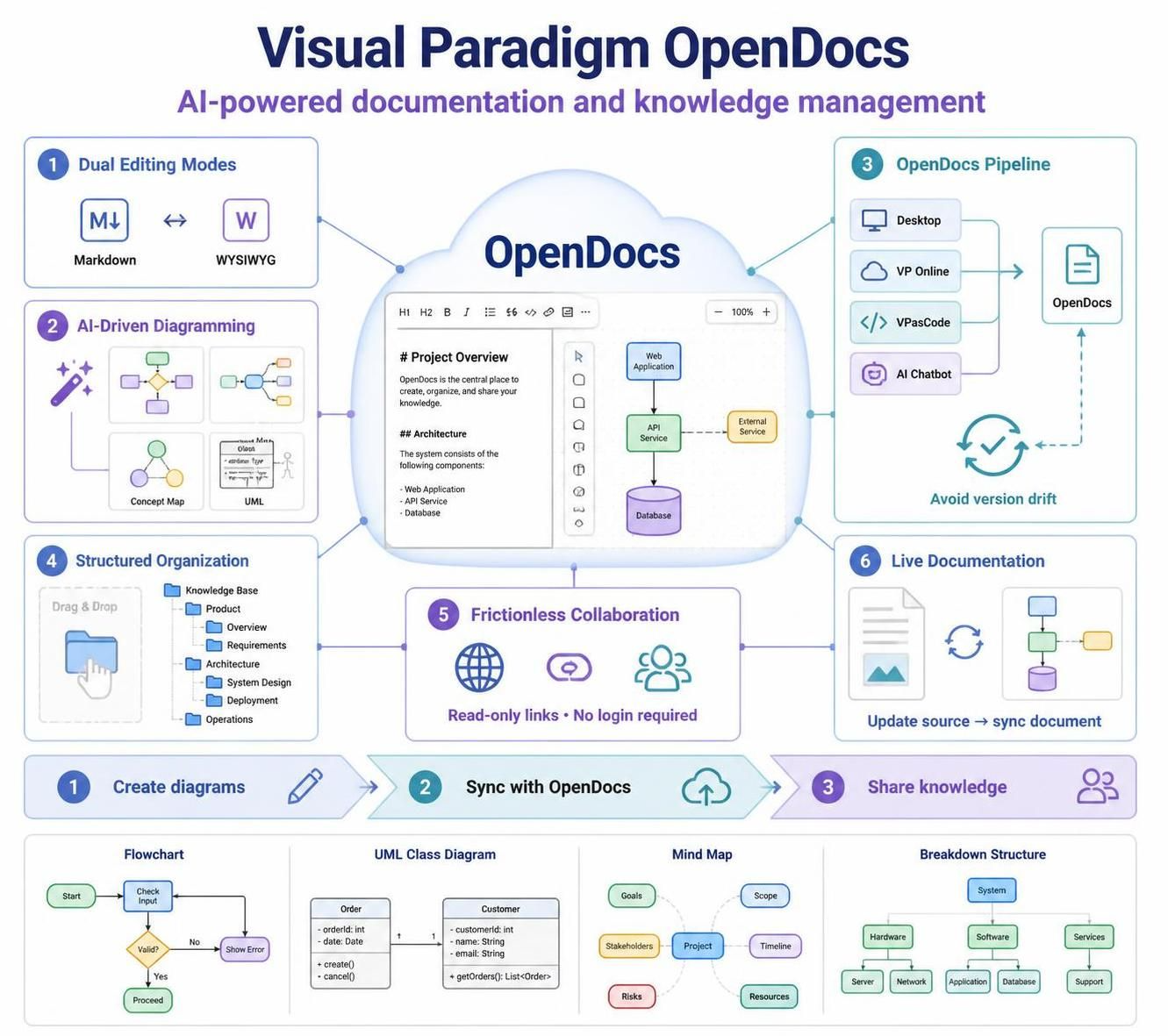
In the modern landscape of software development, documentation often suffers from “version drift”—the inevitable gap between a written document and the actual state of the software it describes. Visual Paradigm OpenDocs addresses this critical challenge by transforming documentation from a static, burdensome task into a dynamic, living artifact. This tutorial explores the architecture behind OpenDocs, explaining how it unifies AI-driven modeling, flexible text editing, and a robust synchronization pipeline to eliminate documentation debt.
1. The Dual-Mode Editing Architecture
At the core of OpenDocs is a flexible editing engine designed to bridge the gap between technical precision and business readability. The system supports two distinct authoring environments that operate on the same data model:
- Markdown Editor: This mode caters to developers and technical writers who prioritize speed and syntax. It allows for rapid content creation using keyboard shortcuts and clean syntax, ideal for writing code snippets, technical specs, or changelogs.
- WYSIWYG (What You See Is What You Get): For stakeholders and product managers, the system provides a traditional word-processing interface. Formatting is visible in real-time, removing the cognitive load of learning markup languages while ensuring professional presentation.
2. AI-Driven Diagramming: Natural Language to Visuals
One of the most significant architectural shifts OpenDocs introduces is the decoupling of diagram creation from manual shape placement. Instead of manually dragging and dropping shapes, the system utilizes an AI engine to interpret natural language prompts and construct complex visual representations.
This capability extends to various modeling standards, including:
- Flowcharts: For mapping business logic and workflows.
- Mind Maps & Concept Maps: For brainstorming and organizing project hierarchies.
- UML Diagrams: Including deployment and profile diagrams for technical architecture.
- Breakdown Structures: For Work Breakdown Structures (WBS) in project planning.
3. The OpenDocs Pipeline: Preventing Version Drift
The “Pipeline” is the architectural backbone that ensures documentation accuracy. It creates a bidirectional link between the documentation and the source models (Visual Paradigm Desktop, VP Online, or VPasCode). This architecture functions as follows:
- Source Change: An engineer updates a deployment diagram in Visual Paradigm Desktop.
- Notification: The OpenDocs Pipeline detects the change via the integration layer.
- Synchronization: The user receives a notification within OpenDocs and can click “Synchronize” to update the embedded diagram instantly.
This mechanism ensures that the documentation is never static; it evolves in lockstep with the codebase and architecture, effectively eliminating version drift.
4. Structured Organization and Collaboration
To manage complex projects, OpenDocs employs a hierarchical file system tree structure. This allows teams to organize documentation logically by project, module, or team, making the repository searchable and navigable. Furthermore, the system supports frictionless collaboration through secure, read-only links, allowing external stakeholders to view documentation without requiring a full login or onboarding process.
Practical Workflow: From Concept to Shareable Knowledge
Understanding the architecture is one thing; applying it is another. Here is how a typical workflow unfolds using these architectural features:
- Creation: Start a new document and use the AI prompt to generate a Work Breakdown Structure (WBS) for a new feature.
- Refinement: Switch to the Markdown editor to add technical details or switch to WYSIWYG for stakeholder-friendly formatting.
- Integration: Embed a live diagram linked to the VPasCode or Desktop environment.
- Sharing: Generate a secure, read-only link to share the entire workspace with clients or executives.
Conclusion
Visual Paradigm OpenDocs represents a paradigm shift in knowledge management. By unifying text editing with live, interactive visual modeling and leveraging a robust synchronization pipeline, it ensures that your knowledge base remains accurate, organized, and accessible. Whether you are outlining requirements or documenting architecture, OpenDocs provides the tools to keep your documentation in sync with your work.