
VP OpenDocs: Bridging Diagrams and Business Context via the Connected Hub
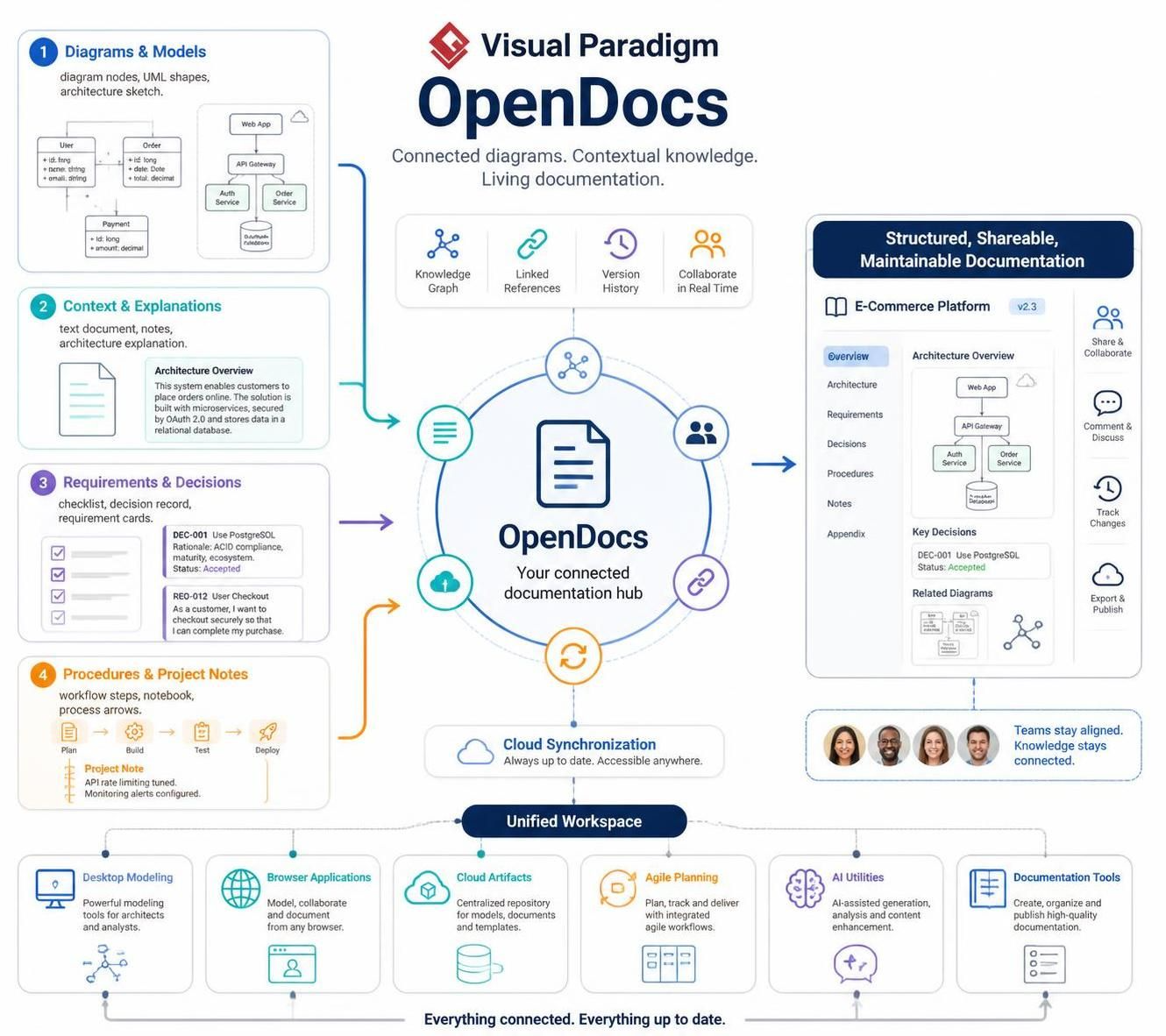
In the modern landscape of software engineering and enterprise architecture, a persistent challenge remains: the disconnect between design artifacts (diagrams) and the business context that drives them. Often, diagrams are created in isolation, becoming “orphaned images” that lose their meaning as projects evolve. Visual Paradigm OpenDocs addresses this by introducing a specific architectural pattern: the Connected Documentation Hub.
This tutorial explores the system architecture of OpenDocs, analyzing how it transforms static models into living, breathing documentation. We will walk through the four distinct input pillars that feed into this central hub and how they are synthesized into a unified, shareable artifact.
The Core Concept: The Connected Documentation Hub
At the center of the Visual Paradigm ecosystem lies the OpenDocs architecture. Unlike traditional documentation tools that treat text and images as separate entities (like a Word document containing a screenshot), OpenDocs utilizes a data-driven approach.
The central component is the OpenDocs Workspace. It functions not merely as a repository but as a dynamic integration point. It ingests structured data from the modeling tools and unstructured data from project management and decision logs, merging them into a single source of truth. This hub maintains “linked references,” ensuring that if a diagram element changes, the accompanying documentation updates automatically.
Pillar 1: Diagrams & Models (The Structural Layer)
The foundation of the OpenDocs architecture is the visual model. In this system, diagrams are not just graphics; they are data structures.
- Input Sources: UML class diagrams, architecture sketches, and entity-relationship models.
- Structural Integrity: OpenDocs parses the metadata within these diagrams. For instance, a User class is not just a box on a screen; it is a data object with attributes (id, name) and relationships (Order).
- Cloud-Native Architecture: Whether the model is drawn on a desktop or a browser-based canvas, OpenDocs treats it as a cloud artifact. This ensures that the “source of truth” for the diagram is always synchronized with the documentation.
Pillar 2: Context & Explanations (The Narrative Layer)
Diagrams provide the “what,” but context provides the “why.” OpenDocs introduces a narrative layer that wraps around the technical models.
Consider an Architecture Overview. A diagram might show an API Gateway and a Database, but the “Context” section provides the prose explanation. It might state: “The solution is built with microservices, secured by OAuth 2.0 and stores data in a relational database.” This text is linked directly to the visual components, allowing a reviewer to click a diagram node and instantly see the architectural rationale.
Pillar 3: Requirements & Decisions (The Governance Layer)
One of the most critical aspects of enterprise documentation is traceability. OpenDocs integrates a governance layer that captures requirements and architectural decisions.
The system structures this data into specific artifacts:
- Requirement Cards: Specific user needs (e.g., “User Checkout”) are tracked as distinct objects. These are often linked to the specific use cases in the diagram that satisfy them.
- Decision Records: Architecture is full of trade-offs. OpenDocs captures these via “Key Decisions” (e.g.,
DEC-001: Use PostgreSQL). It records the rationale (ACID compliance, maturity) and the status (Accepted), creating an audit trail that is essential for compliance and future maintenance.
Pillar 4: Procedures & Project Notes (The Operational Layer)
Finally, OpenDocs incorporates the operational reality of the project. It bridges the gap between design and deployment by including workflows and project notes.
This layer includes:
- Workflow Steps: Process arrows and build pipelines (Plan -> Build -> Test -> Deploy) are visualized and linked to the documentation.
- Project Notes: Real-time operational details, such as “API rate limiting tuned,” are captured here. This ensures that the documentation reflects the actual state of the deployed system, not just the theoretical design.
Synthesis: The Unified Output
When these four pillars are fed into the OpenDocs hub, the result is a Structured, Shareable, Maintainable Document. This is typically rendered as a comprehensive view (such as an E-Commerce Platform overview) that contains:
- Dynamic Diagrams: Rendered from the live model, ensuring accuracy.
- Linked References: Navigation that connects the overview to the detailed requirements and decisions.
- Collaboration Tools: Real-time comments and version history.
- Export & Publish: The ability to export the entire context into various formats for stakeholders.
By unifying these disparate elements, OpenDocs ensures that “Everything connected. Everything up to date.”