


Introduction
As a software architect who has evaluated dozens of diagramming and modeling tools over the years, I’m always on the lookout for solutions that bridge the gap between conceptual design and practical implementation. When I first heard about Visual Paradigm’s integrated approach to C4 modeling—combining traditional diagramming precision with cutting-edge AI generation—I was skeptical but intrigued. Could a single platform really deliver both the rigor professional architects demand and the accessibility that helps teams get started quickly? After spending several weeks putting both the Desktop and Online editions through their paces, I’m ready to share my authentic experience. This isn’t a marketing brochure; it’s a real-world review from someone who needs these tools to work under pressure, with real projects, and real teams.
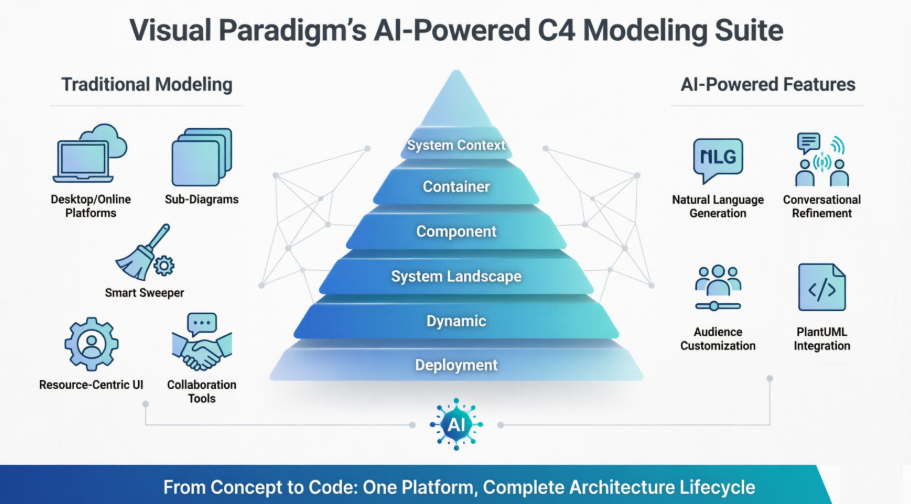
Why C4 Modeling Matters (And Why Your Tool Choice Is Critical)
Let’s be honest: drawing boxes and lines is easy. Communicating complex software architecture clearly across stakeholders, developers, and leadership? That’s the hard part. The C4 model has become the de facto standard for this because it provides a consistent, multi-level vocabulary—from high-level system context down to granular component details. But a model is only as good as the tool you use to create and maintain it.
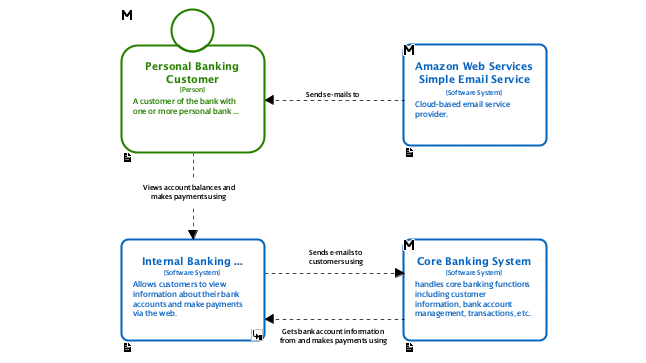
The Desktop Experience: Power Where You Need It
Visual Paradigm Desktop feels like a professional workshop. It’s not minimalist, and that’s intentional. When you’re modeling a distributed microservices architecture with dozens of interdependencies, you need depth, not simplicity.
Professional-Grade C4 Support Out of the Box
The tool natively supports all six C4 diagram types: System Context, Container, Component, System Landscape, Dynamic, and Deployment. What impressed me most wasn’t just the checklist coverage—it was the thoughtful implementation. Each element type has dedicated properties, stereotypes, and tagged values that let you embed metadata directly into your model. This turns diagrams from static pictures into living documentation.
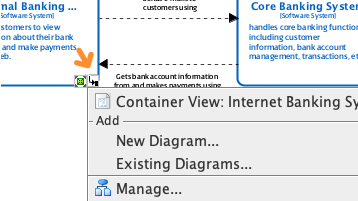
Drill-Down Workflow That Actually Works
One of my favorite features is the sub-diagram capability. I can start with a high-level System Context diagram, then double-click any container to automatically generate a linked Container diagram, and repeat down to the Component level. The traceability is automatic, and the navigation feels intuitive. No more manually syncing multiple files or losing context between views.
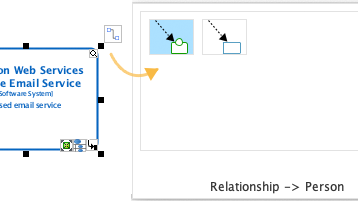
Resource-Centric Modeling: Speed Meets Precision
The interface uses smart magnets and one-click connections that dramatically reduce the “drag-drop-align-fudge” cycle common in other tools. Creating a new component and connecting it to an existing service takes seconds, not minutes. For iterative design sessions, this fluidity keeps your focus on architecture, not on fighting the UI.
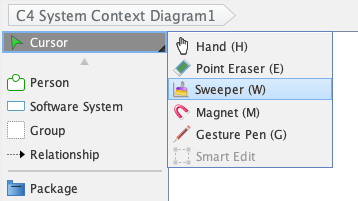
Smart Sweeper: Because Nobody Likes Manual Alignment
We’ve all been there: a diagram that makes perfect sense logically but looks like a toddler drew it. The Smart Sweeper feature automatically aligns, distributes, and routes connectors to produce a clean, publication-ready layout instantly. It’s not magic, but it’s close—and it saves hours of manual tweaking.
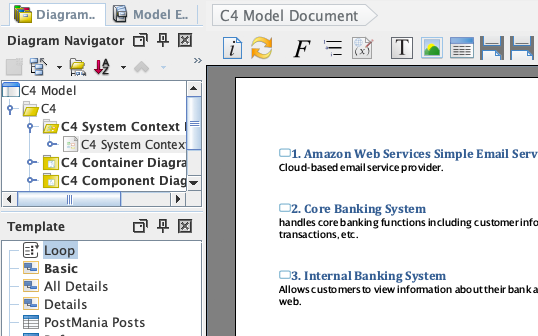
Full Lifecycle: From Whiteboard to Wiki
Architecture doesn’t live in isolation. Visual Paradigm integrates collaboration features like threaded comments, version control hooks, and annotation tools directly into the modeling environment. When it’s time to share, Doc. Composer generates detailed specifications, and Project Publisher can output your entire model as an interactive website. This end-to-end support means your diagrams stay relevant and accessible long after the initial design session.
AI-Powered Assistance: Not Just a Gimmick
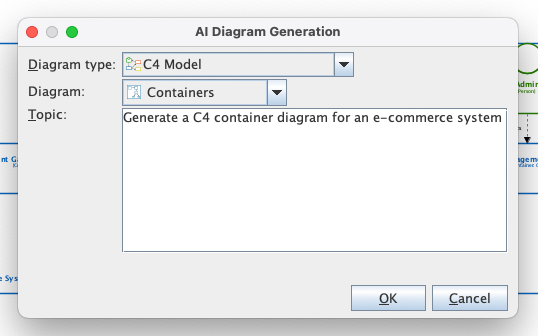
I’ll admit—I was wary of the “AI diagram generator” label. Too many tools promise AI magic and deliver little more than templated outputs. Visual Paradigm’s implementation, however, genuinely augments the workflow.
Instant Generation from Plain English
Try typing: “Generate a C4 Container Diagram for an e-commerce system with user authentication, product catalog, shopping cart, Stripe payment integration, and order fulfillment service.” Within seconds, the AI produces a structured, standards-compliant diagram with appropriate elements, relationships, and even sensible default properties. It’s not perfect—you’ll still want to review and refine—but it eliminates the blank-canvas paralysis that slows down early design phases.
Iterative Refinement via Conversational AI
What sets this apart is the integrated chatbot. After the initial generation, you can ask follow-ups like “Add a Redis cache layer between the product catalog and the database” or “Highlight all external dependencies in red.” The AI updates the diagram contextually, maintaining consistency across the model. This conversational refinement feels like pair-programming with a knowledgeable architect.
Audience-Aware Output
A subtle but powerful feature: the AI can tailor diagram complexity based on your intended audience. Generating a view for executive stakeholders? It simplifies technical details and emphasizes business capabilities. Preparing for a sprint planning session with engineers? It surfaces integration points, data flows, and deployment considerations. This adaptability makes the same model useful across multiple conversations.
Visual Paradigm Online: Collaboration Without Compromise
For teams that prioritize real-time collaboration or prefer browser-based workflows, the Online edition delivers a surprisingly robust experience. While it lacks some of Desktop’s deep customization, it excels at speed, accessibility, and shared editing. The C4 templates are well-curated, and the interface remains responsive even with complex diagrams. Plus, changes sync instantly across collaborators—no more “which version is latest?” confusion.
Diagram Gallery: See It in Action
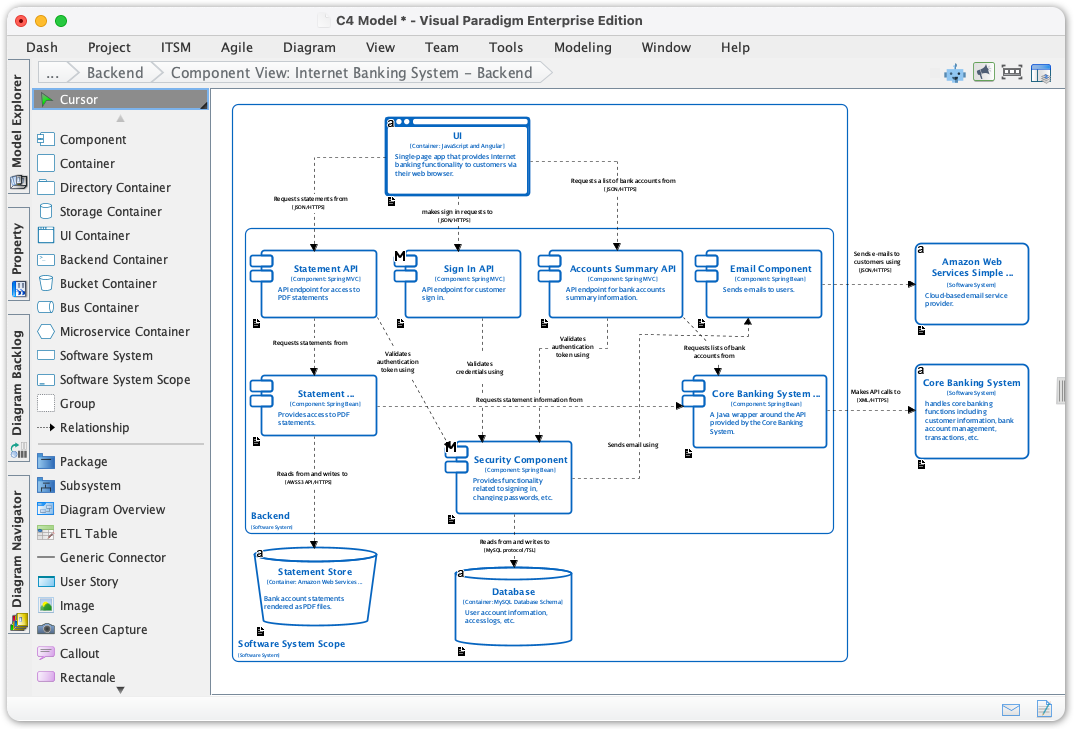
Sometimes you just need to see what’s possible. Here are examples of the six core C4 diagram types rendered in Visual Paradigm:
C4 Component Diagram
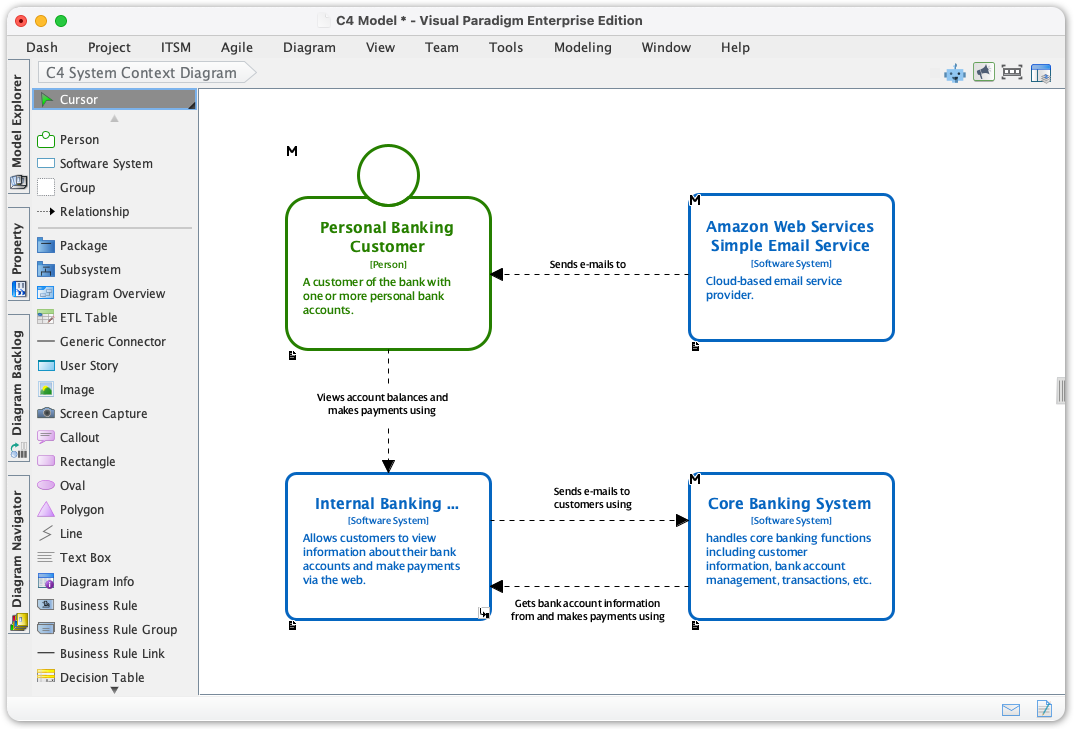
System Context diagram
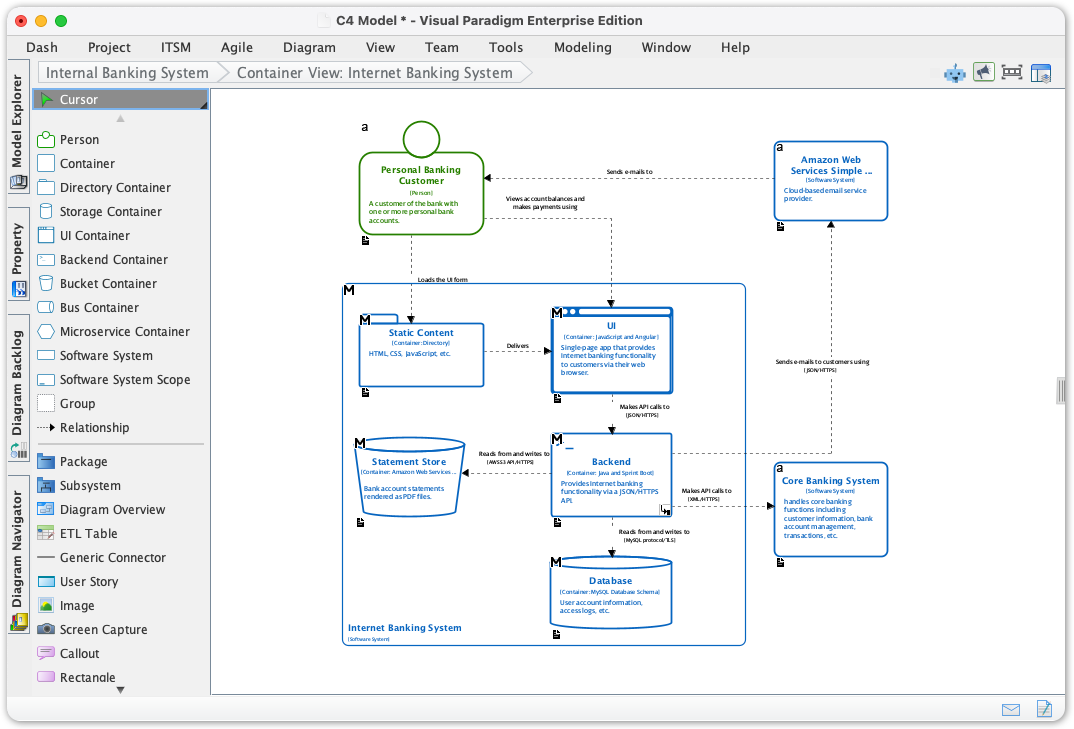
Container diagram
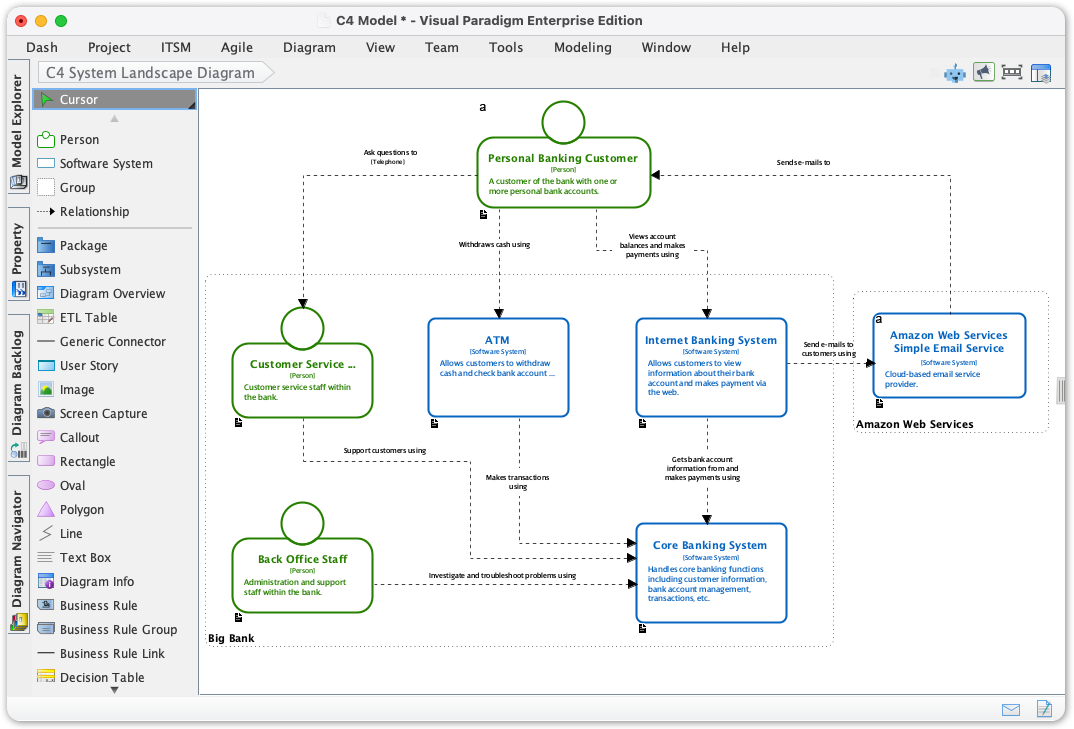
System Landscape diagram
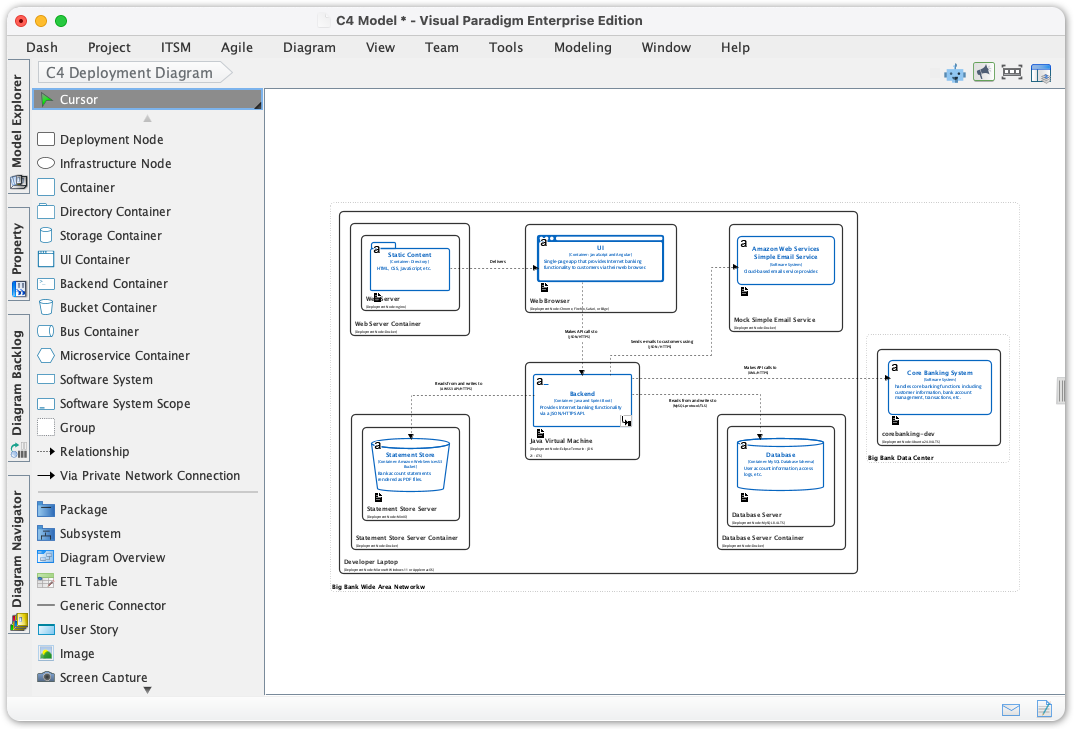
Deployment diagram
Dynamic diagram

Access, Editions, and Getting Started
Visual Paradigm structures access thoughtfully:
-
Desktop: AI features and full C4 support require the Professional Edition or higher with active maintenance. Access via Tools > App menu.
-
Online: AI C4 PlantUML Studio is available to Combo Edition users or higher, directly through the web interface.
-
Bonus: Desktop users with active maintenance also get access to the cloud-based C4 PlantUML Studio and the AI Diagramming Chatbot—blending offline power with cloud convenience.
Conclusion: Who Should Choose Visual Paradigm for C4 Modeling?
After extensive hands-on use, here’s my candid take: Visual Paradigm isn’t the simplest C4 tool on the market, nor is it the cheapest. But if you value precision, scalability, and a tool that grows with your architectural complexity, it’s one of the most compelling options available today.
Choose Visual Paradigm Desktop if: You’re a solo architect or part of a team that needs deep modeling capabilities, offline access, and tight integration with documentation and version control workflows. The AI features act as a powerful accelerator, not a replacement for expertise.
Choose Visual Paradigm Online if: Your team prioritizes real-time collaboration, browser-based access, and rapid iteration. The C4 templates and AI generator help onboard new members quickly while maintaining modeling standards.
Skip it if: You only need occasional, simple diagrams and prefer ultra-minimalist tools. There are lighter-weight options for basic use cases.
For me, the combination of rigorous C4 support, thoughtful UX features like Smart Sweeper and sub-diagram navigation, and genuinely useful AI assistance makes Visual Paradigm a standout. It respects the craft of software architecture while removing the friction that often gets in the way of clear communication. In a landscape full of diagramming tools that do one thing well, Visual Paradigm delivers a cohesive, professional-grade environment that supports the entire architecture lifecycle—from first sketch to living documentation.
References
-
Visual Paradigm C4 Diagram Tool Solution: Official solution page detailing Visual Paradigm’s comprehensive support for C4 modeling across Desktop and Online platforms.
-
Visual Paradigm Full C4 Model Support Release: Release announcement covering native support for all six C4 diagram types and deep modeling capabilities.
-
AI Diagram Generator: Complete C4 Model: Announcement of AI-powered generation for the full C4 model hierarchy from natural language descriptions.
-
Visual Paradigm Online C4 Model Tool: Feature overview of the browser-based C4 modeling environment with templates and collaboration tools.
-
Visual Paradigm Full C4 Model Support Update: Detailed update on enhanced C4 modeling features and resource-centric interface improvements.
-
C4 Diagram Tool Features: Comprehensive feature list for C4 diagramming capabilities including stereotypes, sub-diagrams, and export options.
-
Comprehensive Guide to the C4 Model with Visual Paradigm: Third-party tutorial walking through C4 modeling best practices using Visual Paradigm tooling.
-
Beginner’s Guide to C4 Model Diagrams: Introductory blog post explaining C4 model fundamentals and how to create each diagram type.
-
**Beginner’s Guide to C4 Model Diagrams **(Part 2): Continued beginner tutorial covering advanced C4 modeling techniques and common pitfalls.
-
C4 Diagram Tool Feature Overview: Detailed breakdown of modeling tools, collaboration features, and AI integration for C4 workflows.
-
AI Diagram Generator: Complete C4 Model Release: Technical release notes on AI-powered C4 model generation across all diagram levels.
-
AI-Powered C4 PlantUML Markdown Editor: Announcement of the side-by-side markdown editor for AI-generated PlantUML C4 diagrams.
-
Generate the Complete C4 Model Instantly: Highlight of instant, standards-compliant C4 model generation for complex systems.
-
AI-Powered C4 PlantUML Studio: Direct access to the cloud-based AI studio for generating and editing C4 diagrams via PlantUML.
-
AI-Powered C4 PlantUML Editor Release: Update on enhanced markdown editing and AI refinement capabilities for C4 PlantUML diagrams.
-
Leveraging Visual Paradigm’s AI C4 Studio: Independent guide on using Visual Paradigm’s AI tools to streamline architectural documentation workflows.
-
AI-Powered C4 PlantUML Editor Enhancements: Follow-up release notes on iterative refinement and audience customization features.
-
Visual Paradigm AI C4 Demo Video: Video demonstration of AI-powered C4 diagram generation and refinement in action.
-
Visual Paradigm AI C4 Tutorial Video: Step-by-step video tutorial showing how to use AI features to accelerate C4 modeling workflows.
-
Visual Paradigm Knowledge Base: AI C4 Activation: Official knowledge base article with step-by-step instructions for activating AI C4 features in your edition.