


Introduction to Modern Business Modeling
In the fast-paced world of entrepreneurship and corporate innovation, the ability to quickly visualize and validate a business strategy is invaluable. The Visual Paradigm Business Model Canvas Builder emerges as a sophisticated yet accessible tool designed to digitize the classic strategic management framework. By combining a structured 10-step wizard with advanced AI generation capabilities, this application aims to reduce the friction between a raw idea and a comprehensive business plan.
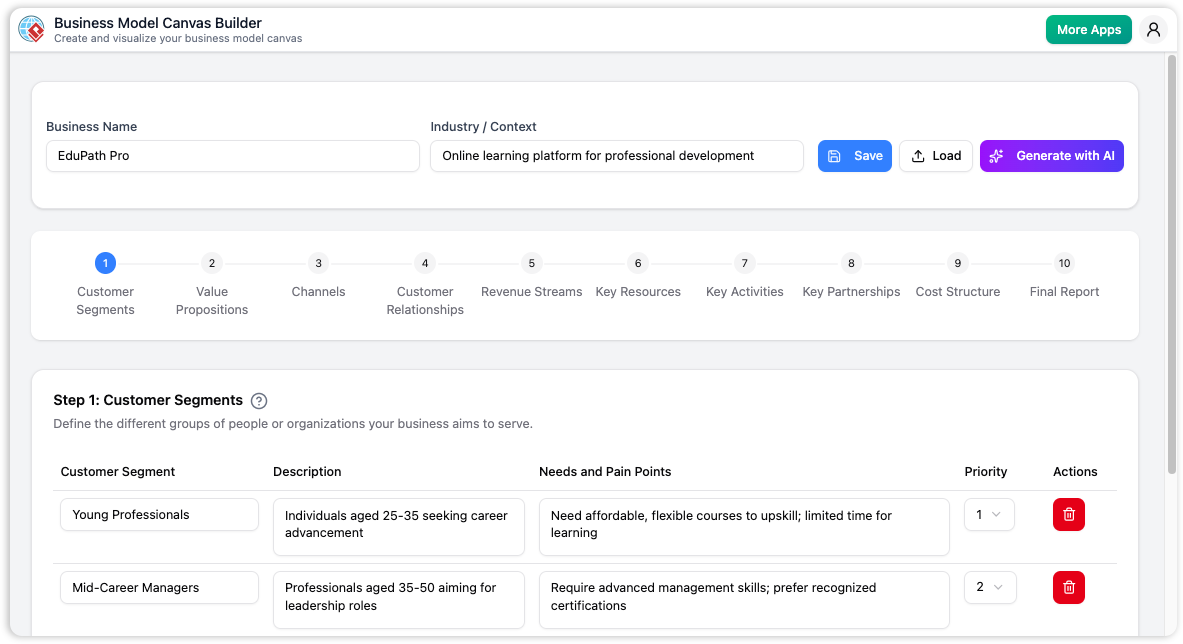
This review explores the core functionalities, user experience, and strategic benefits of the Business Model Canvas Builder, analyzing how it serves distinct user groups ranging from early-stage founders to seasoned business consultants.
Core Features and Functionality
AI-Powered Canvas Generation
The standout feature of this tool is undoubtedly its integration of Artificial Intelligence. For users facing the “blank page problem,” the AI generator acts as an instant brainstorming partner. By simply entering a business name and a brief description of the industry or context (e.g., “Meal delivery service for busy urban professionals”), the system populates all nine fundamental building blocks of the canvas.
This is not merely a text-filling exercise; the AI attempts to create logical connections between blocks. For instance, if the AI identifies a specific niche in “Customer Segments,” it generates corresponding entries in “Revenue Streams” and “Value Propositions.” This feature allows users to develop a comprehensive first draft in minutes rather than weeks, effectively serving as a catalyst for strategic thinking.
The 10-Step Guided Wizard
While the AI provides speed, the 10-step wizard provides discipline. The application breaks down the daunting task of business modeling into manageable, sequential steps. Users are guided through the nine standard blocks of the framework:
- Customer Segments: Defining target audiences and prioritizing them.
- Value Propositions: Articulating the unique value provided to each segment.
- Channels & Customer Relationships: Mapping how value is delivered and maintained.
- Revenue Streams & Cost Structure: Analyzing the financial viability of the model.
- Key Resources, Activities, & Partnerships: Identifying the operational necessities.
The tenth step culminates in a Final Report, consolidating all data into the iconic one-page Business Model Canvas layout. This step-by-step approach ensures that no critical aspect of the business is overlooked.
User Experience and Interface
Interactive Data Management
The user interface is designed for clarity and ease of use. Each step features dynamic data tables where users can add, edit, and delete items. This structured input method feels like filling out a well-designed worksheet. A notable detail is the inclusion of specific attributes, such as the “Priority” field in the Customer Segments section, which helps users rank their target audiences on a scale of 1 to 5.
Educational Resources
For students or first-time entrepreneurs, the tool doubles as an educational platform. Each step includes built-in help modals that explain the specific building block being addressed. This feature democratizes strategic planning, ensuring that users understand why they are filling out a section, not just how.
Privacy and Data Security
In an era where cloud-based tools often raise data sovereignty concerns, the Business Model Canvas Builder takes a privacy-first approach. The application operates without a mandatory login system for data retention. Instead, it utilizes a Local Save/Load mechanism.
Users save their progress as a .json file directly to their local machine. This ensures that sensitive business ideas and innovative strategies remain confidential and in the full possession of the user. To resume work, one simply loads the JSON file back into the browser. This offline-first philosophy (excluding the AI generation, which requires internet access) is a significant advantage for consultants and corporate strategists dealing with sensitive client data.
Strategic Application and Use Cases
For Startups and Entrepreneurs
Founders can use the tool to rapidly prototype different business models. The ability to save multiple versions (e.g., model-A.json vs. model-B.json) allows for A/B testing of strategic assumptions. The AI generation helps in identifying potential gaps in the business logic that a passionate founder might miss.
For Consultants and Educators
The tool is highly effective for facilitating workshops. Consultants can quickly generate a visual representation of a client’s ideas during a session. Meanwhile, business students benefit from the rigid structure of the wizard, which enforces the correct application of the Business Model Canvas theory.
Final Verdict
The Business Model Canvas Builder successfully bridges the gap between theoretical frameworks and practical application. Its primary strength lies in the seamless integration of AI assistance with a structured, step-by-step workflow.
Pros:
- Rapid generation of detailed business models via AI.
- Privacy-focused local storage (.json) prevents data leaks.
- High-quality, printable one-page reports (PDF via print dialog).
- Educational context provided for every step.
Limitations:
- Lacks deep financial modeling or forecasting tools.
- No direct cloud collaboration features (users must share files manually).
- Strict adherence to the 9-block format means no customization for hybrid frameworks.
For anyone looking to clarify their business vision, identify strategic gaps, or communicate a business plan effectively, the Business Model Canvas Builder is a robust and efficient solution.