


Introduction: Bridging the Gap Between Modeling and Documentation
In today’s fast-paced development environment, the disconnect between visual modeling and documentation creates friction, version conflicts, and wasted effort. Teams spend valuable time manually exporting diagrams, re-uploading static images, and struggling to keep documentation synchronized with evolving designs.
Enter the Visual Paradigm Pipeline—a cloud-based integration that acts as the central “knowledge hub” of the Visual Paradigm AI Visual Modeling Ecosystem. When combined with OpenDocs, Visual Paradigm’s AI-powered documentation platform, the Pipeline transforms fragmented workflows into a unified, living “Concept-to-Docs” powerhouse.
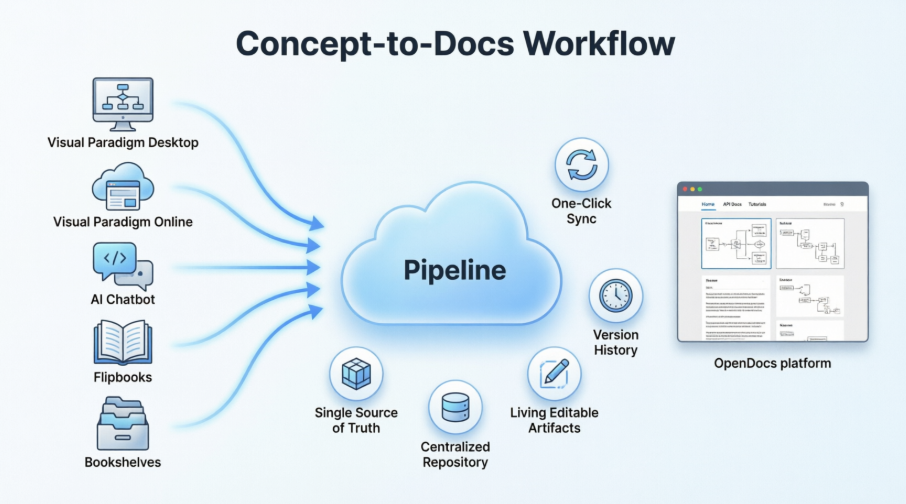
This comprehensive guide explores how the Pipeline + OpenDocs combination empowers modern teams to create, manage, and publish professional documentation with unprecedented efficiency, accuracy, and collaboration. Whether you’re architecting enterprise systems with UML, designing workflows with BPMN, or generating diagrams via AI chat, this integration ensures your visual assets flow seamlessly from concept to publication—always editable, always up-to-date.
What is the Visual Paradigm Pipeline?
The Pipeline is the high-speed connective tissue of the Visual Paradigm ecosystem. It is a secure, cloud-based centralized repository designed to store, manage, and transfer artifacts—the valuable visual assets you create across our various platforms.
In the context of Visual Paradigm’s AI Visual Modeling Ecosystem, the Pipeline acts as the vital bridge between our four core pillars: Visual Paradigm Desktop AI Diagram Generation, AI Chatbot, OpenDocs Knowledge Management Platform, and Step-by-Step AI-Powered Web Apps. It ensures that a diagram created in one “pillar” doesn’t stay trapped there; instead, it flows instantly to where it’s needed most: your documentation and publication hub.
A Single Source of Truth: The Pipeline eliminates the friction of manual downloads and uploads. It preserves the editability of your models and ensures that every stakeholder is looking at the most recent revision of a design.
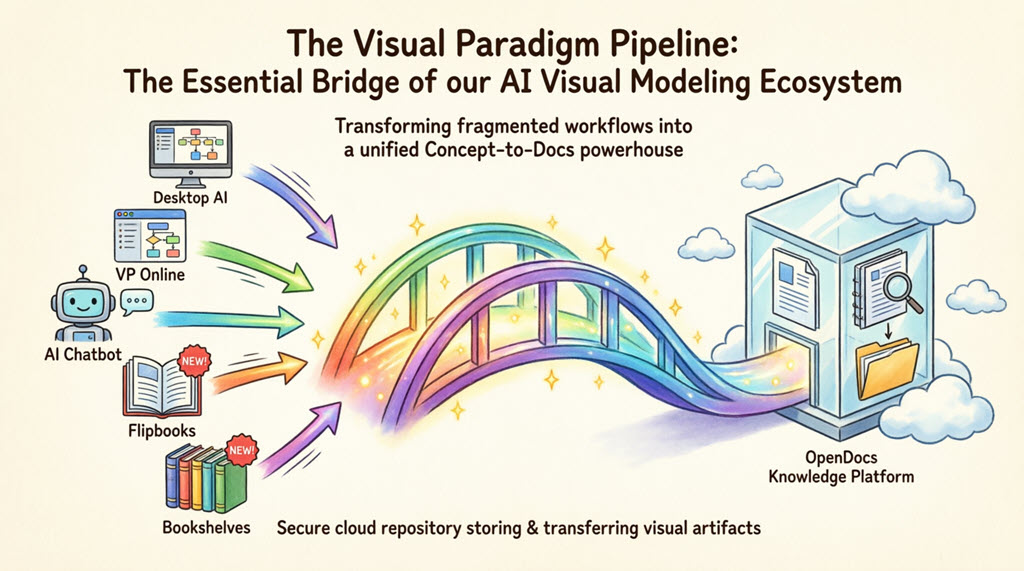
The Power of Pipeline + OpenDocs: What This Combination Achieves
🎯 Unified Ecosystem Value
When the Pipeline and OpenDocs work together, they create a closed-loop workflow where:
-
Diagrams stay alive: Embedded artifacts remain editable and syncable, not static screenshots
-
Documentation evolves automatically: One-click updates keep docs aligned with design changes
-
Collaboration scales securely: Teams access a centralized repository with version history and access controls
-
AI accelerates creation: Natural language prompts generate diagrams that flow directly into publishable docs
🔄 The Concept-to-Docs Lifecycle
-
Conceptualize: Brainstorm architecture with AI Chatbot or model detailed systems in Desktop
-
Create: Build UML, BPMN, C4, flowcharts, or infographics in your preferred tool
-
Connect: Send artifacts to the Pipeline with optional version comments
-
Compose: Insert living diagrams into OpenDocs pages alongside narrative content
-
Collaborate: Share documentation with stakeholders; everyone sees the latest revision
-
Continue: Update source diagrams anytime; sync changes to docs with one click
📊 Real-World Impact Examples
| Scenario | Traditional Approach | Pipeline + OpenDocs Solution |
|---|---|---|
| System Architecture Updates | Export PNG → Upload to wiki → Notify team → Repeat for every change | Update UML in Desktop → Click “Update to Latest Revision” in OpenDocs → Done |
| AI-Generated Process Flows | Screenshot chatbot output → Paste into doc → Lose editability | Generate via AI Chatbot → Send to Pipeline → Embed as editable artifact in OpenDocs |
| Marketing Flipbook Integration | Download PDF → Attach to doc → Users can’t interact | Send Flipbook to Pipeline → Embed interactive viewer directly in OpenDocs page |
| Multi-Tool Collaboration | Email files, manage versions manually, risk conflicts | All artifacts in centralized Pipeline; version history preserved; one source of truth |
Core Workflow: How the Pipeline Works
The pipeline allows you to “send” live diagrams, charts, and flipbooks to a central repository so they can be embedded in documentation as living, editable artifacts rather than static images.
🔑 Three Pillars of the Workflow
1. Export to Pipeline
In Visual Paradigm (Desktop or Online), use Export > Send to OpenDocs Pipeline. You can add comments for version tracking and context.
2. Insert in OpenDocs
While editing an OpenDocs page, click the Pipeline button in the sidebar and select your artifact from the library. The diagram embeds as a live, interactive element.
3. Sync Revisions
When the source diagram changes, click the update indicator in the OpenDocs Pipeline panel to instantly refresh the document to the latest version.
✨ Key Features Enabled by the Pipeline
-
One-Click Updates: Sync changes from source editor to documentation instantly
-
Version History: Secure cloud repository preserves every revision; roll back or compare as needed
-
Multi-Source Support: Artifacts from VP Desktop, VP Online, AI Chatbot, Flipbooks, and Bookshelves
-
Editability Preserved: Embedded diagrams remain interactive and modifiable within OpenDocs
-
Access Control: Manage who can view, edit, or sync artifacts across your organization
The 5 Core Connections: What You Can Send to the Pipeline
We are constantly encircling our apps with deeper connectivity. Here are the five critical ways you can currently leverage the Pipeline to streamline your workflow:
1. Visual Paradigm Desktop to OpenDocs
For the power user. Create intricate UML, BPMN, or SysML models in our professional desktop modeling software and export to OpenDocs via the pipeline. This moves your local modeling expertise into a global, accessible knowledge base.
How to send a diagram from Visual Paradigm Desktop to OpenDocs
-
In Visual Paradigm Desktop, open the diagram you wish to send.
-
Right-click on the diagram and select Export > Send to OpenDocs Pipeline.
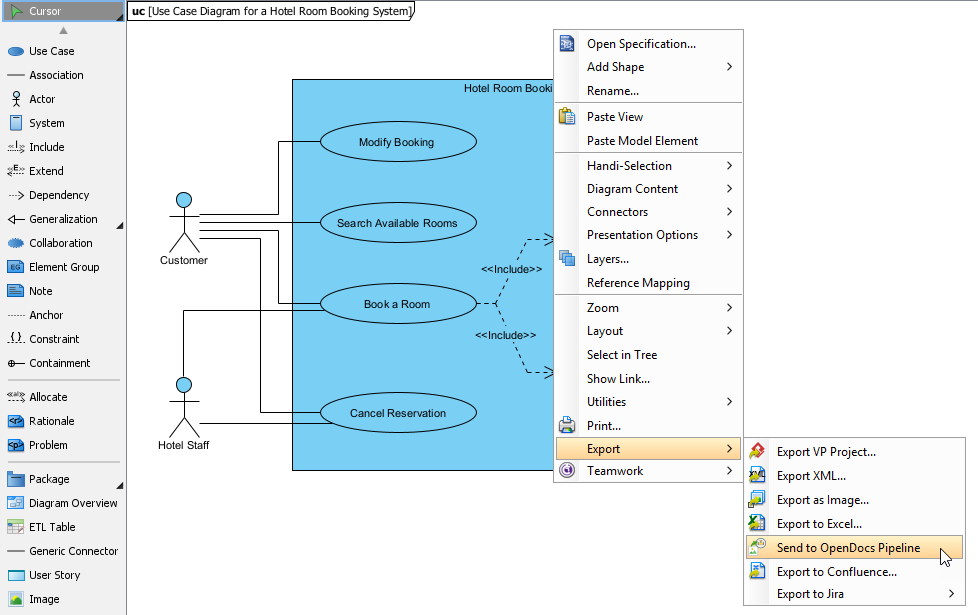 New Feature: Seamlessly Export Visual Paradigm Desktop Diagrams to OpenDocs
2. Visual Paradigm Online to OpenDocs
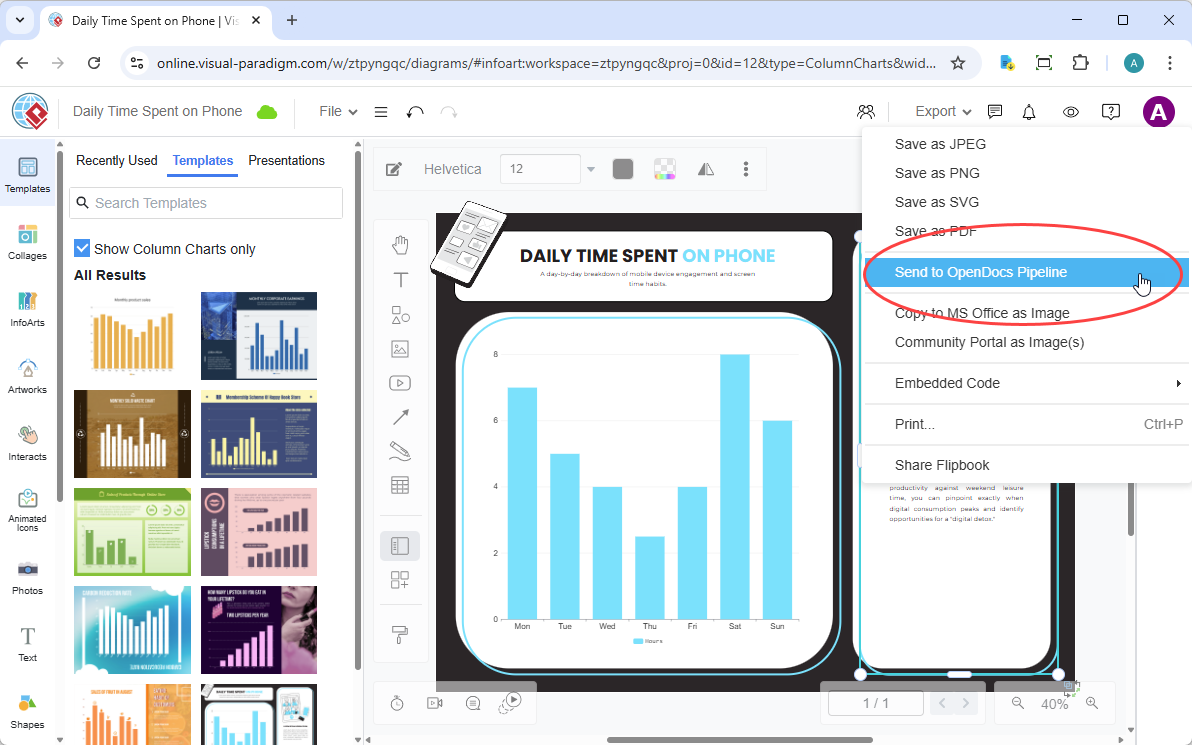
The 100% cloud workflow. Whether you are designing a technical flowchart or a high-impact marketing graphic in your browser, the Pipeline pass your work directly to your documentation in OpenDocs without a single local download.
How to send a diagram from Visual Paradigm Online to OpenDocs
-
Open your diagram or graphic in Visual Paradigm Online.
-
In the top menu, select Export > Send to OpenDocs Pipeline.
-
(Optional) Add a comment to describe the artifact. This makes it easier to find later in the Pipeline pane.
-
Confirm the export. Your visual is now securely stored in the Pipeline.
-
Once your diagram is in the Pipeline, you can place it anywhere in your knowledge base: Open any document page in OpenDocs and click Edit. Click on the page where you want to insert the diagram. On the toolbar, click Insert. In the Insert window, select Pipeline from the left-hand sidebar. Your sent diagrams will appear here.
Extended Reading: New Feature: Send Your Visual Paradigm Online Creations Directly to OpenDocs
3. AI Chatbot to OpenDocs
Conversational documentation. Ask our AI Chatbot to generate a system architecture or a business process diagram. With one click, that AI-generated artifact is ready to be inserted into your OpenDocs pages.
How to send a diagram from Visual Paradigm AI Chatbot to OpenDocs
-
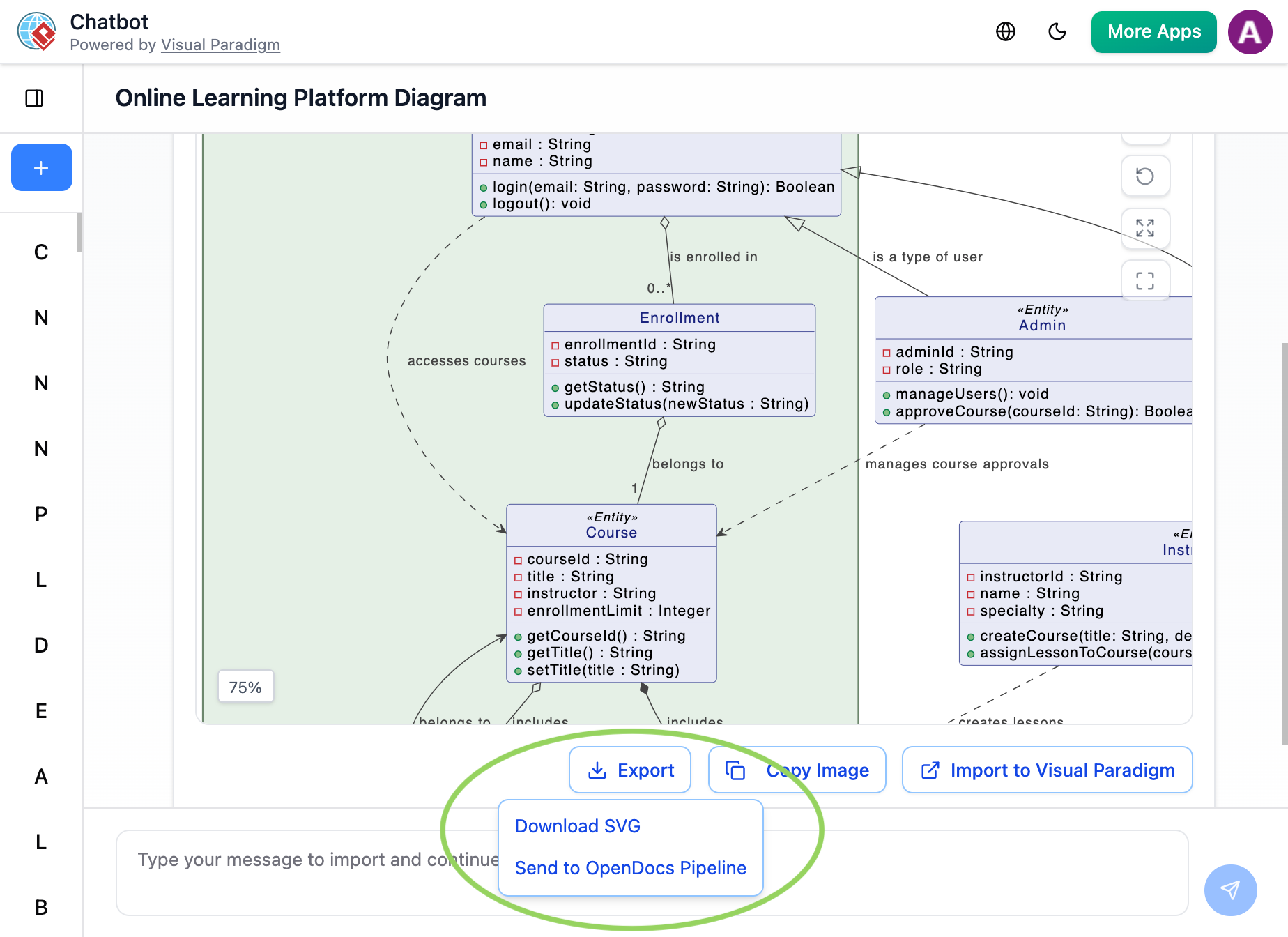
Generate Your Diagram: Create or refine your diagram (UML, flowchart, architecture, BPMN, etc.) in the AI Chatbot.
-
Once the AI has produced the visual you need, click Export and select Send to OpenDocs Pipeline.
-
Go to your desired document page in OpenDocs and enter the editor. Click Insert on the toolbar and select Pipeline. Your AI-generated diagram will be waiting for you in the asset list.
Extended Reading: New Feature Alert: Send Diagrams from Visual Paradigm AI Chatbot Directly to OpenDocs!
4. Flipbooks to OpenDocs (New!)
Bring interactive media into your knowledge management. You can now send your digital Flipbooks through the Pipeline, allowing you to embed rich, flippable catalogs or brochures directly within your OpenDocs pages.
Use Case Example: Marketing teams create product catalogs in Visual Paradigm’s Flipbook tool, send them to the Pipeline, and embed them in OpenDocs knowledge bases. Stakeholders can flip through pages interactively without leaving the documentation—no PDF attachments, no broken links.
5. Bookshelves to OpenDocs (New!)
Organize and publish at scale. Send entire Bookshelves to OpenDocs to create a centralized library of resources within your documentation workspace, making it easier than ever to manage large volumes of information.
Use Case Example: Training departments organize onboarding materials into Bookshelves, push them to OpenDocs via Pipeline, and maintain a single, updatable resource hub for new hires across global offices.
Practical Guidelines & Best Practices
🎯 Getting Started Checklist
-
Ensure you have active accounts for both Visual Paradigm (Desktop/Online) and OpenDocs
-
Verify cloud sync permissions and organizational access policies
-
Establish naming conventions and comment templates for Pipeline artifacts
-
Train team members on the “Export → Insert → Sync” workflow
-
Document your organization’s version control and approval processes
💡 Pro Tips for Maximum Efficiency
-
Use descriptive comments when sending to Pipeline: Include purpose, version, and stakeholder notes to simplify future retrieval.
-
Leverage version history: Before major updates, create a named revision in the Pipeline to enable easy rollbacks if needed.
-
Embed contextually: Place diagrams near relevant narrative content in OpenDocs to improve reader comprehension.
-
Set update expectations: Communicate to stakeholders when diagrams will auto-sync vs. require manual approval.
-
Combine with AI features: Use OpenDocs’ AI writing assistance alongside Pipeline-embedded diagrams for rapid, high-quality documentation.
⚠️ Common Pitfalls to Avoid
-
Over-embedding: Too many live diagrams on one page can slow loading; prioritize key visuals.
-
Ignoring permissions: Ensure all collaborators have appropriate access to both source diagrams and OpenDocs pages.
-
Skipping comments: Without context, future users may struggle to understand an artifact’s purpose or version.
-
Forgetting to sync: Changes in source diagrams won’t auto-propagate; remember to click “Update to Latest Revision.”
Why the Pipeline is a Game-Changer
Traditional Workflow The Pipeline Workflow Manual Export (PNG/JPG) Instant “Send to Pipeline” Manual Re-uploading on changes “Update to Latest Revision” in one click Disconnected, static images Deep-linked, editable artifacts Scattered files on local drives Centralized cloud repository Version confusion across teams Clear revision history with comments Time lost on formatting & alignment Focus on content; Pipeline handles integration
The Gateway to OpenDocs: Your Publication Powerhouse
While the Pipeline is the vehicle, Visual Paradigm OpenDocs is the destination. OpenDocs is our premier knowledge management platform, specifically engineered to be “diagram-aware.” By utilizing the Pipeline, you can move work from any Visual Paradigm feature directly into a professional document, technical manual, or knowledge base.
This “Work-to-Publish” workflow allows you to:
-
Model with Precision: Use high-end desktop or online tools to create complex system architectures.
-
Generate with Speed: Use AI to brainstorm and visualize ideas instantly.
-
Publish with Authority: Seamlessly embed those visuals into OpenDocs to create living documentation that evolves alongside your project.
Conclusion: The Future of Integrated Visual Documentation
The Visual Paradigm Pipeline, paired with OpenDocs, represents more than a technical integration—it’s a philosophical shift in how teams create, share, and maintain knowledge. By eliminating the artificial barrier between modeling and documentation, this combination empowers organizations to:
✅ Accelerate delivery: Reduce documentation overhead by 70%+ with automated sync workflows
✅ Improve accuracy: Ensure docs always reflect the latest design decisions
✅ Enhance collaboration: Give stakeholders confidence they’re viewing current, approved artifacts
✅ Scale intelligently: Manage growing complexity without proportional increases in documentation effortAs Visual Paradigm continues to expand its AI Visual Modeling Ecosystem, the Pipeline will only grow stronger—encircling more tools, supporting more artifact types, and deepening integration with OpenDocs. The vision is clear: a world where ideas flow seamlessly from conception to publication, where documentation is a living extension of design, and where teams spend less time managing files and more time creating value.
The future isn’t just connected—it’s intelligent, automated, and alive. With the Visual Paradigm Pipeline and OpenDocs, that future is available today.
Ready to transform your workflow? Start by sending your first diagram to the Pipeline and experience the Concept-to-Docs difference.
References
- Visual Paradigm Pipeline: The Bridge for AI Modeling Ecosystem: Comprehensive guide explaining how the Pipeline serves as the connective tissue between Visual Paradigm’s AI modeling tools and OpenDocs documentation platform.
- Export Diagrams from Visual Paradigm Desktop to OpenDocs: Step-by-step release notes detailing how to send Desktop diagrams to OpenDocs via the Pipeline for seamless documentation integration.
- Sending Diagrams from Visual Paradigm Desktop to OpenDocs: Video tutorial demonstrating the workflow for exporting and syncing Desktop diagrams to OpenDocs through the Pipeline.
- Export Cloud Diagrams from Visual Paradigm Online to OpenDocs: Release documentation covering the cloud-native workflow for sending Online diagrams directly to OpenDocs.
- Comprehensive Guide: Visual Paradigm’s Full Support for C4 Diagrams: In-depth article exploring C4 diagram capabilities and how Pipeline integration enables living, editable architecture documentation.
- Solving Documentation Chaos: Visual Paradigm’s Pipeline Workflow: Case study showcasing how the Pipeline eliminates manual export/import friction and creates a unified Concept-to-Docs experience.
- My Journey to Seamless Documentation with Visual Paradigm Pipeline: Personal workflow narrative demonstrating real-world application of sending Visual Paradigm creations directly to OpenDocs.
- My Journey with Visual Paradigm Pipeline: Asset Transit Hub Transformation: User testimonial highlighting how the Pipeline serves as an asset transit hub to transform documentation workflows.
- Visual Paradigm Online Tutorial: Video demonstration of Visual Paradigm Online features and capabilities.
- New Integration: Seamlessly Share Flipbooks to OpenDocs: Announcement and guide for embedding interactive digital flipbooks into OpenDocs documentation via the Pipeline.
- AI Diagram to OpenDocs Pipeline Feature Release: Official release notes for sending AI-generated diagrams from the Visual Paradigm Chatbot directly to OpenDocs.
- AI Diagram Tutorial: Video guide showing how to generate diagrams via natural language prompts and send them to OpenDocs using the Pipeline.
-