


Suggested Article Title: “Diagram-as-Code, Unified: Accelerating Architecture Documentation with VPasCode’s Multi-Engine, AI-Ready Platform”
📘 Introduction: The Documentation Dilemma in Modern Software Development
In today’s fast-paced engineering environments, software architecture evolves as rapidly as the source code itself. Yet, a persistent gap remains between how developers write code and how teams document system design. Traditional visual modeling tools, while powerful, often require context-switching, manual layout adjustments, and disconnected workflows that slow down iteration and hinder collaboration.
Enter Diagram-as-Code (DaC): a paradigm that treats architectural diagrams as versionable, reviewable, and automatable text artifacts. By declaring system structures in code notation, teams gain agility, consistency, and seamless integration with modern DevOps pipelines.
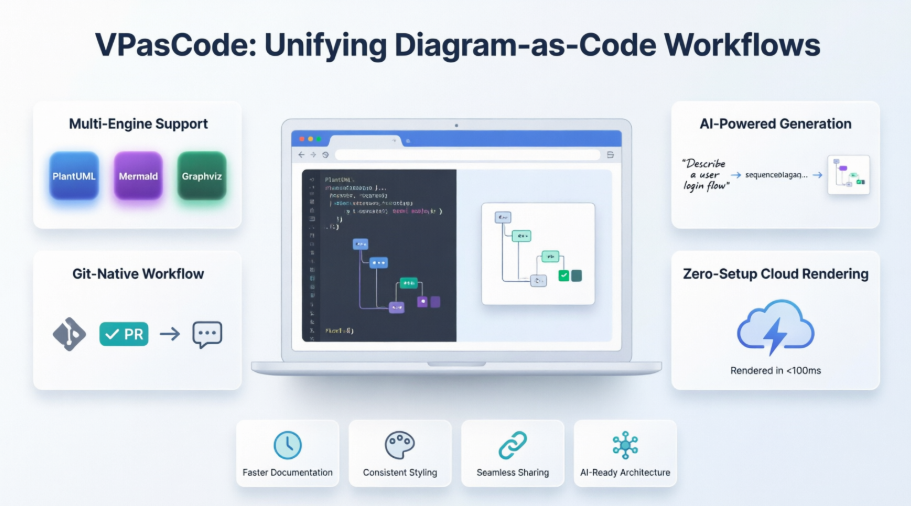
This case study explores VPasCode—Visual Paradigm’s browser-native, multi-engine DaC platform—and demonstrates how it resolves long-standing friction points in technical documentation. Through unified syntax support, AI-powered generation, and zero-setup cloud rendering, VPasCode empowers developers, solution architects, and engineering leaders to translate structural logic into clean, instant visual assets—purely through code.
🎯 Executive Summary
| Challenge | Solution | Outcome |
|---|---|---|
| Fragmented diagramming tools across teams (PlantUML, Mermaid, Graphviz) | Unified, cloud-native workspace supporting all major DaC syntaxes | Single source of truth for architectural documentation |
| Manual layout, inconsistent styling, and version control friction | Automated layout engineering + plain-text scripts tracked via Git | Faster reviews, uniform design, reproducible diagrams |
| AI models struggle with binary visual formats | Native compatibility with structured text syntax | Natural language → diagram generation via LLMs |
| Local environment setup overhead (Java, npm, binaries) | Zero-setup browser-based rendering | Immediate onboarding, no dependency conflicts |
🔍 The Challenge: Fragmented Diagramming Workflows
Modern engineering organizations rarely standardize on a single diagramming syntax. Instead, teams adopt tools based on immediate needs:
-
DevOps teams leverage Graphviz for infrastructure topology and pipeline visualization
-
Backend architects prefer PlantUML for formal UML, C4 modeling, and sequence diagrams
-
Frontend/agile teams choose Mermaid.js for lightweight flowcharts embedded in Markdown
This diversity, while pragmatic, introduces significant friction:
❌ Context switching between disconnected web tools
❌ Inconsistent export formats and styling standards
❌ Local dependency conflicts (Java runtimes, Node modules)
❌ Difficulty reviewing diagram changes in pull requests
❌ Barriers to AI-assisted documentation generation
The result? Documentation lags behind code, architectural decisions become opaque, and cross-team alignment suffers.
💡 The Solution: VPasCode – A Unified Diagram-as-Code Engine
VPasCode eliminates syntax silos by integrating the industry’s leading text-to-diagram engines into a single, cohesive, cloud-native workspace. Built by Visual Paradigm, VPasCode complements traditional visual modeling suites with a high-velocity, text-first environment tailored for modern development pipelines.
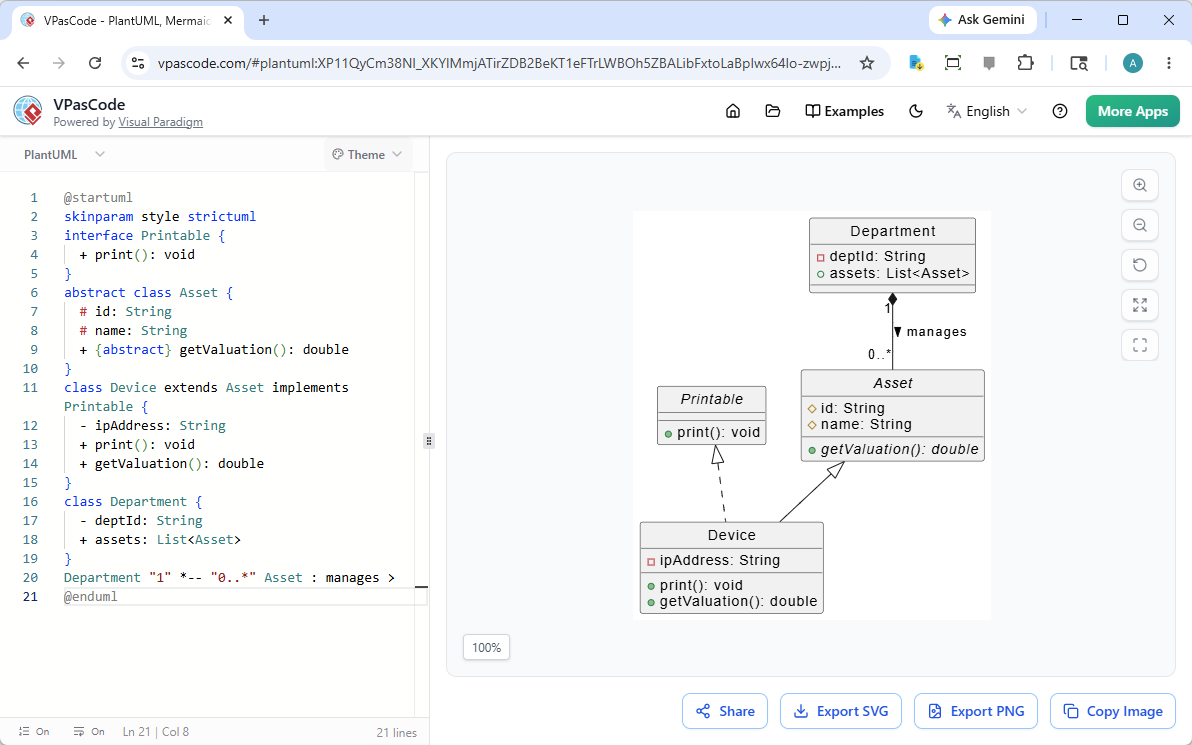
Core Value Propositions
✅ Multi-Engine Auto-Detection: Write PlantUML, Mermaid, or Graphviz side-by-side; VPasCode parses and renders instantly
✅ Zero-Setup Cloud Rendering: No local Java, npm, or binary installations—just open a browser and start coding
✅ Git-Native Workflows: Diagrams live as plain-text scripts, enabling git diff, PR reviews, and CI/CD integration
✅ AI-Ready Architecture: Structured syntax enables LLMs to generate, interpret, and validate diagrams from natural language
✅ Unified Sharing & Export: One URL format for sharing; high-res SVG/PNG exports for wikis, repos, and presentations
⚙️ Key Features & Capabilities Deep Dive
1. Multi-Engine Syntax Support
VPasCode treats different DaC notations as first-class citizens within the same interface:
| Engine | Best For | Example Use Case |
|---|---|---|
| PlantUML | Enterprise UML, C4 modeling, sequence diagrams | Formal microservice architecture with boundary contexts |
| Mermaid.js | Agile flowcharts, Gantt charts, Markdown docs | User journey maps embedded in README.md |
| Graphviz | Network topologies, pipeline graphs, cluster layouts | Infrastructure dependency graphs with nested subgraphs |
2. AI-Powered Architecture Co-Pilot
Because DaC syntax is structured text, VPasCode unlocks seamless AI integration:
🤖 Natural Language → Diagram:
Prompt: “Create a microservice pipeline where an API gateway routes requests to a user service with a Redis cache”
→ VPasCode + AI generates executable PlantUML/Mermaid code instantly
🔍 Automated Verification:
AI parses diagram scripts to identify edge cases, missing connections, or alternative user flows—enhancing architectural rigor
🧱 C4 Hierarchical Modeling:
Generate layered architectures (System Context → Container → Component) from high-level descriptions, maintaining semantic consistency across abstraction levels
3. OpenDocs Documentation Pipeline
VPasCode bridges the gap between living code and living documentation:
🔄 Zero-Screenshot Workflows: Eliminate manual PNG exports; diagrams sync directly to team wikis, Notion, or Confluence via URL embeds
🔗 Living Relationships: Diagram elements maintain version history and semantic metadata when pushed to knowledge systems
🌐 Cross-Ecosystem Import: Toggle between VPasCode and Visual Paradigm Online for advanced modeling, then export vector SVGs for publication
4. Developer-Centric Editor Experience
Designed for engineers, by engineers:
✨ Intelligent Auto-Fill: Contextual autocomplete and real-time syntax validation prevent broken scripts
🧪 Isolated Compilation: Each diagram renders in a secure, high-performance sandbox—no cross-script interference
🔀 Git-Friendly Versioning: Because diagrams are plain text, changes appear cleanly in git diff and PR comments
🚀 Implementation: 60-Second Quickstart in Action
Getting started with VPasCode requires no installation, no configuration—just a browser.
Step 1: Open the Live Editor
Navigate to VPasCode Playground to access the dual-panel interface:
-
Left Panel: Syntax-highlighted code editor with error detection
-
Right Panel: Real-time diagram preview that updates as you type
Step 2: Paste a Blueprint – See Instant Results
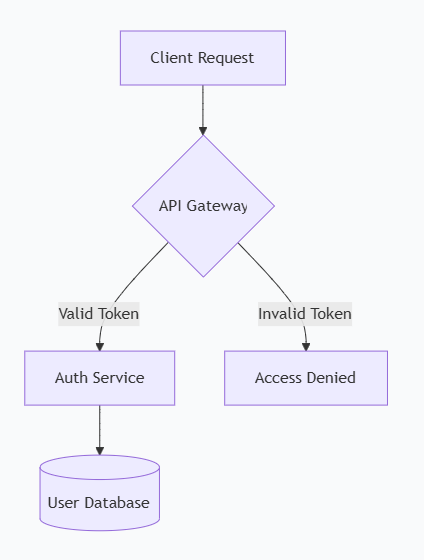
Option A: Mermaid Flowchart (Agile Documentation)
graph TD
    A[Client Request] --> B{API Gateway}
    B --> |Valid Token| C[Auth Service]
    B --> |Invalid Token| D[Access Denied]
    C --> E[(User Database)]
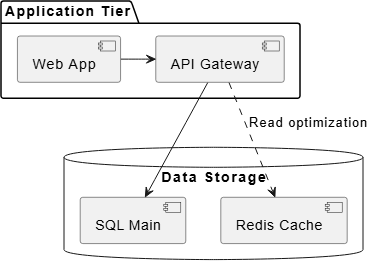
Option B: PlantUML Component Diagram (Enterprise Architecture)
@startuml
package "Application Tier" {
    [Web App] -right-> [API Gateway]
}
database "Data Storage" {
    [API Gateway] --> [SQL Main]
    [API Gateway] ..> [Redis Cache] : "Read optimization"
}
@enduml
Step 3: Export & Share in One Click
-
🔗 Copy Shareable URL: Entire diagram state compresses into the URL hash—no backend storage required
-
📐 Export SVG: Scalable vector for Git repos, wikis, or technical documentation
-
🖼️ Export PNG: High-resolution snapshot for Slack, Teams, or executive presentations
🌐 Real-World Use Cases & Measurable Benefits
Case Example: Cloud Migration Documentation at a FinTech Scale-Up
Challenge: A 50-engineer team needed to document a legacy-to-microservices migration across 3 squads using different diagramming preferences.
VPasCode Implementation:
-
Squad A (Backend): Used PlantUML for C4 container diagrams
-
Squad B (DevOps): Leveraged Graphviz for infrastructure dependency maps
-
Squad C (Product): Created Mermaid user journey flows for stakeholder reviews
Outcomes:
| Metric | Before VPasCode | After VPasCode |
|---|---|---|
| Time to produce architecture docs | 3–5 days/sprint | <1 day/sprint |
| Cross-team diagram review cycles | 2–3 rounds of reformatting | Single PR with git-diff clarity |
| AI-assisted diagram generation | Not feasible | 40% of new diagrams bootstrapped via natural language prompts |
| Onboarding time for new engineers | 2 weeks to understand system maps | 3 days with unified, searchable diagram library |
Broader Benefits Across Roles
👨💻 Developers: Write diagrams like code; review changes in PRs; no context switching
🏗️ Solution Architects: Enforce styling standards; generate hierarchical C4 models; validate edge cases via AI
👥 Engineering Managers: Track documentation velocity; ensure architectural decisions are visible and versioned
🤖 AI/ML Teams: Feed structured diagram syntax into training pipelines; automate documentation generation
🤖 AI Integration: The Future-Proof Foundation
One of VPasCode’s most strategic advantages is its native alignment with the AI revolution. While large language models excel at generating structured text, they struggle with pixel-based or binary visual formats. By anchoring diagrams in semantic, parseable syntax, VPasCode enables:
🔹 Prompt-to-Prototype: Describe a system in plain English → receive executable DaC code + rendered diagram
🔹 Automated Documentation Drift Detection: AI compares live code repositories against diagram scripts to flag inconsistencies
🔹 Intelligent Refactoring Suggestions: When code changes, AI proposes corresponding diagram updates to maintain alignment
🔹 Accessibility & Knowledge Transfer: Non-technical stakeholders can query architecture via natural language; AI translates answers into visual explanations
This positions VPasCode not just as a documentation tool, but as an AI-augmented architectural reasoning layer for engineering organizations.
🏁 Conclusion: Unifying Vision, Accelerating Execution
The shift to Diagram-as-Code represents more than a workflow optimization—it’s a cultural alignment between how engineers build software and how they communicate its design. VPasCode embodies this shift by delivering a unified, intelligent, and frictionless platform where text, visuals, and AI converge.
By embracing multi-engine support, cloud-native rendering, and AI-ready syntax, VPasCode empowers teams to:
✅ Document faster – Generate diagrams in seconds, not hours
✅ Collaborate clearer – Share via URL, review via Git, embed anywhere
✅ Scale smarter – Add new syntax engines as standards evolve
✅ Future-proof – Leverage AI for generation, validation, and maintenance
In an era where architectural clarity directly impacts delivery velocity, system reliability, and team alignment, VPasCode offers more than a tool—it offers a new paradigm: where every line of code can instantly become a window into your system’s design.
VPasCode: Write text. Leverage AI. Accelerate your documentation.
🌐 Explore the platform: https://www.vpascode.com/editor/
📚 References & Further Reading
-
Archimetric – DaC Adoption Trends: https://www.archimetric.com
-
CyberMedian – VPasCode Use Cases: https://www.cybermedian.com/category/vpascode/
Note: All screenshots and code examples embedded in this case study are sourced from official VPasCode documentation and used with permission for educational purposes.