


Introduction to UML in Agile Context
While traditional UML modeling was often seen as heavyweight and documentation-focused, modern Agile teams are rediscovering its value when applied with the right mindset and tools. The key is just-enough, just-in-time modeling that supports communication and design decisions without becoming a bottleneck.
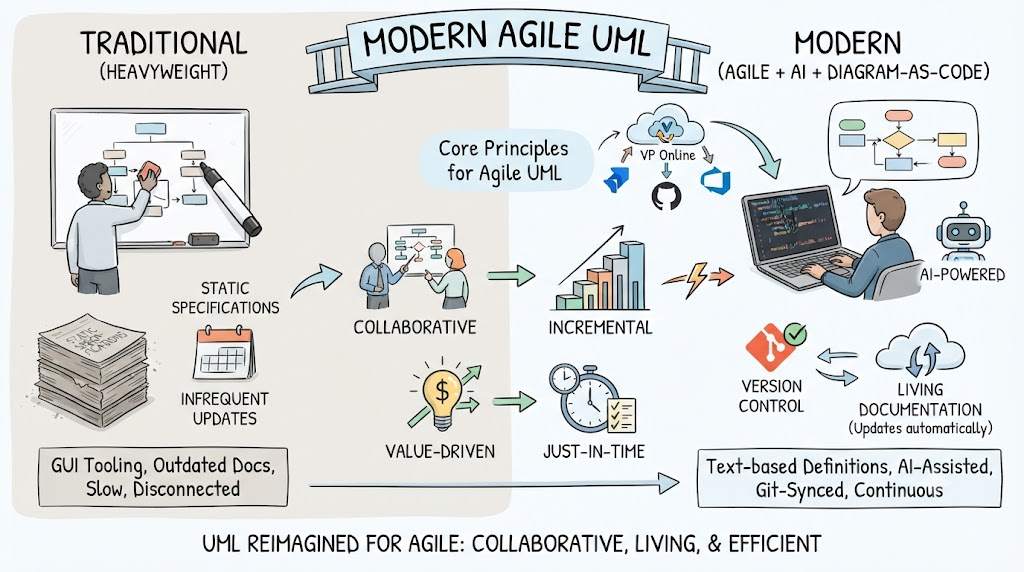
Core Principles for Agile UML:
-
Collaborative over comprehensive: Models serve as conversation starters, not final specifications
-
Living documentation: Models evolve with the code, not separate from it
-
Value-driven: Only create diagrams that provide immediate team benefit
-
Incremental: Start simple, add detail as needed
Why AI + Diagram-as-Code is Perfect for Agile
The Paradigm Shift
Traditional Approach (Past):
-
Manual diagram creation in GUI tools
-
Static documents that quickly become outdated
-
Separate from code repositories
-
High maintenance overhead
-
Limited collaboration capabilities
-
Version control challenges
Modern Approach (AI + Diagram-as-Code):
-
Text-based definitions stored alongside code
-
Automatically generated visualizations
-
Version-controlled with Git
-
AI-assisted creation and maintenance
-
Seamless integration with CI/CD pipelines
-
Real-time synchronization with implementation
Key Benefits for Agile Teams
1. Speed and Efficiency
-
AI-powered generation: Describe requirements in natural language, get UML diagrams instantly
-
Rapid iteration: Modify text descriptions instead of redrawing diagrams
-
Reduced cognitive load: Focus on logic, not layout
2. Maintainability
-
Single source of truth: Diagrams live in code repositories
-
Automatic updates: Changes propagate through regeneration
-
No drift: Documentation stays synchronized with implementation
3. Collaboration
-
Code review workflow: Diagram changes reviewed like code
-
Merge conflict resolution: Text-based diffs are manageable
-
Team accessibility: Anyone can read and modify diagram definitions
4. Integration
-
CI/CD pipeline: Auto-generate diagrams on commits
-
Documentation sites: Embed diagrams in wikis and docs automatically
-
Architecture validation: Check models against code structure
5. Knowledge Preservation
-
Searchable: Text-based diagrams are indexable
-
Historical tracking: Full version history of design decisions
-
Onboarding: New team members can trace architectural evolution
Comparison: Traditional vs. Modern Approach
| Aspect | Traditional UML Tools | AI + Diagram-as-Code |
|---|---|---|
| Creation Speed | Slow, manual drawing | Fast, AI-assisted generation |
| Maintenance | High effort, often neglected | Low effort, automated |
| Version Control | Binary files, poor diff support | Text files, excellent Git integration |
| Collaboration | File sharing, email attachments | Pull requests, inline comments |
| Synchronization | Manual updates, frequent drift | Automatic regeneration |
| Learning Curve | Tool-specific UI mastery | Standard markup languages |
| Accessibility | Requires specific software | Any text editor suffices |
| Customization | Limited by tool capabilities | Fully programmable |
| Integration | Standalone applications | Native DevOps integration |
| Cost | Per-seat licensing | Often open-source or subscription |
Visual Paradigm Ecosystem: Enabling the Modern Approach
Visual Paradigm has evolved significantly to support this new paradigm. Here’s how their ecosystem addresses Agile needs:
1. VP Online (Cloud-Based Platform)
-
Real-time collaboration: Multiple team members work simultaneously
-
Browser-based access: No installation required
-
Centralized repository: Single source of truth for all models
-
Integration hub: Connects with Jira, GitHub, Azure DevOps
2. AI-Powered Features
-
Natural Language to Diagram: Describe use cases or workflows, generate UML automatically
-
Smart Suggestions: AI recommends diagram elements based on context
-
Code Generation: Convert UML models to skeleton code in multiple languages
-
Reverse Engineering: Generate diagrams from existing codebases using AI pattern recognition
3. Diagram-as-Code Support
-
PlantUML Integration: Native support for text-based diagram definitions
-
Mermaid.js Compatibility: Web-friendly diagram syntax
-
Import/Export: Seamless conversion between visual and code representations
-
Template Libraries: Pre-built patterns for common Agile scenarios
4. Agile-Specific Capabilities
-
User Story Mapping: Visual backlog management integrated with UML
-
Sprint Planning Views: Filter models by sprint or release
-
Traceability Matrix: Link requirements → designs → test cases → code
-
Lightweight Modeling: Quick sketch mode for rapid prototyping
5. DevOps Integration
-
GitHub/GitLab Connectors: Sync diagrams with repositories
-
CI/CD Plugins: Auto-generate documentation in build pipelines
-
API Access: Programmatic model manipulation
-
Webhook Support: Trigger actions on model changes
6. Hybrid Workflow Support
-
Desktop + Cloud Sync: Work offline, sync when connected
-
Flexible Export Options: PNG, SVG, PDF, HTML for different audiences
-
Embedded Views: Insert live diagrams in Confluence, Notion, or custom docs
-
Mobile Access: Review and comment on diagrams from any device
7. Enterprise Governance (When Needed)
-
Role-Based Access: Control who can view/edit models
-
Audit Trails: Track all changes for compliance
-
Standards Enforcement: Ensure consistent modeling practices
-
Portfolio Management: Aggregate views across multiple teams/projects
Practical Implementation Strategy for Agile Teams
Phase 1: Foundation (Weeks 1-2)
-
Set up VP Online workspace with team access
-
Define modeling standards (which diagrams, level of detail)
-
Integrate with existing project management tools (Jira, Azure DevOps)
-
Train team on basic UML and VP features
Phase 2: Pilot Project (Weeks 3-6)
-
Select one active sprint/project for pilot
-
Create essential diagrams only (use case, sequence, class for complex features)
-
Use AI features to accelerate initial model creation
-
Establish review process for diagram changes
-
Gather feedback and adjust approach
Phase 3: Scale and Optimize (Weeks 7+)
-
Roll out to additional teams/projects
-
Implement Diagram-as-Code for critical architecture diagrams
-
Set up automated documentation generation
-
Create reusable templates and patterns
-
Measure ROI (time saved, defects prevented, onboarding speed)
Best Practices
-
Start small: Don’t model everything; focus on complex or ambiguous areas
-
Time-box modeling: Limit diagramming sessions to avoid analysis paralysis
-
Review in ceremonies: Discuss diagrams in refinement and planning meetings
-
Archive obsolete models: Keep the workspace clean and relevant
-
Balance rigor and agility: More detail for stable components, less for experimental features
Conclusion
The combination of AI assistance and Diagram-as-Code represents a fundamental shift that makes UML modeling genuinely compatible with Agile values. Visual Paradigm’s ecosystem provides the bridge between traditional modeling power and modern development practices, offering:
-
Flexibility: Choose visual or code-based approaches per team preference
-
Automation: Reduce manual effort through AI and integrations
-
Collaboration: Enable distributed teams to work together effectively
-
Sustainability: Ensure models remain valuable throughout the product lifecycle
For Agile teams skeptical of UML, this modern approach removes the historical pain points while preserving the communication and design benefits. The key is adopting a pragmatic mindset: use modeling as a tool for thinking and communicating, not as an end in itself.
Would you like me to dive deeper into any specific aspect, such as setting up particular diagram types, integrating with your current toolchain at Acme Cloud, or creating templates for common Agile scenarios?
Related posts:
 VPasCode Review: Streamlining Architectural Documentation with Diagram-as-Code
From Text to Visuals: A Hands-On Review of VPasCode for Modern Engineering Teams
Enhancing State Machine Design: How Visual Paradigm’s AI-Powered State Diagram Generator Revolutionizes Visual Modeling
Hands-On Review of Visual Paradigm’s AI-Powered C4 Modeling
VPasCode Review: Streamlining Architectural Documentation with Diagram-as-Code
From Text to Visuals: A Hands-On Review of VPasCode for Modern Engineering Teams
Enhancing State Machine Design: How Visual Paradigm’s AI-Powered State Diagram Generator Revolutionizes Visual Modeling
Hands-On Review of Visual Paradigm’s AI-Powered C4 Modeling