


In the realm of software engineering and systems architecture, the ability to visualize structural blueprints is paramount. The Class Diagram, a cornerstone of the Unified Modeling Language (UML), serves as the static backbone of system design. While many tools exist to facilitate this, finding a robust, truly free solution can be challenging. This guide explores the capabilities of Visual Paradigm Online (VP Online) Free Edition, a powerful platform that democratizes access to professional-grade UML diagramming.
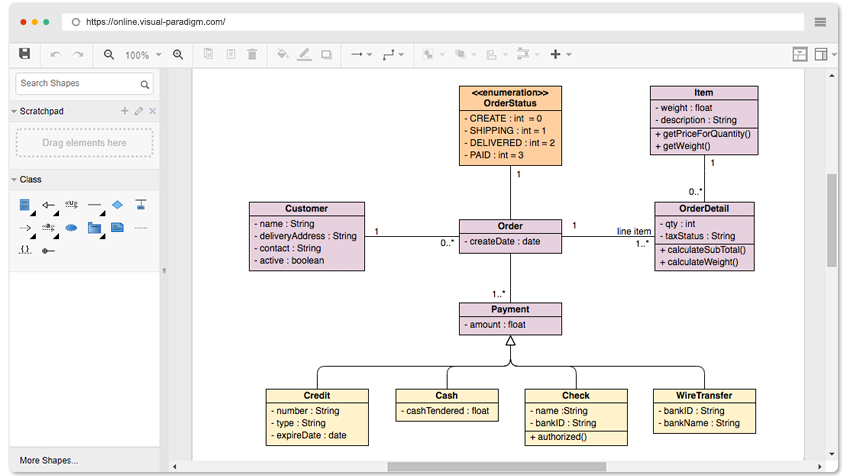
Key Concepts in Class Diagramming
Before diving into the tools and techniques, it is essential to establish a clear understanding of the fundamental terminology used in object-oriented design and UML modeling. These concepts form the building blocks of any effective class diagram.
- UML (Unified Modeling Language): A standardized modeling language consisting of an integrated set of diagrams, developed to help system and software developers for specifying, visualizing, constructing, and documenting the artifacts of software systems.
- Class Diagram: A type of static structure diagram that describes the structure of a system by showing the system’s classes, their attributes, operations (or methods), and the relationships among objects.
- Class: A representation of an object or a set of objects that share a common structure and behavior. In a diagram, it is usually depicted as a rectangle divided into three compartments: name, attributes, and operations.
- Attributes: The data properties or variables contained within a class (e.g., a ‘Car’ class might have attributes like ‘color’ or ‘model’).
- Operations: The functions or behaviors that a class can perform (e.g., ‘accelerate’ or ‘brake’).
- Relationships: The logical connections between classes. Common types include Association (a structural link), Inheritance/Generalization (parent-child relationship), and Dependency (one class relying on another).
Visual Paradigm Online: The Free Edition Advantage
Visual Paradigm Online (VP Online) distinguishes itself in the crowded market of diagramming tools by offering a genuinely free edition for personal and non-commercial use. Unlike ‘freemium’ models that impose restrictive caps on usage, VP Online provides a robust environment for creating Class Diagrams without the typical barriers.
Unrestricted Creativity
One of the most significant pain points in free software is the limitation on volume. VP Online removes these barriers completely:
- Unlimited Diagrams: Users can create as many diagrams as required without hitting a paywall.
- Unlimited Shapes: Complex systems require complex diagrams. There is no cap on the number of classes or connectors you can place on a single canvas.
- Unlimited Access Time: The free edition is not a trial; it is a permanent account status with no expiration date.
- Ad-Free Experience: The interface remains clean and professional, free from distracting advertisements that plague other free tools.
VP AI: Automating and Enhancing Diagramming
Artificial Intelligence is transforming how we approach technical documentation and design. Visual Paradigm integrates AI capabilities to streamline the creation of Class Diagrams, moving beyond simple manual drawing to intelligent generation.
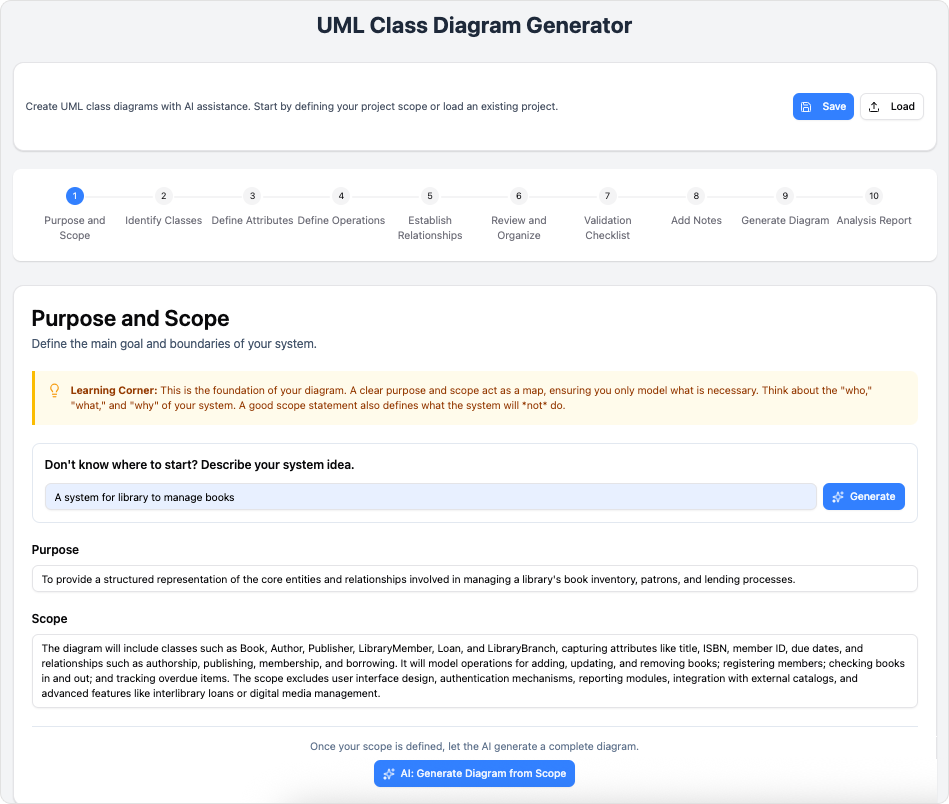
VP AI can significantly enhance the diagramming workflow in the following ways:
- Text-to-Diagram: Instead of manually dragging and dropping every shape, users can describe their system in natural language. for example, typing “A library management system with classes for Book, Librarian, and Member” allows VP AI to generate a preliminary Class Diagram structure automatically.
- Code Visualization: VP AI helps bridge the gap between implementation and design by analyzing code snippets and suggesting structural representations, ensuring that documentation remains synchronized with the actual codebase.
- Smart Suggestions: When defining attributes and operations, the AI can suggest common properties associated with specific class names, speeding up the population of class details.

Features and Functionality
A tool is only as good as its usability. VP Online combines simplicity with power, making it accessible for beginners while retaining the depth required by experienced architects.
Intuitive Editing Interface
The editor is designed for speed and precision. Key features include:
- Drag-and-Drop Creation: Shapes can be easily pulled from the palette onto the canvas.
- Smart Connectors: Lines connect seamlessly to shapes and, crucially, stay attached when shapes are moved. This “sticky” behavior prevents the diagram from breaking during reorganization.
- Inline Editing: Attributes and operations can be edited directly within the shape, eliminating the need to navigate through complex pop-up menus.
- Alignment Guides: To ensure professional presentation, the tool provides alignment guides that help position shapes precisely relative to one another.
Format and Export Options
Once a diagram is complete, sharing it effectively is the next step. VP Online supports a variety of export formats suitable for different use cases:
| Format | Best Use Case |
|---|---|
| PNG / JPG / GIF | Quick sharing via email or embedding in web pages. |
| SVG (Scalable Vector Graphics) | High-quality printing and scaling without pixelation. |
| Formal documentation and reports. |
Integration and Compatibility
Modern workflows are rarely isolated. VP Online is built as a cross-platform solution, running entirely within the web browser. This ensures compatibility across Windows, Mac, and Linux without the need for installation. Furthermore, the tool integrates with Google Drive, allowing teams to store and manage their diagrams alongside their other documents seamlessly.
Visio Import
For organizations transitioning from legacy tools, VP Online supports the import of Microsoft Visio drawings and stencils. This feature preserves historical data and allows users to modernize their diagrams using Visual Paradigm’s web-based platform.
Conclusion
Visual Paradigm Online Free Edition represents a significant resource for students, developers, and system architects. By combining unlimited usage caps with professional formatting tools and emerging AI capabilities, it provides a comprehensive environment for mastering Object-Oriented Design. Whether you are modeling a simple ‘Sales Order System’ or a complex ‘Star-Based LAN’ architecture, the ability to draw, format, and export without restriction makes it a top-tier choice for free UML software.
-
AI-Assisted UML Class Diagram Generator – Visual Paradigm: An interactive, step-by-step tool to help users create UML class diagrams with AI-powered suggestions, validation, PlantUML export, and design analysis.
-
From Problem Description to Class Diagram: AI-Powered Textual Analysis: Explore how Visual Paradigm uses AI to convert natural language problem descriptions into accurate class diagrams for software modeling.
-
How AI Enhances Class Diagram Creation in Visual Paradigm: This blog explores how Visual Paradigm leverages AI to automate and improve the creation of class diagrams, making software design faster and more accurate.
-
Streamlining Class Diagrams with Visual Paradigm’s AI: This article explains how Visual Paradigm’s AI-powered tools reduce the complexity and time required to create accurate class diagrams for software projects.
-
AI-Powered UML Class Diagram Generator by Visual Paradigm: An advanced AI-assisted tool that automatically generates UML class diagrams from natural language descriptions, streamlining software design and modeling.
-
Real-Life Case Study: Generating UML Class Diagrams with Visual Paradigm AI: A detailed case study showcasing how Visual Paradigm’s AI assistant successfully transformed textual requirements into accurate UML class diagrams in a real-world project.
-
Comprehensive Tutorial: Generate UML Class Diagrams with Visual Paradigm’s AI Assistant: Step-by-step guide demonstrating how to use Visual Paradigm Online’s AI assistant to create precise UML class diagrams from plain text input.
-
Creating a UML Class Diagram for a Library System Using AI and Visual Paradigm: A practical blog post that walks through building a UML class diagram for a library management system using Visual Paradigm’s AI assistant.
-
Interactive AI Chat for UML Class Diagram Generation: A conversational AI interface that allows users to generate UML class diagrams through natural language interaction directly in the browser.
-
AI-Assisted UML Class Diagram Generator – Visual Paradigm AI Toolbox: A dedicated AI-powered application that enables developers to generate UML class diagrams from text descriptions with minimal manual input.
-
Building a Hotel Reservation System Class Diagram with Visual Paradigm AI: A hands-on tutorial guiding users through the creation of a comprehensive UML class diagram for a hotel reservation system using Visual Paradigm’s AI capabilities.
-
MVC System Architecture Generator Archives – Visual Paradigm AI: A Controller Class Diagram is a specialized diagram used in MVC (Model–View–Controller) architecture to represent the controller layer of a system.
-
Enroll in Course Example | AI MVC System Architecture Generator – Visual Paradigm AI: See how the Enroll in Course use case in an e-learning platform is expanded into MVC architecture. Generate controller class diagrams and MVC sequence …
-
Case Study: How AI-Powered Modeling Software Builds a Complete Online Shopping System UML Diagram – Visual Paradigm Guides: 9 Oct 2025 · Below is a step-by-step walkthrough of how a developer used AI-powered modeling software to build a complete UML Class Diagram for an online …
Related posts:
 Visual Modeling in 2026: The AI-Driven Renaissance of UML, BPMN, and ArchiMate
Comprehensive Guide to Understanding & Working with Swimlane Activity Diagrams: The Pizza Delivery Process
AI-Powered UML Diagrams: A Modern Approach to Software Modeling
The Complete Guide to AI-Powered UML Modeling with Visual Paradigm
Visual Modeling in 2026: The AI-Driven Renaissance of UML, BPMN, and ArchiMate
Comprehensive Guide to Understanding & Working with Swimlane Activity Diagrams: The Pizza Delivery Process
AI-Powered UML Diagrams: A Modern Approach to Software Modeling
The Complete Guide to AI-Powered UML Modeling with Visual Paradigm