


In today’s fast-paced software development landscape, clear, maintainable, and collaborative architecture documentation is no longer optional—it’s essential. Enter C4-PlantUML Studio, a groundbreaking tool from Visual Paradigm that marries the proven C4 model for software architecture with PlantUML’s expressive diagramming capabilities and AI-driven automation.
This comprehensive guide walks you through everything you need to know to master C4-PlantUML Studio—from foundational concepts to real-world applications, best practices, and future-ready strategies. Whether you’re a software architect, developer, business analyst, or educator, this tool empowers you to design, document, and communicate complex systems with unprecedented speed and clarity.
1. Understanding the C4 Model: Key Concepts
The C4 model, introduced by software architect Simon Brown, offers a structured, hierarchical approach to visualizing software systems. The name “C4” stands for Context, Container, Component, and Code—four progressive levels of abstraction that help teams understand systems at different granularities, without drowning in unnecessary detail.
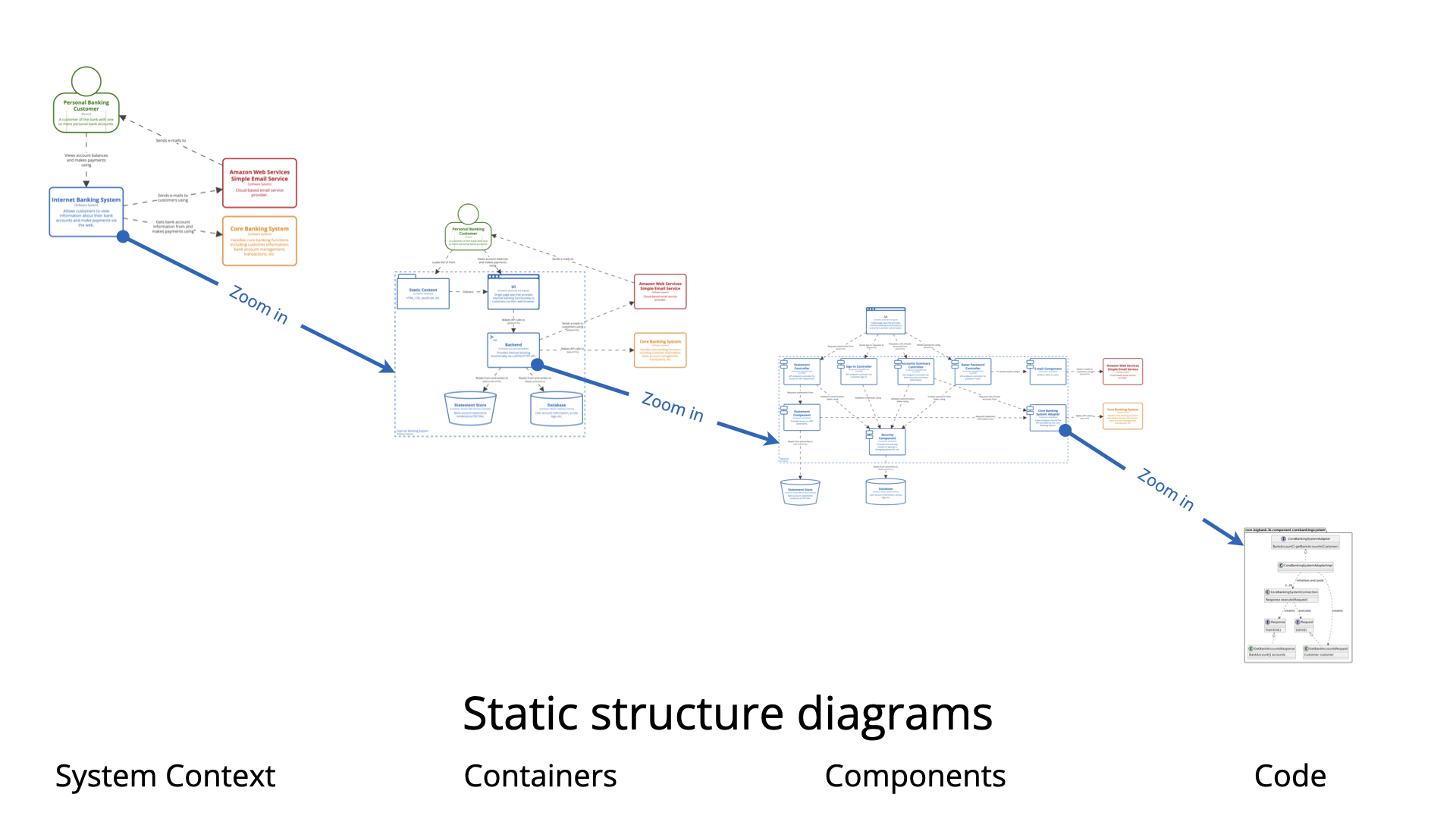
📊 Core Layers of the C4 Model
| Layer | Description | Key Elements | Purpose |
|---|---|---|---|
| Context
(Level 1) |
High-level view of the system in its environment. | Users, external systems, core software system | Show how the system interacts with people and other systems |
| Container (Level 2) | Breakdown into deployable units. | Web apps, APIs, databases, microservices | Reveal technology choices and system boundaries |
| Component (Level 3) | Internal structure of containers. | Services, modules, APIs, libraries | Detail how responsibilities are distributed and interact |
| Code
(Level 4) |
Optional deep dive into implementation. | Classes, functions, code files | Used for complex debugging or documentation, rarely in high-level docs |
✅ Pro Tip: Always start with the Context layer. It ensures alignment across stakeholders—engineers, product owners, and executives—before diving into technical details.
🔍 Supplementary Views for Deeper Insight
Beyond static diagrams, the C4 model supports dynamic and deployment views:
-
Dynamic Views: Use sequence diagrams or activity flows to capture runtime behavior (e.g., user login flow).
-
Deployment Views: Illustrate how containers are deployed across servers, cloud platforms (AWS, Azure), or Kubernetes clusters.
-
System Landscape Views: Show multiple systems within an enterprise, ideal for enterprise architects.
🌐 Real-World Example: In a banking system, the Context view shows customers and third-party payment gateways; the Deployment view reveals container placement across AWS regions.
2. Introducing C4-PlantUML Studio: Features & Benefits
C4-PlantUML Studio isn’t just another diagramming tool—it’s a next-generation architecture design platform built on top of PlantUML, enhanced with AI, cloud collaboration, and intelligent automation.
✨ Key Features
| Feature | Description |
|---|---|
| AI-Powered Diagram Generation | Type natural language (e.g., “A mobile app for e-commerce with user authentication and Stripe integration”) → AI generates full C4 diagrams instantly. |
| Interactive Dual-Mode Editing | Switch seamlessly between visual drag-and-drop and text-based PlantUML code editing with real-time preview. |
| Cloud Collaboration & Versioning | Share projects in real time, branch, merge, and track changes—ideal for distributed teams. Integrates with GitHub, Jira, Confluence. |
| Export Flexibility | Export as PNG, SVG, PDF, PlantUML source code, or interactive HTML for embedding in wikis or presentations. |
| AI Chatbot Assistance | Refine diagrams conversationally: “Add a Kubernetes deployment view with three replicas.” |
| Template Gallery | Pre-built templates for microservices, monoliths, SaaS platforms, legacy modernization, and more. |
💡 Why It Stands Out: Key Benefits
-
⚡ Speed: Generate a complete C4 suite (Context → Code) in under 5 minutes.
-
🔁 Consistency: Enforces C4 standards and correct PlantUML syntax—reducing human error.
-
🧠 Accessibility: No need to master PlantUML syntax. Let AI do the heavy lifting.
-
🔄 Maintainability: Diagrams stay in sync with system changes through iterative updates.
-
🛠 Extensibility: Supports custom skins, legends, stereotypes, and integration hooks.
💬 Team Tip: Assign roles—architects create Context/Container views, developers refine Components, and DevOps teams build Deployment diagrams.
3. Step-by-Step Workflow: From Idea to Architecture Diagram
Follow this proven workflow to go from concept to polished documentation in minutes.
✅ Step 1: Set Up & Define Your System
-
Sign up at Visual Paradigm (free tier available).
-
Create a new project: e.g., “Online Banking System”.
-
Use the AI-Assist feature to input a natural language description:
📝 Example Input:
“Customers access their accounts via a React mobile app. The backend is a Node.js API service that connects to a PostgreSQL database. Admins use a dashboard to monitor transactions. The system integrates with Stripe for payments.”
💡 Pro Tip: Mentioning technologies like React, Node.js, PostgreSQL, or Kubernetes helps the AI generate accurate container-level diagrams.
✅ Step 2: Generate Diagrams with AI
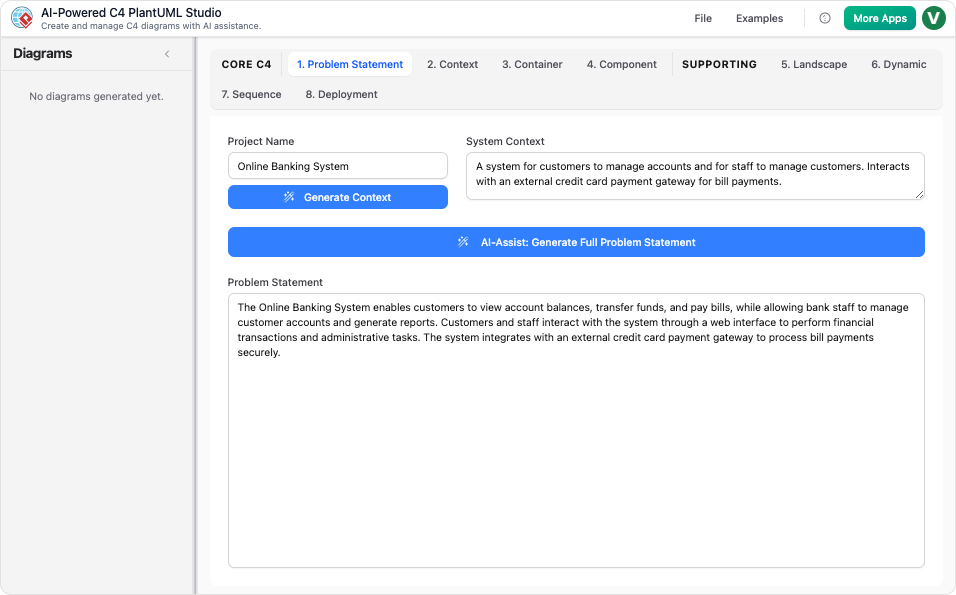
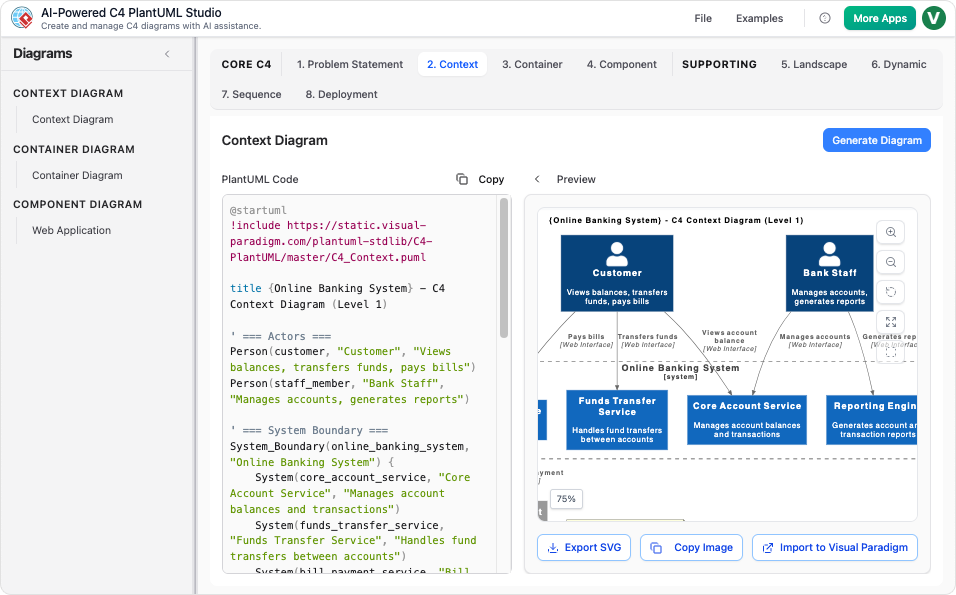
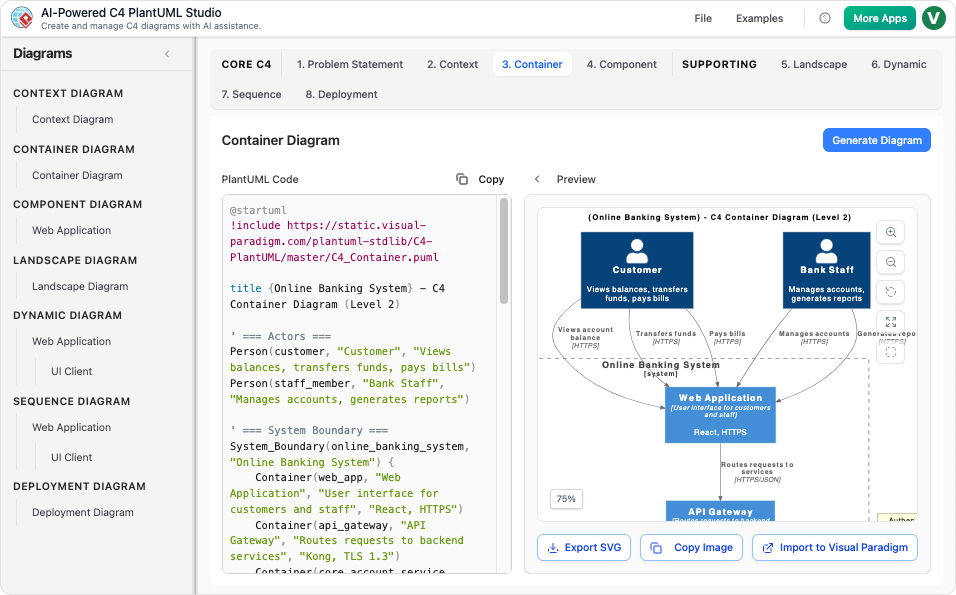
Click Generate → AI analyzes your input and produces:
-
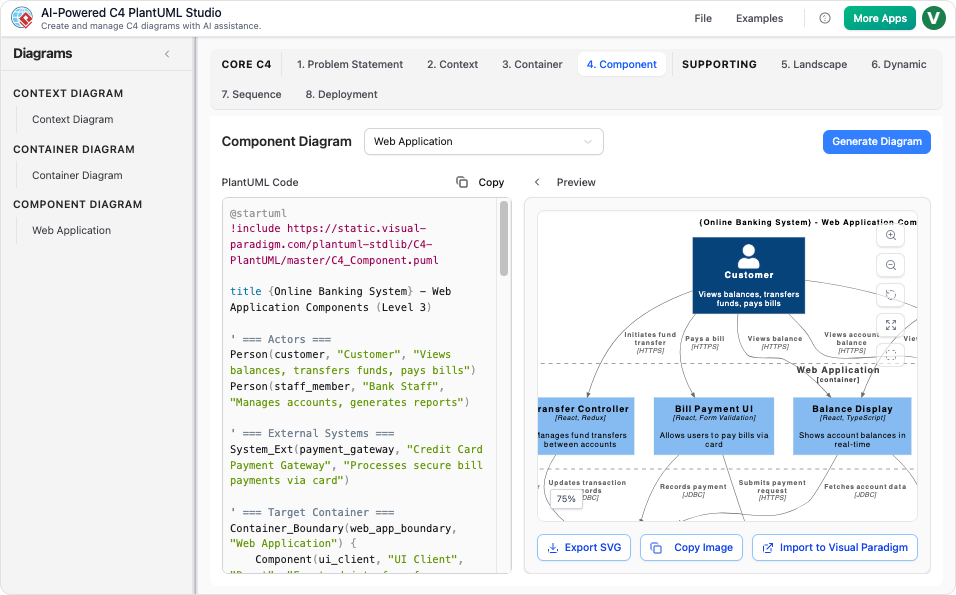
✅ Context Diagram: Shows users, system boundary, and external dependencies.
-
✅ Container Diagram: Deploys containers (mobile app, API, DB), with tech labels.
-
✅ Component Diagram: Breaks down the API into services (Auth, Transaction, Admin).
-
🔄 Optional: Sequence Diagrams (e.g., login flow), Deployment Diagrams (AWS EC2, Kubernetes pods).
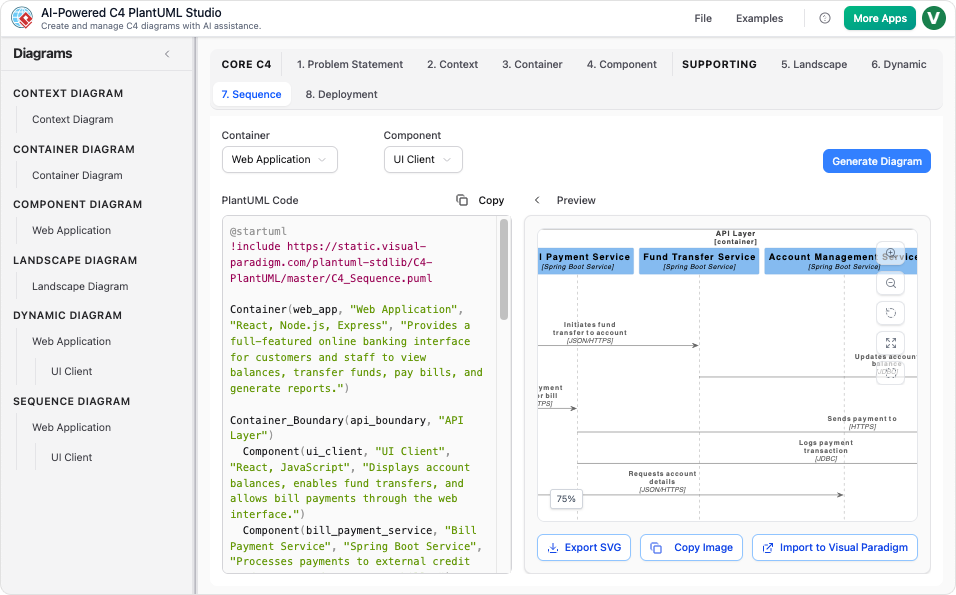
🔍 The AI interprets phrases like “interacts with” → draws arrows; “connected to” → adds dependency lines.
✅ Step 3: Refine & Customize
Choose your editing mode:
-
Visual Mode: Drag elements, adjust layouts, add notes.
-
Text Mode: Edit the underlying PlantUML code directly.
@startuml
' Example snippet from generated code
@startuml
actor "Customer" as Customer
rectangle "Online Banking System" {
  [Mobile App]
  [API Service]
  [PostgreSQL DB]
}
Customer --> (Mobile App)
(Mobile App) --> (API Service)
(API Service) --> (PostgreSQL DB)
@enduml
🎨 Design Tip: Use
skinparamsfor branding:
skinparam backgroundColor #F5F5F5
skinparam shadowing true
🛡️ Best Practice: Use branches for experimental changes. Never edit the main branch directly.
✅ Step 4: Validate, Export & Share
-
Validate using built-in C4 compliance checks.
-
Export:
-
PNG/SVG: For reports or presentations.
-
PlantUML Code: For version control (Git).
-
Interactive HTML: Embed in Confluence, Notion, or internal wikis.
-
-
Share via link—viewers can interact without installing anything.
🌐 Agile Hack: Embed interactive HTML exports in your sprint wiki—automatically updates as architecture evolves.
4. Real-World Use Cases
| Role | Application | Impact |
|---|---|---|
| Software Architects | Rapid prototyping of enterprise systems | Faster feedback cycles, clearer stakeholder alignment |
| Developers | Documenting microservices architecture | Onboard faster; reduce miscommunication |
| Business Analysts | Map business requirements to technical components | Bridge gap between business and tech teams |
| Educators | Teach C4 model to students | Use templates to demonstrate real-world systems |
| DevOps Engineers | Plan deployments using Kubernetes or cloud infrastructure | Automate CI/CD pipeline integrations |
🚀 Microservices Tip: Focus on Container and Component layers to define service boundaries clearly and avoid “hidden monoliths.”
5. Tips & Tricks for Mastery
| Tip | How to Apply |
|---|---|
| Use User Stories for AI Input | “As a user, I want to reset my password via email.” → AI generates login flow + component interactions |
| Fix AI Errors with Chatbot | Prompt: “Remove duplicate dependency between API and DB.” |
| Scale Large Systems | Split into sub-projects (e.g., one per microservice), linked via Landscape View |
| Integrate with Git | Export PlantUML code → commit to repo → track changes over time |
| Use Stereotypes | Add <<Microservice>>, <<Database>>, <<Frontend>> for clarity |
| Avoid Over-Engineering | Keep Context simple—don’t include every external system. Use Landscape View for broader scope. |
| Cross-Tool Compatibility | Export to Mermaid or import from Draw.io for flexibility |
⚠️ Pitfall Alert: Never skip the legend—non-technical audiences rely on it to interpret diagrams.
6. Why C4-PlantUML Studio Leads in 2026
In a market crowded with diagramming tools, C4-PlantUML Studio stands out due to its intelligent hybrid approach:
| Feature | C4-PlantUML Studio | Free Tools (e.g., raw PlantUML) | Paid Tools (e.g., Lucidchart) |
|---|---|---|---|
| AI Diagram Generation | ✅ Yes (95%+ accuracy) | ❌ No | ❌ Limited or manual |
| Dual-Mode Editing | ✅ Visual + Text | ❌ Text only | ❌ Visual only |
| Cloud Collaboration | ✅ Real-time sync | ❌ Local only | ✅ (but expensive) |
| Integration | ✅ GitHub, Jira, Confluence | ❌ | ✅ |
| Cost | 💰 Free tier available | ✅ Free | 💸 Expensive |
✅ Verdict: It’s the fastest, most accurate, and most collaborative way to build C4 diagrams in 2026.
7. Getting Started: Your First Steps
-
Go to https://www.visual-paradigm.com → Sign up for the free tier.
-
Launch C4-PlantUML Studio.
-
Try this prompt:
“A cloud-based task management app where users can create, edit, and delete tasks. The frontend is built with React, backend uses Spring Boot, and data is stored in MongoDB. Admins can view analytics via a dashboard.”
-
Explore the Template Gallery → Choose “SaaS Application” or “Microservices.”
-
Join the Community Forum for tips, templates, and troubleshooting.
📚 Further Reading:
✅ Conclusion: Transform Your Architecture Workflow
C4-PlantUML Studio isn’t just a diagramming tool—it’s a catalyst for better software design, communication, and collaboration.
By combining the clarity of the C4 model, the power of PlantUML, and the intelligence of AI, it empowers teams to:
-
Design faster
-
Document smarter
-
Communicate clearly
-
Evolve iteratively
🏁 Final Challenge: Start today with a simple system (e.g., a to-do app), generate your first C4 diagram, and share it with your team.
The future of architecture documentation is not just visual—it’s intelligent, collaborative, and alive.
👉 Start building smarter systems with C4-PlantUML Studio—today.
-
The Ultimate Guide to C4-PlantUML Studio: Revolutionizing Software Architecture Design: This resource explains how the studio combines AI-driven automation, the structural clarity of the C4 model, and the flexibility of PlantUML (an open-source UML tool) to solve documentation bottlenecks.
-
Ultimate Guide to C4 Model Visualization Using Visual Paradigm’s AI Tools: A comprehensive guide on leveraging specialized AI features to automate and enhance the creation of hierarchical C4 model diagrams for faster system design.
-
AI-Powered UML Class Diagram Generator by Visual Paradigm: This page details an advanced tool that automatically generates UML class diagrams from natural language descriptions, significantly streamlining the software design process.
-
Visual Paradigm – AI-Powered UML Sequence Diagrams: This article demonstrates how to produce professional UML sequence diagrams directly from text prompts using an integrated AI modeling suite.
-
Comprehensive Tutorial: Generating and Modifying C4 Component Diagrams with AI Chatbot: A step-by-step guide illustrating how to use a conversational assistant to create and refine the internal structure of software systems through the C4 model’s component level.
-
Major Upgrade to AI UML Component Diagram Generation in Visual Paradigm AI Chatbot: An official update detailing enhancements that make the AI chatbot an indispensable tool for generating modular UML component structures.
-
AI-Powered Sequence Diagram Refinement Tool | Visual Paradigm: This resource discusses how AI can automatically optimize and suggest improvements for existing sequence diagrams, ensuring structural correctness and clarity.
-
Beyond the Code: How AI Automates C4 Model Diagrams for DevOps and Cloud Teams: A detailed guide on using an AI assistant to automate the full C4 modeling lifecycle through simple conversational prompts, ensuring consistency across all abstraction levels.
-
AI Diagram Generator: Complete C4 Model Support: An announcement regarding the release of a specialized AI engine capable of automated creation of C4 model diagrams to support complex architectural documentation.
-
How AI Enhances Class Diagram Creation in Visual Paradigm: This blog post explores how the integration of AI automates and improves the accuracy of creating UML class diagrams, making software design faster for development teams.