


This guide provides a structured, professional, and actionable framework for interpreting, designing, and validating UML Activity Diagrams in the context of complex business processes like Sales and Proposal Management.
🔷 1. Introduction: Purpose of the Activity Diagram
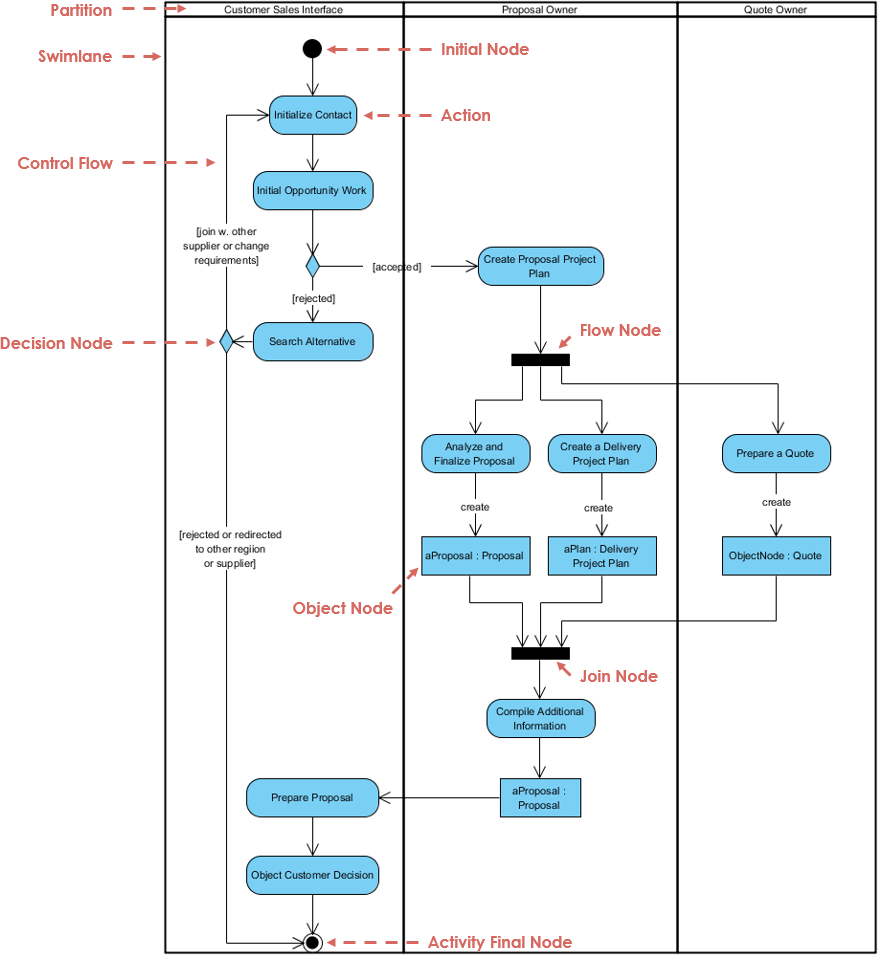
The Sales & Proposal Management Process is a cross-functional workflow involving three key roles:
-
Customer Sales Interface
-
Proposal Owner
-
Quote Owner
This UML activity diagram models the end-to-end lifecycle of a customer opportunity—from initial contact to final proposal delivery—emphasizing parallel execution, decision logic, and role-based responsibilities.
✅ Goal: To ensure clarity, traceability, and efficiency across sales, proposal, and quoting teams.
🔷 2. Core Components: Elements of the Activity Diagram
| Element | Symbol | Function | Best Practice |
|---|---|---|---|
| Initial Node | ● (filled circle) | Marks the start of the process. | Always use one per diagram. |
| Final Node | ⬤ (bullseye) | Marks the end of the process. | Ensure all paths lead here. |
| Action | Rounded Rectangle | A single task or operation (e.g., Create Project Plan). | Start with a verb (e.g., “Generate”, “Review”). |
| Control Flow | Arrowed Line | Direction of process flow. | Use straight lines; avoid crossing. |
| Decision Node | ◼️ (Diamond) | Branching based on conditions. | Label each edge with [condition]. Conditions must be mutually exclusive. |
| Fork Node | ▮ (black bar) | Splits one flow into parallel streams. | Must be balanced by a Join. |
| Join Node | ▮ (black bar) | Synchronizes multiple parallel flows. | Only continues when all incoming flows are complete. |
| Object Node | Rectangle (with :) |
Represents a tangible artifact (e.g., aProposal : Proposal). |
Use to track state of documents/data. |
| Partition (Swimlane) | Vertical column | Assigns actions to roles or departments. | Essential for clarity in cross-functional processes. |
💡 Pro Tip: Always use swimlanes to assign actions to roles. This prevents ambiguity and supports accountability.
🔷 3. Step-by-Step Breakdown of the Workflow
🟦 Phase 1: Initiation – Customer Sales Interface
-
Start at the Initial Node.
-
Initialize Contact & Opportunity Work
-
Action:
Initialize Customer Contact -
Output:
aCustomerOpportunity : Opportunity
-
-
Decision Node: Is the opportunity accepted?
-
[accepted]→ Proceed to Proposal Owner -
[rejected]→ Redirect or search for alternatives
-
✅ Note: The
[accepted]guard ensures only valid opportunities progress.
🟨 Phase 2: Parallel Processing (Fork)
At the Fork Node, the workflow splits into three parallel streams:
| Stream | Responsible Role | Action | Output Object |
|---|---|---|---|
| Analysis | Proposal Owner | Finalize proposal document | aProposal : Proposal |
| Planning | Proposal Owner | Create delivery project plan | aProjectPlan : ProjectPlan |
| Pricing | Quote Owner | Generate formal quote | aQuote : Quote |
⚠️ Critical Rule: All three streams must complete before the process can continue.
🟥 Phase 3: Consolidation (Join)
-
Join Node: Waits for all three parallel tasks to finish.
-
Once synchronized:
-
Proposal Owner compiles:
-
aProposal -
aProjectPlan -
aQuote
-
-
Creates Final Information Package
-
✅ Why Join is Essential: Prevents premature closure and ensures completeness.
🟩 Phase 4: Finalization & Handover
-
Submit Final Proposal to Customer Sales Interface
-
Customer Decision:
-
Accept → Final Node (Success)
-
Reject → Loop back or terminate
-
🔄 Note: The diagram implies that rejection leads to rework or closure, depending on business rules.
🔷 4. Key Design Principles (Best Practices)
✅ A. Organizational Clarity
-
Use Swimlanes Consistently:
-
Always label columns:
Customer Sales Interface,Proposal Owner,Quote Owner -
Place actions within the correct swimlane
-
-
Flow Direction:
-
Prefer top-to-bottom or left-to-right for readability
-
Avoid diagonal or looping arrows
-
✅ B. Logical Precision
-
Guard Conditions:
-
Always use
[condition]on decision edges -
Examples:
[accepted],[needs revision],[budget approved] -
Ensure mutual exclusivity (only one path can be true at a time)
-
-
Fork/Join Balance:
-
Every Fork must have a corresponding Join
-
Never leave parallel flows unjoined
-
-
Object Tracking:
-
Use Object Nodes to show data artifacts
-
Example:
aProposal : Proposal→ indicates a specific proposal instance
-
✅ C. Visual & Semantic Consistency
-
Action Naming:
-
Start with verb (e.g.,
Create,Review,Submit) -
Avoid passive voice
-
-
Shape & Size Uniformity:
-
Keep action boxes similar in size
-
Align text horizontally
-
-
Color Coding (Optional):
-
Use color to distinguish swimlanes (e.g., blue for Sales, green for Proposal, orange for Quote)
-
Helps visually separate roles
-
🔷 5. Common Pitfalls & How to Avoid Them
| Pitfall | Risk | Solution |
|---|---|---|
| Missing Join after Fork | Process continues prematurely | Always pair Fork with Join |
| Ambiguous Decision Guards | Confusion about which path to take | Use clear, binary, non-overlapping conditions |
| Overlapping Arrows | Hard to trace flow | Use orthogonal routing; avoid crossing |
| Misplaced Object Nodes | Confusion about data state | Place object nodes near where they’re created or used |
| No Swimlanes | Unclear ownership | Always define roles with swimlanes |
🔷 6. Example: Text-Based Path – “Rejected” Path
Scenario: The opportunity is not accepted by the sales team.
-
Start →
Initialize Customer Contact -
Decision Node:
[accepted]→ No → Branch: Rejected -
Action:
Search for AlternativesorRedirect Lead -
End: Final Node (Termination)
✅ This path avoids parallel processing and does not require a Join.
📌 Key Insight: Rejection paths are often simpler and do not involve full proposal creation.
🔷 7. Recommendations for Implementation
🛠️ Tool Suggestions:
-
Lucidchart – Excellent for collaborative UML modeling
-
Draw.io (diagrams.net) – Free, supports UML, integrates with Confluence
-
Visual Paradigm / StarUML – Advanced UML tools with validation
📋 Checklist Before Finalizing Your Diagram:
-
All swimlanes are labeled
-
One initial and one final node
-
Every decision has mutually exclusive
[condition]labels -
Every Fork has a matching Join
-
All actions start with a verb
-
Object nodes are used for key artifacts
-
Flow moves logically (top-to-bottom or left-to-right)
🔚 Conclusion: Why This Diagram Works
This Sales & Proposal Management Activity Diagram exemplifies best-in-class process modeling because it:
-
Clearly separates responsibilities via swimlanes
-
Uses parallel processing to improve efficiency
-
Enforces synchronization through Fork/Join
-
Maintains logical integrity with guard conditions
-
Tracks critical artifacts with object nodes
✅ Result: A scalable, maintainable, and understandable model that supports both business users and technical teams.
📌 Need Help With?
Let me know if you’d like:
-
A text-based flowchart of any specific path (e.g., “Accepted” path)
-
A diagram template (in Draw.io or Markdown format)
-
A version of this diagram with annotations for training or documentation
-
A version tailored for Agile/Scrum teams (e.g., sprint planning integration)
🏁 Final Thought: A well-designed activity diagram is not just a visual tool—it’s a shared language that aligns sales, proposal, and finance teams around a single, coherent process.
Let me know how I can help you generate, refine, or explain any part of this workflow! 🚀
-
Mastering UML Activity Diagrams with AI | Visual Paradigm Blog: This article explores how AI-powered features enhance the creation and optimization of UML activity diagrams for developers and analysts.
-
Integrating AI Activity Diagrams into Your Visual Paradigm Workflow: A technical guide explaining how to use AI modeling software to generate and refine activity diagrams using natural language.
-
Generate Activity Diagrams from Use Cases Instantly with AI: This resource highlights how an AI engine enables the rapid conversion of use case descriptions into professional activity diagrams.
-
Convert Use Case to Activity Diagram – AI-Powered Transformation: This page details a tool that automatically converts use case diagrams into detailed activity diagrams to visualize system workflows.
-
AI-Powered Use Case to Activity Diagram Tutorial: A step-by-step guide demonstrating how AI features can automatically transform use case descriptions into detailed activity diagrams.
-
Convert Use Case Diagrams to Activity Diagrams with Visual Paradigm: This resource explains the process of using intelligent modeling features to transform use case diagrams into activity diagrams automatically.
-
Interactive UML Activity Diagram Creator – AI Chat Interface: An interactive tool that allows users to generate and edit UML activity diagrams in real time through an AI-powered chat interface.
-
Comprehensive Guide: Transforming Use Cases into UML Activity Diagrams with AI: A detailed walkthrough on using AI-powered tools to automate the transition from use cases to structured activity diagrams.
-
AI-Powered Editor for Converting Use Cases to Activity Diagrams: This online editor uses AI to provide intelligent suggestions while transforming use cases into structured UML activity diagrams.
-
Interaction Overview vs. Interaction vs. Activity Diagram in UML: A comparative guide that explains the differences and specific use cases for activity diagrams compared to other UML interaction models.