


As a software architect who’s spent over a decade wrestling with whiteboard sketches, Visio files, and clunky modeling tools, I was skeptical when I first heard about AI-powered UML generation. Could a chatbot really understand my system requirements? Would it produce diagrams that actually follow UML semantics? After three months of daily use with Visual Paradigm’s AI ecosystem, I’m ready to share my honest, third-party experience—from initial setup to real-world project delivery.
This isn’t a marketing piece. This is a practitioner’s review of how Visual Paradigm’s AI features changed my workflow, where they shine, where they still need polish, and whether they’re worth your time if you’re serious about UML modeling.
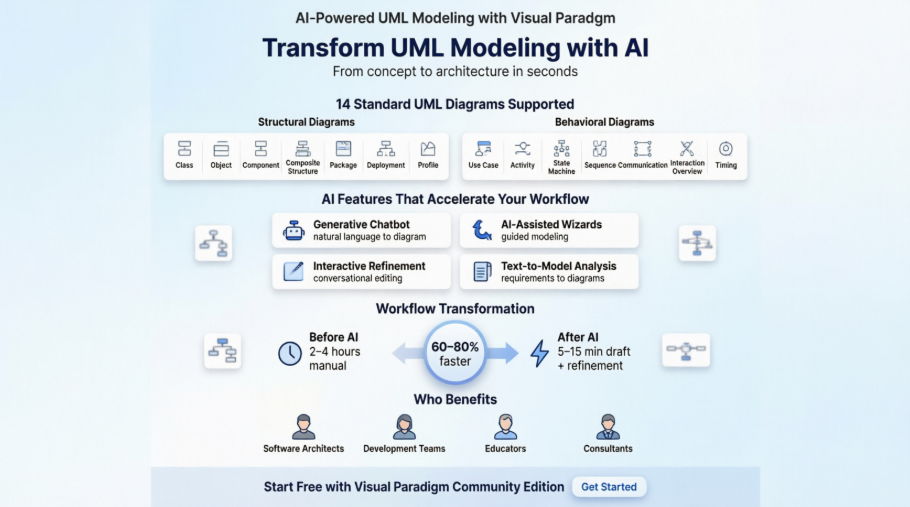
Key AI Features I Actually Use (And Why They Matter)
🤖 Generative AI Chatbot: My New “Diagram Co-Pilot”
In my experience, the chatbot is the standout feature. Instead of dragging classes onto a canvas for 20 minutes, I type: “Create a sequence diagram for OAuth2 authentication flow with refresh token rotation.” Within seconds, I get a syntactically correct draft.
What I love:
-
Natural language understanding handles complex scenarios
-
Instant iteration: “Add error handling for expired tokens” updates the diagram live
-
Export to editable VP project format means I’m not locked into AI output
Where it stumbles:
-
Very niche domain terms sometimes need clarification prompts
-
Complex inheritance hierarchies occasionally need manual tweaking
🧙 AI-Assisted Wizards: Guided Modeling for Complex Diagrams
The AI-Assisted UML Class Diagram Generator walked me through defining an e-commerce domain model step-by-step. As someone who’s taught UML workshops, I appreciate how it scaffolds the learning process without dumbing down the output.
✏️ Interactive Refinement: The “Conversational Editor”
This is where the tool feels truly innovative. After generating a base diagram, I can say:
-
“Rename
UserServicetoAccountManager“ -
“Add a composition relationship between Order and OrderItem”
-
“Show only public methods in this class”
The model updates in real-time. No more right-click → properties → type → apply loops.
📝 Text-to-Model Analysis: From Requirements to Diagrams
I pasted a 2-page product requirements document for a notification system. The AI extracted entities (User, NotificationChannel, Template), identified relationships, and drafted a class diagram. It wasn’t perfect—but it gave me a 70% starting point, saving hours of manual modeling.
🎓 Educational Insights: Learning UML While Working
As a mentor to junior developers, I’ve used the Visual Paradigm AI Chatbot to explain notation. When a teammate asked, “What’s the difference between aggregation and composition?”, the chatbot provided a clear example with visual cues. It’s like having a UML tutor embedded in your workflow.
All 14 UML Diagrams—With AI Support
One of my initial concerns was whether AI support was limited to “easy” diagrams. I’m pleased to report that Visual Paradigm’s AI engine covers all 14 standard UML 2.x diagrams:
Structural Diagrams (Static Views)
-
Class Diagrams
-
Object Diagrams
-
Component Diagrams
-
Composite Structure Diagrams
-
Package Diagrams
-
Deployment Diagrams
-
Profile Diagrams
Behavioral Diagrams (Dynamic Views)
-
Use Case Diagrams
-
Activity Diagrams
-
State Machine Diagrams
-
Sequence Diagrams
-
Communication Diagrams
-
Interaction Overview Diagrams
-
Timing Diagrams
In practice, I’ve used AI generation most heavily for Class, Sequence, and Use Case diagrams—the “daily drivers” of my workflow. But when I needed a Deployment Diagram for a cloud migration project, the AI correctly inferred infrastructure components from my textual description of AWS services.
Platform Integration: Where the AI Lives
💻 VP Desktop: Power User’s Dream
The native AI integration in the desktop app feels seamless. I access the chatbot via a sidebar, trigger generators from context menus, and all outputs land directly in my project explorer. No copy-paste, no format conversion headaches.
🌐 Web & Mobile Considerations
While my primary workflow is desktop-based, I’ve tested the web version for quick reviews. The AI features are accessible, though complex diagram editing still feels more fluid in the desktop client. For teams collaborating remotely, the web access is a solid bonus.
UML Refresher: Why This Standard Still Matters
Before diving deeper into the AI features, let’s ground ourselves in why UML remains relevant. As someone who’s worked through multiple methodology shifts (waterfall → agile → DevOps), I’ve seen modeling tools come and go. UML endures because:
“The UML represents a collection of best engineering practices that have proven successful in the modeling of large and complex systems.”
It provides a shared visual language for:
-
Analysts defining requirements
-
Architects designing system boundaries
-
Developers implementing components
-
QA teams planning test scenarios
-
Stakeholders reviewing system behavior
Without a standard notation, every team reinvents the wheel. UML prevents that.
The Origin Story: How UML Came to Be
Understanding UML’s history helps appreciate why Visual Paradigm’s AI integration is significant. UML emerged from the unification of three pioneering methods:
-
OMT (Object Modeling Technique) by James Rumbaugh (1991) – Excelled at analysis and data-intensive systems
-
Booch Method by Grady Booch (1994) – Strong in design and implementation (though notation was visually cluttered)
-
OOSE (Object-Oriented Software Engineering) by Ivar Jacobson (1992) – Introduced Use Cases for capturing system behavior
When these “Three Amigos” joined forces at Rational Corp in the mid-1990s, they created a unified notation that was submitted to the Object Management Group (OMG). Industry heavyweights like IBM, Microsoft, Oracle, and HP contributed to refine UML 1.0 → 1.1 → 2.5.

This collaborative, standards-driven foundation is why UML diagrams are interoperable across tools—and why AI can reliably generate them.
Why I Still Reach for UML in 2024
In an era of low-code platforms and AI-generated code, some ask: “Do we still need UML?” My answer, after using Visual Paradigm’s AI tools: Yes, more than ever.
Here’s why:
-
Complexity Management: As systems grow (microservices, cloud-native, event-driven), visual modeling helps tame complexity
-
Communication Bridge: UML diagrams translate technical designs for non-technical stakeholders
-
Documentation That Stays Relevant: AI-generated diagrams can be embedded in living documentation (via OpenDocs), reducing drift between code and design
-
Onboarding Acceleration: New team members grasp system architecture faster with visual models
The primary goals of UML design, as summarized by Page-Jones, still resonate:
-
Provide an expressive, ready-to-use visual language
-
Support extensibility without breaking core semantics
-
Remain language- and process-agnostic
-
Encourage tooling innovation (hello, AI!)
The AI Evolution: My Workflow Transformation
Before AI-Assisted Modeling:
Requirements → Manual diagramming (2-4 hours) → Peer review → Revisions → Finalize
After Adopting Visual Paradigm AI:
Requirements → AI draft (5-15 minutes) → Interactive refinement (20-30 min) → Export/Document
That’s a 60-80% time reduction on initial modeling. But the bigger win isn’t speed—it’s cognitive load. Instead of wrestling with notation syntax, I focus on system design logic.
Streamline Your Design Workflow (My Tested Recommendations):
-
AI Diagram Chatbot: Start here for quick prototypes. I use it for brainstorming sessions and initial stakeholder reviews.
-
Desktop AI Generator: Switch to desktop for production-grade models. The deeper integration pays off for complex projects.
-
OpenDocs Knowledge Management: Embed live diagrams in Confluence or Notion. When the model updates, docs auto-sync—no more stale screenshots.
Explore the complete AI modeling ecosystem:
View AI Diagram Generation Guide →
UML Diagram Types: A Practitioner’s Visual Guide
Below are the 14 standard UML diagrams with real-world examples from my projects. All images are retained from the original Visual Paradigm documentation for reference.
Structure Diagrams: Modeling Static Architecture
What is a Class Diagram?
The class diagram is my most-used UML artifact. It describes object types and their static relationships.
Key Relationships:
-
Association: “A Person works for a Company”
-
Inheritance: “AdminUser extends User”
-
Aggregation: “Order contains OrderItems” (whole-part relationship)
Class Diagram Example

My tip: Use the AI wizard to bootstrap class structures from requirement text, then refine multiplicities and visibility manually.
For more details: What is Class Diagram?
What is Component Diagram?
Component diagrams show how software modules wire together. I use these for microservices architecture reviews.
Component Diagram Example

Pro insight: Label interfaces clearly—AI sometimes infers dependencies that need human validation.
Learn more: What is Component Diagram?
What is a Deployment Diagram?
Essential for DevOps teams. Models how software artifacts deploy to hardware/cloud targets.
Deployment Diagram Example

Real-world use: I mapped our Kubernetes cluster topology using this diagram type.
Deep dive: What is Deployment Diagram?
What is an Object Diagram?
Shows concrete instances at a specific moment—great for debugging complex state scenarios.
Class Diagram vs Object Diagram – Key Difference
-
Class Diagram: Abstract blueprint (“User class has email attribute”)
-
Object Diagram: Concrete snapshot (“user_123 has email=’[email protected]’”)
Class Diagram Example

Object Diagram Example

When I use this: Demonstrating data flow in bug reports or training sessions.
Reference: What is Object Diagram?
What is a Package Diagram?
Organizes large models into logical namespaces. Critical for enterprise-scale projects.
Package Diagram Example

My workflow: Use packages to separate domain, application, and infrastructure layers.
Guide: What is Package Diagram?
What is a Composite Structure Diagram?
Shows internal class structure and part collaborations. Niche but powerful for complex components.
Composite Structure Diagram Example

Use case: Modeling a payment processor’s internal state machine and port interactions.
Details: What is Composite Structure Diagram?
What is a Profile Diagram?
Enables domain-specific stereotypes (e.g., <>, <>). Advanced but valuable for custom DSLs.
Profile Diagram Example

My experience: Used this to create a fintech-specific UML profile for regulatory compliance modeling.
Learn: What is Profile Diagram in UML?
Behavior Diagrams: Modeling Dynamic Interactions
What is a Use Case Diagram?
Captures system functionality from actor perspectives. My go-to for requirement workshops.
Use Case Diagram Example

AI tip: Prompt with “List use cases for a food delivery app” to jumpstart stakeholder discussions.
Explore: What is Use Case Diagram?
What is an Activity Diagram?
Models workflows with decisions, parallel flows, and iterations. Great for business process mapping.
Activity Diagram Example

Real project: Mapped our user onboarding flow, identifying 3 bottleneck steps for optimization.
Tutorial: What is Activity Diagram?
What is a State Machine Diagram?
Visualizes object lifecycles and state transitions. Essential for event-driven systems.
State Machine Diagram Example

When I reach for this: Modeling order status flows (Pending → Paid → Shipped → Delivered).
Guide: What is State Machine Diagram?
What is a Sequence Diagram?
Shows time-ordered object interactions. My most frequent AI-generated diagram.
Sequence Diagram Example
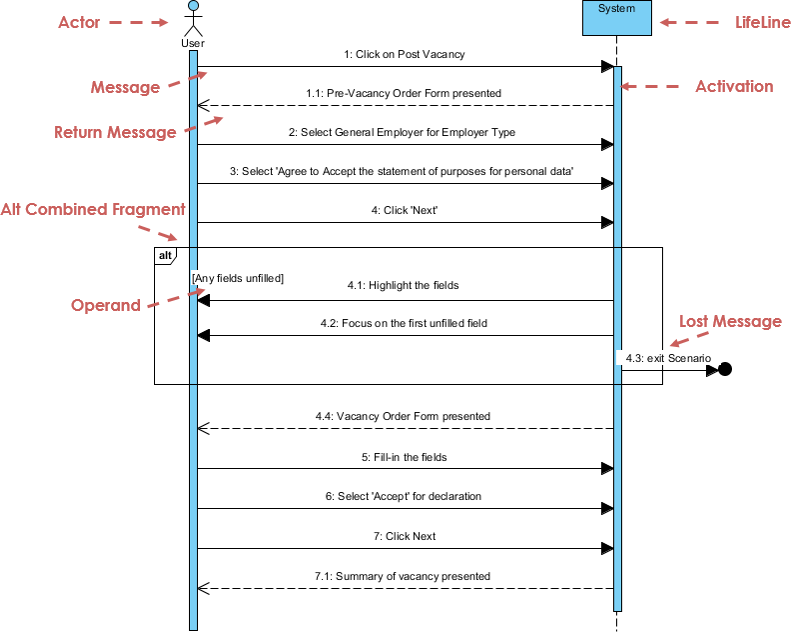
Pro workflow: Generate from use case descriptions, then refine message parameters manually.
Master it: What is Sequence Diagram?
What is a Communication Diagram?
Focuses on object collaboration over time sequence. Semantically equivalent to Sequence Diagrams but different emphasis.
Communication Diagram Example

Note: Image appears to show Activity Diagram—verify in tool. Concept remains valid for Communication Diagrams.
Reference: What is Communication Diagram?
What is Interaction Overview Diagram?
High-level flow of interactions, hiding message details. Useful for executive summaries.
Interaction Overview Diagram Example
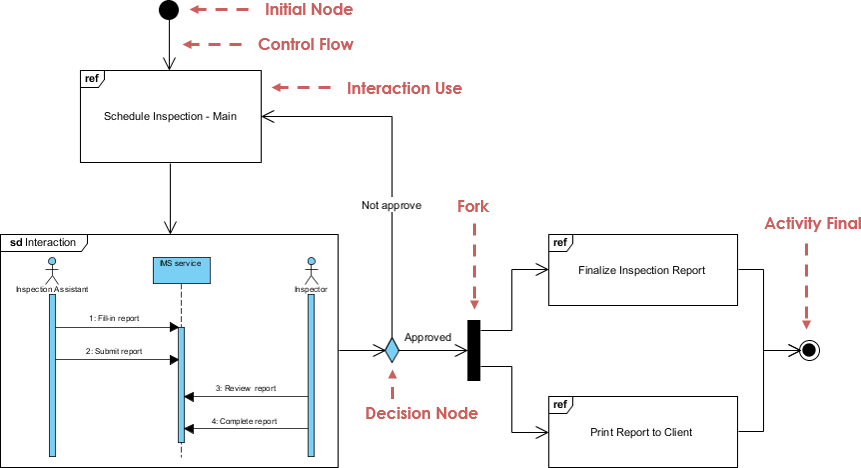
My use: Linking detailed Sequence Diagrams into a navigable architecture overview.
Details: What is Interaction Overview Diagram?
What is Timing Diagram?
Shows object state changes over precise time intervals. Specialized but critical for real-time systems.
Timing Diagram Example

Niche application: Modeling sensor data processing deadlines in IoT projects.
Learn: What is Timing Diagram?
Getting Started: My Recommended Path
If you’re new to Visual Paradigm’s AI features, here’s my suggested onboarding:
-
Start with the Free Community Edition: Download Visual Paradigm Community Edition to explore core UML features at no cost.
-
Try the AI Chatbot First: Visit chat.visual-paradigm.com with a simple prompt like “Create a use case diagram for a library system.”
-
Graduate to Desktop AI: Once comfortable, install the desktop version for advanced generation and editing.
-
Embed in Documentation: Use OpenDocs to keep diagrams synchronized with your team’s knowledge base.
Visual Paradigm Online & AI Studios
For web-based collaboration, Visual Paradigm Online offers AI Studios for rapid prototyping. I’ve used this for remote design sprints—no installation required, just share a link.
OpenDocs for Living Documentation
The ability to embed live, AI-generated UML diagrams into collaborative docs (OpenDocs) solved a persistent pain point: outdated architecture diagrams. Now, when the model updates, the documentation reflects it automatically.
Conclusion: Is AI-Powered UML Worth It? My Verdict
After three months of daily use, here’s my honest assessment:
✅ Strengths:
-
Dramatically reduces time-to-first-diagram (from hours to minutes)
-
Lowers barrier to UML adoption for junior team members
-
Maintains standards compliance—AI outputs are valid UML 2.x
-
Seamless refinement loop: chat → edit → export
-
Educational value: Learn UML notation while working
⚠️ Considerations:
-
Complex domain logic still requires human validation
-
AI suggestions are starting points, not final artifacts
-
Desktop version recommended for production work (web is good for reviews)
🎯 Who Should Try This:
-
Teams adopting or refreshing UML practices
-
Architects documenting complex systems
-
Educators teaching software design
-
Consultants needing rapid prototyping
🚫 Who Might Skip It:
-
Teams already satisfied with existing modeling workflows
-
Projects with extremely niche domain semantics (may require heavy prompt engineering)
Final Thought: Visual Paradigm’s AI integration doesn’t replace the modeler—it amplifies them. By handling syntax and boilerplate, it frees you to focus on what matters: system design, stakeholder communication, and architectural integrity. If you’re curious about modern UML tooling, the free Community Edition plus AI chatbot is a risk-free way to test the waters.
Have you tried AI-assisted UML modeling? I’d love to hear your experience in the comments below.
References
- Visual Paradigm UML Tool Overview: Comprehensive visual modeling platform supporting all 14 standard UML 2.x diagram types with integrated AI ecosystem for automated diagram generation and refinement.
- Visual Paradigm Ecosystem AI-Supported UML Diagram Features: Third-party analysis of AI capabilities across Visual Paradigm’s UML tooling suite, including chatbot integration and workflow automation.
- UML Support in the Visual Paradigm AI Ecosystem: A Comprehensive Guide: Detailed walkthrough of AI-powered features for all 14 UML diagram types, with practical examples and implementation tips.
- Guide to Powered UML Diagram Generation: Official documentation for using the AI chatbot to generate, refine, and export UML diagrams via natural language prompts.
- How AI Chatbot Can Help You Learn UML Faster: Educational resource demonstrating how the AI assistant explains UML notation, suggests improvements, and accelerates learning for beginners and professionals.
- Visual Paradigm AI Tutorial Video: Video demonstration of AI-powered UML diagram generation workflow, from prompt to editable model.
- AI-Assisted UML Class Diagram Generator: Feature page for the step-by-step wizard that guides users through defining scope, identifying classes, attributes, and operations for class diagrams.
- Visual Paradigm AI Sequence Diagram Demo: Video tutorial showing AI generation of sequence diagrams from textual use case descriptions.
- Visual Paradigm AI Use Case Modeling: Demonstration of AI-assisted creation and refinement of use case diagrams for requirement analysis.
- Visual Paradigm UML Tool Features: Overview of core UML modeling capabilities, including diagram types, collaboration features, and integration options.
- AI-Powered Use Case Modeling Studio: Tool page describing how natural language prompts can generate complete use case models without manual drawing.
- Visual Paradigm Desktop AI Activity Diagram Generation: Release notes detailing AI-powered activity diagram generation capabilities in the desktop application.
- OMG UML Specification: Official Unified Modeling Language specification from the Object Management Group, defining the 14 standard diagram types and notation rules.